English
78
Note:
To use the coaxial or the optical connection, you need an amplier which can decode the DOLBY DIGITAL- or
MPEG-Format.
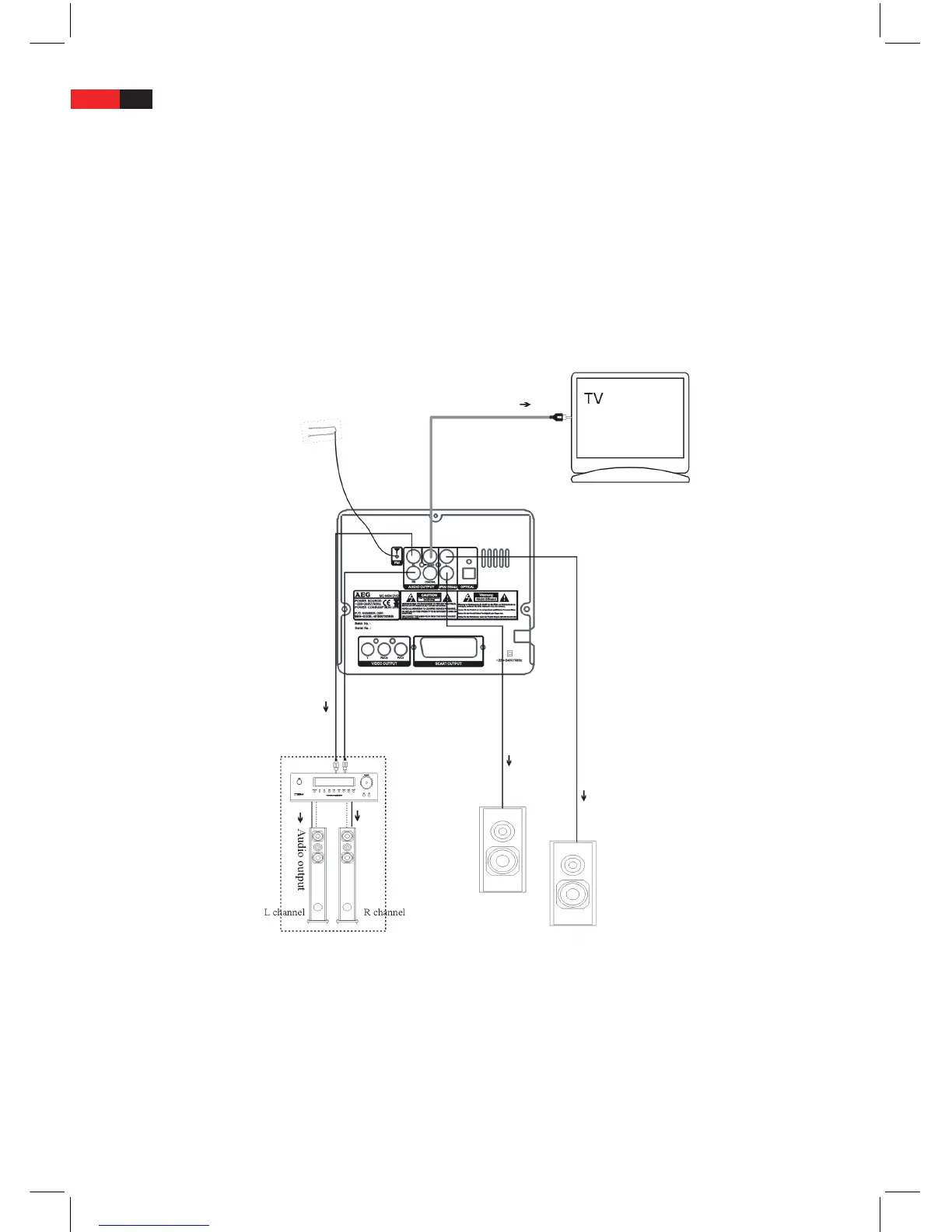
Analogue Audio connections: Speaker connection
Analogue Audio connections: Connection diagrams
The Audio-System of the device consists of the right and left audio output (FL und FR AUDIO OUTPUT, white and
red jacks) as well as the right and left jacks (L and R SPEAKERS) to connect the supplied speakers.
Before you connect any acoustic appliances to the DVD system, please refer to the connection diagrams below
showing how the external audio devices should be correctly connected to the device.
FL/FR AUDIO OUTPUT: Left and right audio output
The two audio outputs (FL and FR AUDIO OUTPUT, white and red jacks) carry the Dolby-Surround as well as a
normal Stereo Signal. In order to decode the Dolby Surround Signal, a suitable Dolby Surround amplier should be
connected to the two outputs. On a normal HiFi-Stereo amplier, you can carry the stereo signal through the two
connections.
Use an Audio cable – the red plug to the right hand jack (FR), the white to the left hand (FL), to connect a device to
the audio output of the system.


 To Next Page