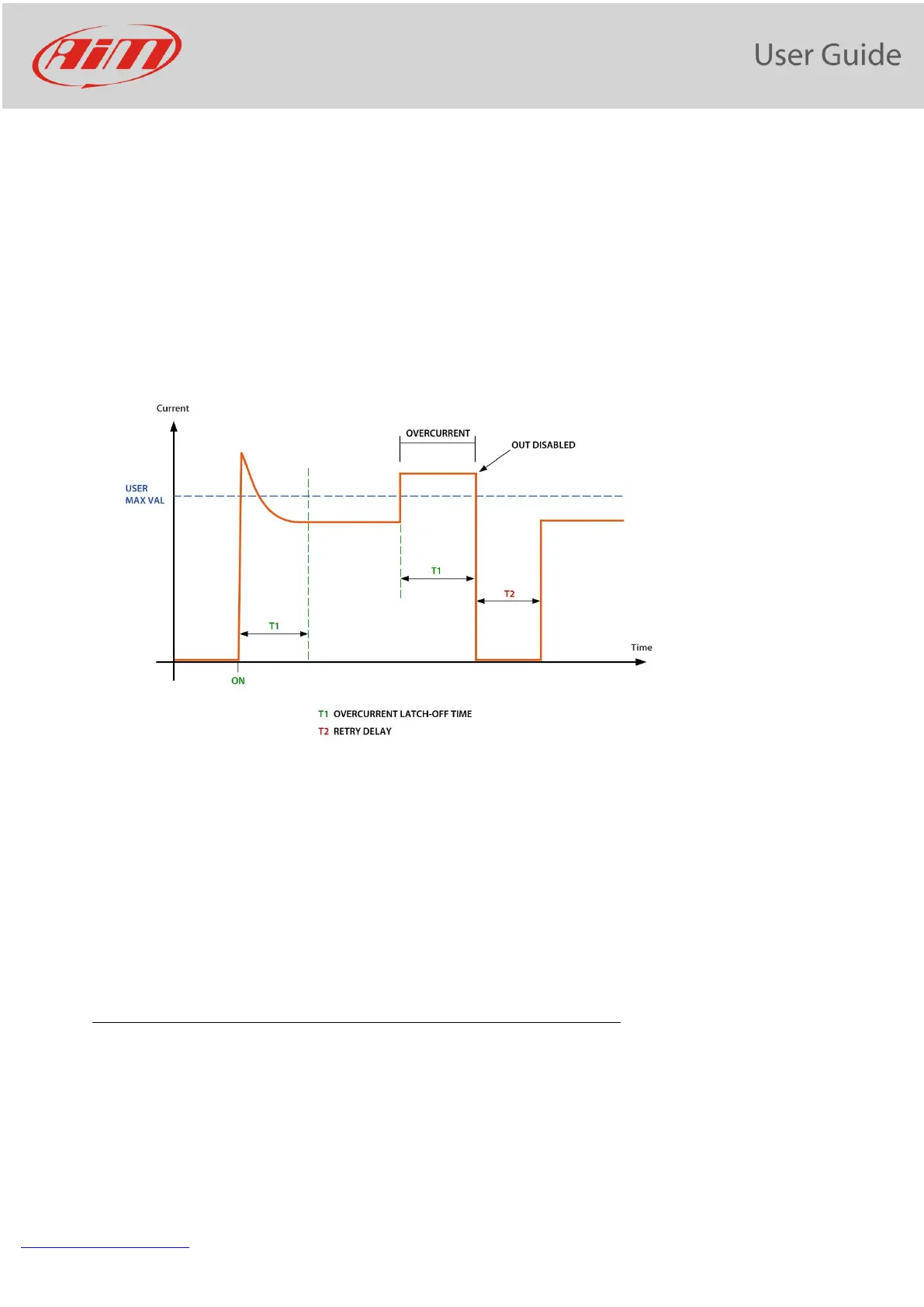
The supervisor continuously checks the current value after T1. In case the current value is higher than user
MAX Value selected, timer starts count. If timer value reaches the overcurrent Latch-off time selected (T2),
the output is disabled.
After Retry Delay, if Number of retries is different from zero, the output will be enabled again, and supervisor
starts current check again. This will be repeated in case of overcurrent until the Number of retries set by the
user is reached. After that out will be disabled.
In case the output is disabled, PDM led indicator becomes red. The Output is re-enabled when the activating
condition switches from ON to OFF and ON again.
As already stated, in order to check the Open Load Status, you have to:
- Define the minimum current, under which the Open Load Status is detected
- In case of L(ow) and M(medium) outputs, you may also set a flag for enabling the Check Open Load also in
OFF state. If you enable this check, a very low current constantly flows through the output. Please note
that, sometimes (LED lamps, for example), is enough for activating the connected device
11.11 PWM
Typical uses of PWM are:
• Fan speed control
• Water pump speed control (useful to maintain water temp close to ideal value)
• Led and Bulb Lamp dimming (i.e. DRL dimming related to low beam status)


 To Next Page