21. The device window
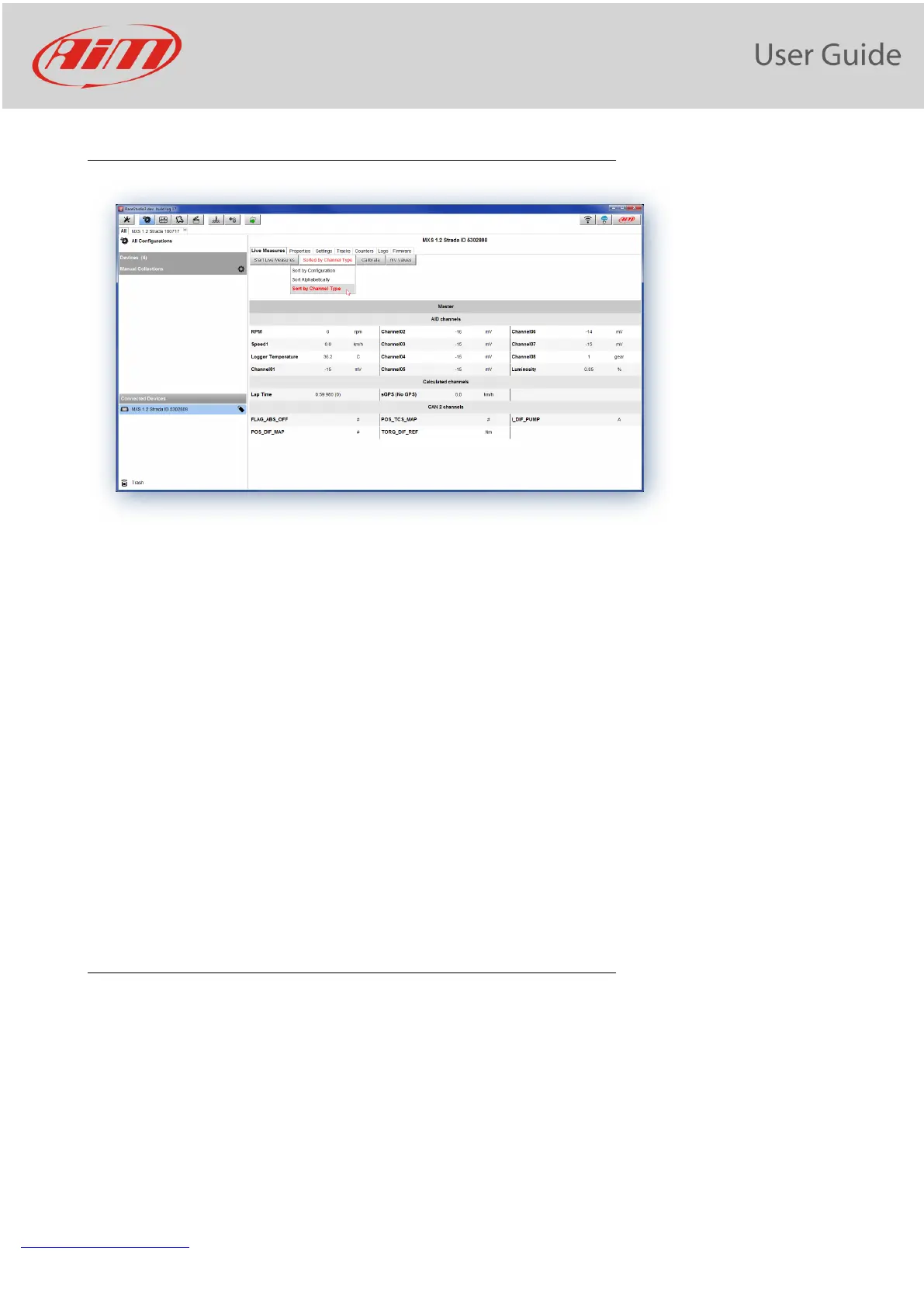
Clicking your PDM 32 bottom left of the software page you enter the device window and have these options:
• Live Measures: to check all PDM 32 channels; here you can:
o start live measures
o sort the channel visualization as you prefer: as managed by the firmware (sort by configuration),
alphabetically, by channel type (they will be shown by device then by channel type and at the end by
measure type)
o calibrate sensors that need the calibration
o show the measure in Mv
• Properties: to name your device, fill in racer’s and vehicle name or number, championship and venue type (generic
or qualifying testing, warm up, race, test type)
• Settings to:
o set date
o enable/disable daylight time
o set time format and time zone
• Tracks: to manage the tracks stored in the device memory
• Counters: to set reset the device odometers
• Logo: transmit/receive the logo that shows up when switching MXS 1.2 Strada on; supported image format are JPEG
or BMP; always use the most recent Windows
TM
versions (Windows8 or Windows10) whose graphic libraries are more
updated
• Firmware: to check or update your PDM 32 firmware version.
21.1 Online measure values forcing
In the Online Interface, it is possible to force the values of every channel:


 To Next Page