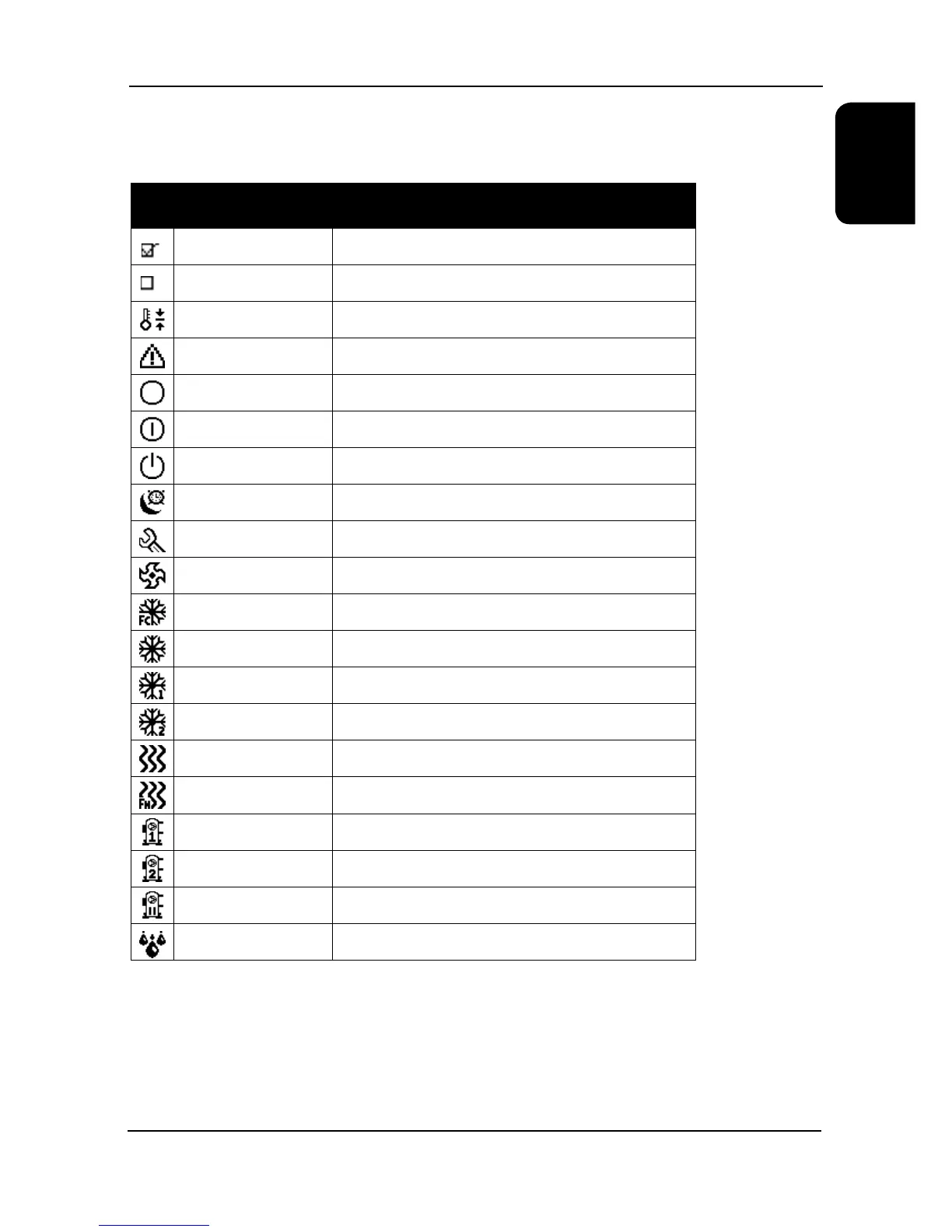
Icon Name/Description Used To Represent
Ticked box Yes, enabled, active, on etc.
Unticked box No, disabled, inactive, off etc.
Setpoint Setpoint
Alarm Alarm, off by alarm
Unit Off Unit off by external factor (i.e. PLAN, digital input)
Unit On/Off Off by display
Unit Standby Standby – on but no action required
Unit Sleep Unit off by timer
Service Manual mode, overrides, attend mode
Fan Fans, freecooling mode
Concurrent Concurrent mode
DX Mechanical mode
DX circuit 1 Circuit 1, single circuit
DX circuit 2 Circuit 2, dual circuit
Heating Heating mode, electric heaters
Freeheating Freeheating mode
Compressor 1 Compressor 1, Compressor 1 fault
Compressor 2 Compressor 2, Compressor 2 fault
Compressor(s) paused Compressors held off, no DX cooling, oil preheat timer
Humidity Current return air humidity
Display Icons
To ensure the software is easy to read at a glance, the Ecotel Mk4 user interface is largely graphical, containing a large
number of icons to represent different modes, actions or components.
The following table is a glossary of icons to use as a reference:


 To Next Page