32
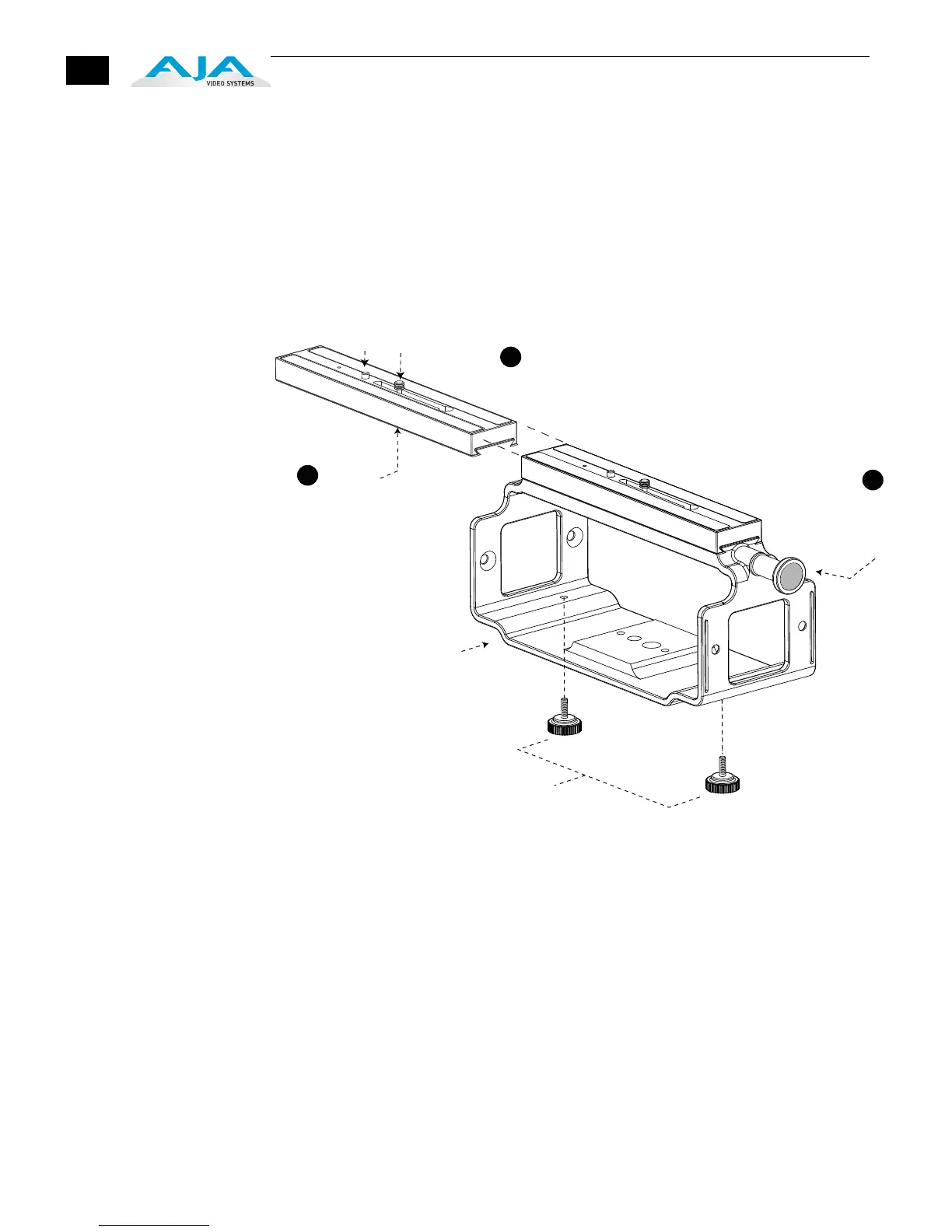
For most uses with an Exo-skeleton, you’ll want to first mount the camera or
camcorder to the adjustable mount on top, before sliding in the Ki Pro unit and
locking it. To mount a camera, follow these steps:
1. Locate the camera mount locking knob on the Exo-skeleton and loosen it.
2. Slide the camera mount off of the mounting rail.
3. Place the camera on the mount, orienting the mount’s alignment pin to
camera’s corresponding pin socket. Once aligned, tighten the mounting screw
to secure the camera.
Slide the camera and mount back on the rail and tighten the locking knob.
Exo-skeleton Camera Mounting
Base Ki Pro Exo-skeleton
chassis with camera mount
Knurled thumbscrews
secure Ki Pro chassis
to Exo-skeleton
Loosen
Camera
Mount
Locking
Knob
Slide Mount
off of Exo-skelton
Alignment
Pin
Mounting
Screw
Locate the Camera
Mounting screw underneath
(2 sizes provided),
align pin to Camera base
and tighten the Mounting screw
to fasten securely.
Replace Mount on
Exo-skeleton when done,
and tighten Locking Knob
to lock camera in place.
1
2
3



 To Next Page