Service Manual Aktilite
CL128
Version 1.
3
Page
5
of
41
1.3
Housing top module (128
-0-
610) assembly
Required items
Part #
# of items
Description
128
-0-
978
1
Housing top (mould
ed plastic)
128
-1-
637
1
Housing top slide bearing
128
-1-
932
5
Screw
PT4x16 countersunk
128
-1-
626
1
Housing right (moulded plastic)
128
-1-
628
1
Housing left (moulded plastic)
128
-1-
931
4
Screw
PT4x25
128
-1-
636
1
User interface (foil keyboard w/ta
il)
Rubbing alcohol (fat free)
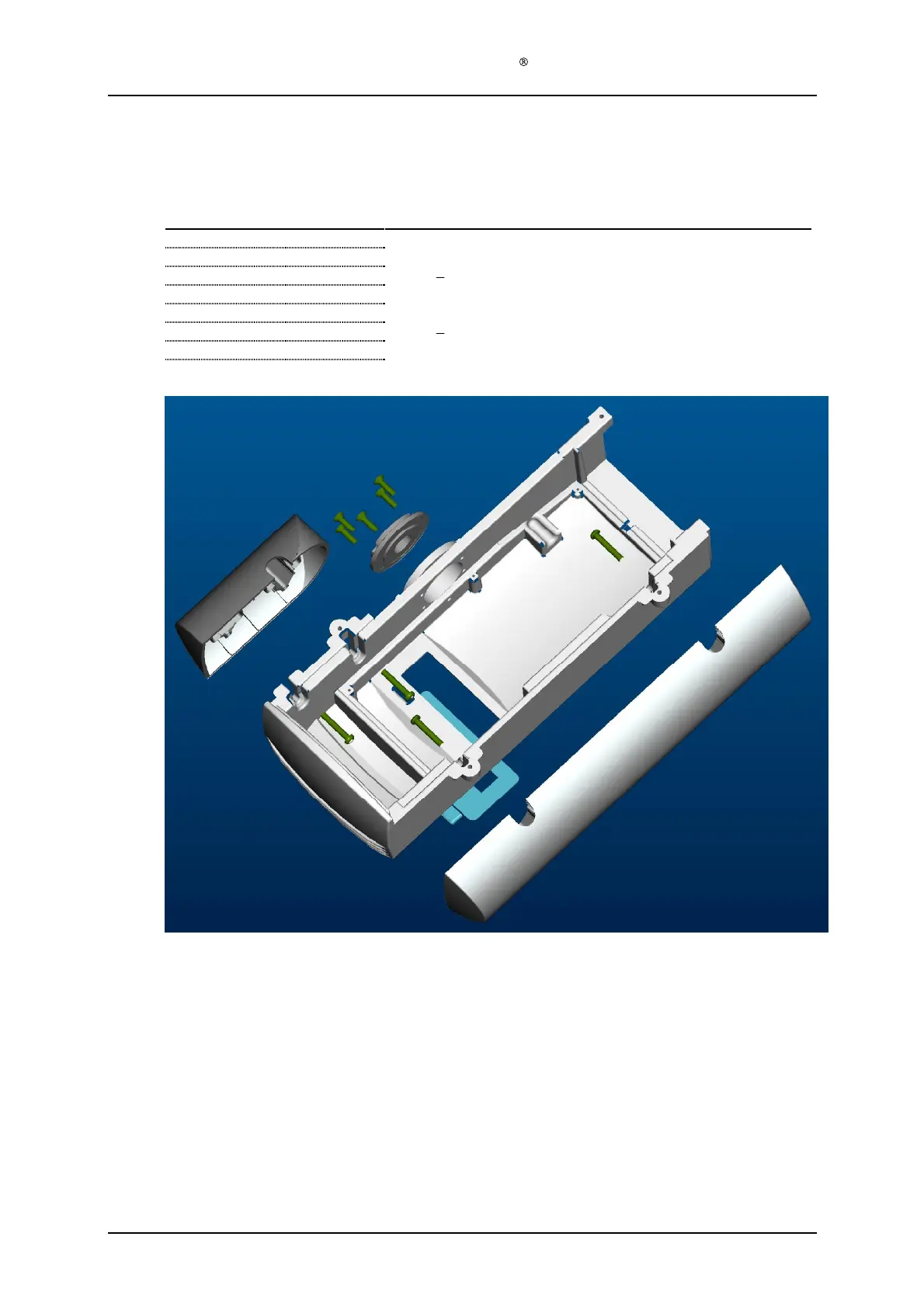
Assembly description
Step 1)
Assemble the housing top slide bearing (128
-1-
637) to the housing top (128
-0-
978) using
the five countersunk PT4x16 screws (128
-1-
932).
Step 2)
Assemble the housing left (128
-1-
628) and housing right (128
-1-
626) to the housing top
(128
-0-
978) using the four PT4x25 screws (128
-1-
931).
Step 3)
Clean the recessed area at the top of the housing top (128
-0-
978) using a cloth and rubbing
alcohol
Step 4)
Glue the Key Touch panel (128
-1-
636) to the housing top (128
-0-
978).


 To Next Page