EasyManua.ls Logo

Akytec PR200 - Appendix G: Battery Replacement; Battery Replacement Procedure

Akytec PR200
45 pages
Print Icon
To Next Page IconTo Next Page
To Previous Page IconTo Previous Page
Loading...
Appendix F. Calibration
akYtec GmbH · Vahrenwalder Str. 269 A · 30179 Hannover · Germany Tel.: +49 (0) 511 16 59 672-0 · www.akytec.de
41
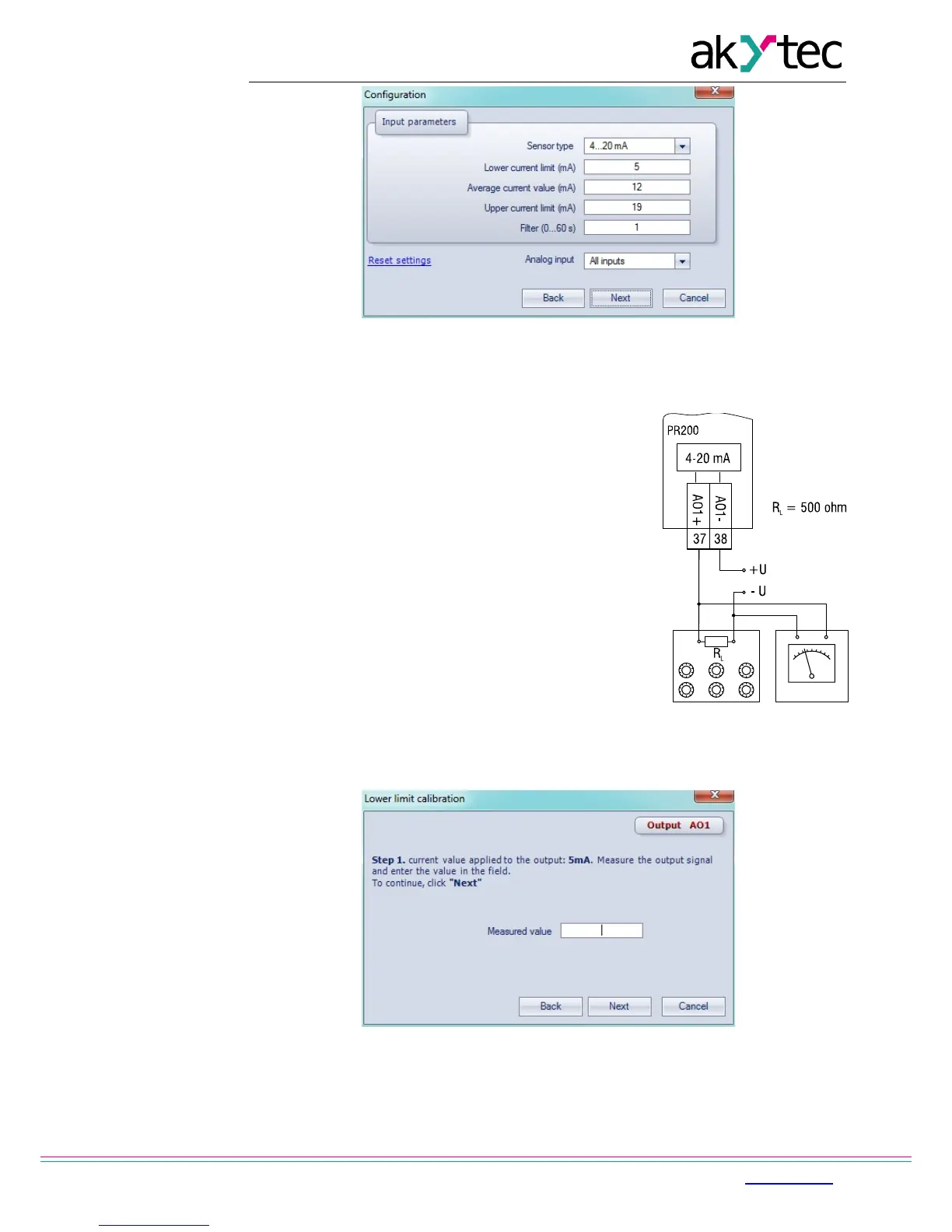
Fig. F.3
F.2 Analog output 4-20 mA
1. Connect the reference resistance box of accuracy class
at least 0.05 to the Output AO1 (Fig. F.4).
2. Ensure the supply voltage is within the range 15…28 V.
3. The measuring device should be of resolution 0.001 V.
4. Set the reference resistance box to 500 ohm.
5. Start ALP software, select menu item Device>Calibration,
in the opened dialogue box select Analog outputs (Fig.
F.2)
6. Click 'Next' to continue and follow the instructions.
7. The output current should be calculated from the
measured output voltage and entered in the displayed
field.

Fig. F.4
Fig. F.5

Other manuals for Akytec PR200