19
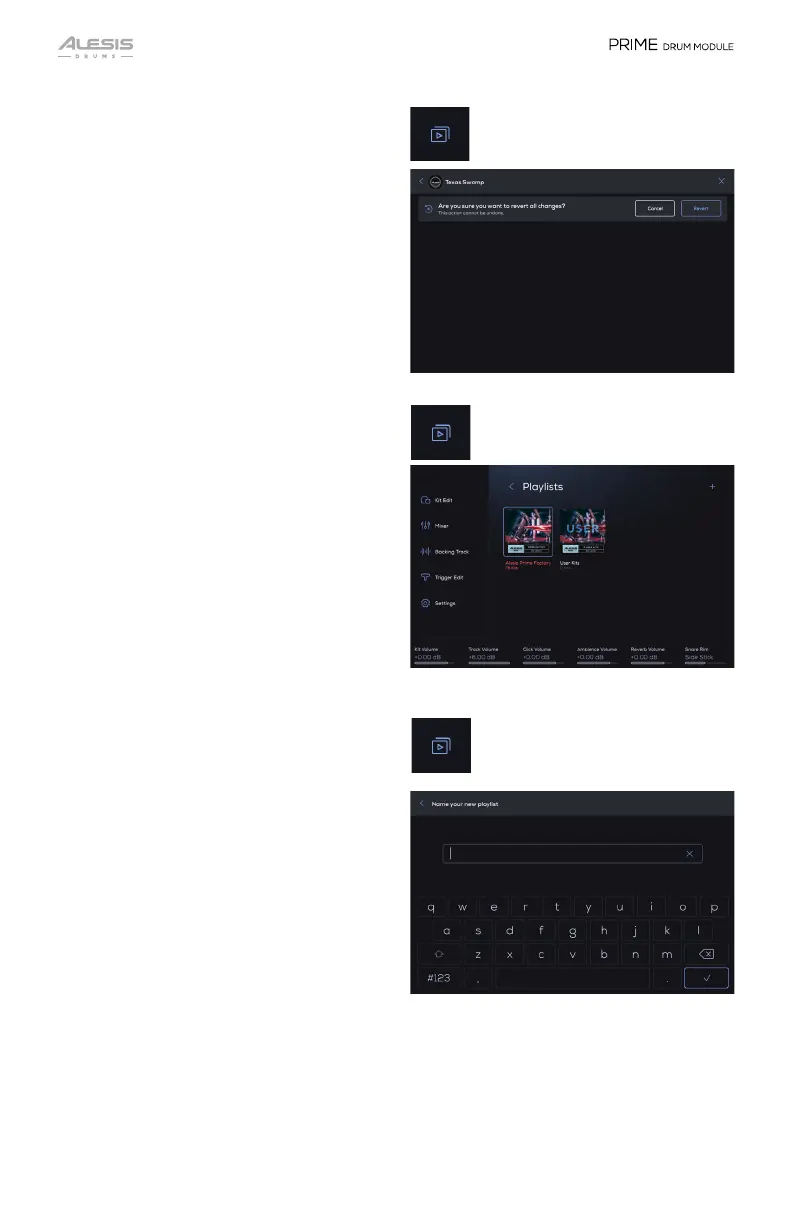
Reverting a User Kit:
1. In the main Kit Browser, tap the
Playlist icon to access the Playlist
feature.
2. Tap the list of User Kits.
3. Tap the 3 vertical dots at the end of the
User kit.
4. Select Revert to go back to the way
the kit was since loading the kit.
To change to another Playlist:
1. In the main Kit Browser, tap the
Playlist icon to access the Playlist
feature.
2. In the Playlist Selection page, select
from the available Playlists by either
tapping a Playlist item or turning the
Main Encoder to move the cursor to a
different Playlist.
3. Press the Main Encoder or tap on
screen to enter the Playlist and view all
of the Kits in it.
Creating a New Playlist:
1. In the main Kit Browser, tap the
Playlist icon to access the Playlist
feature.
2. Tap the + icon to create and name your
new Playlist (using the touchscreen
keyboard).
3. Tap the Save
icon to save a copy of
the current Preset Kit to your User
Library.


 To Next Page