63
(4.5) Hardware
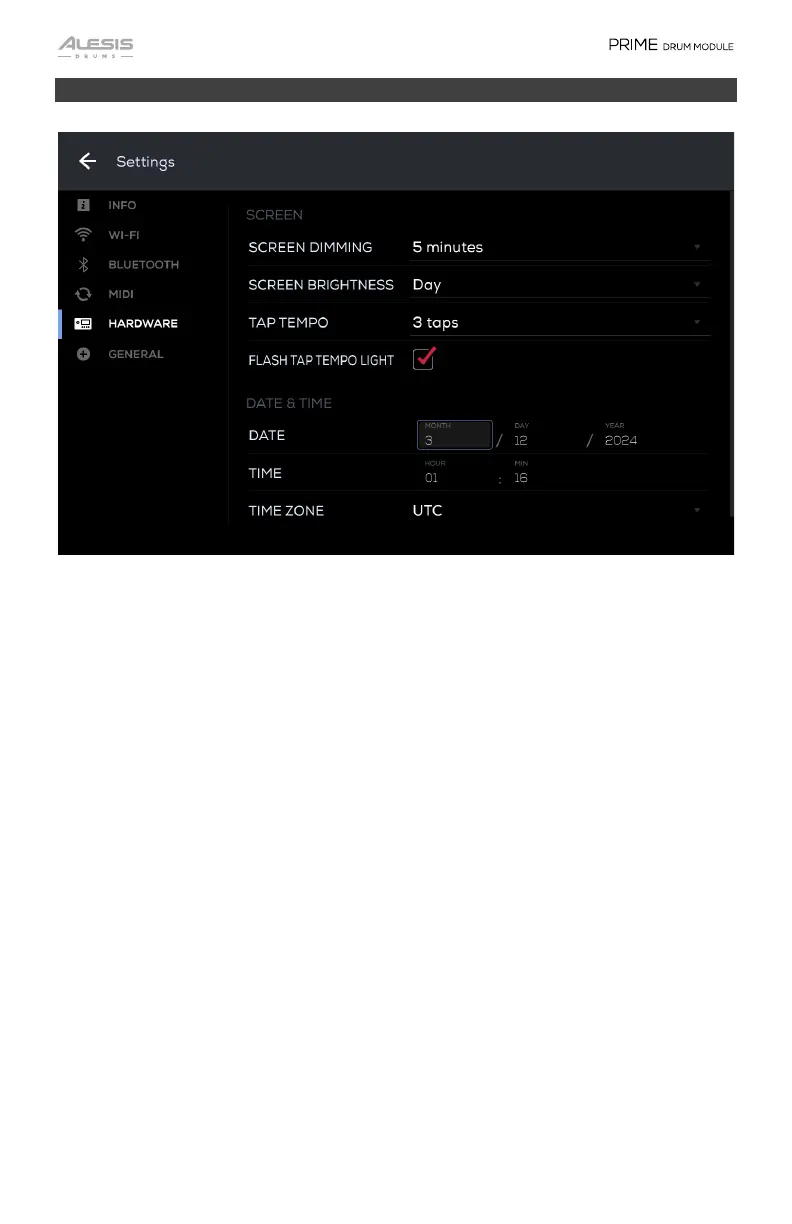
Screen
Screen Dimming: This setting determines how long it will take the screen to dim
when it is untouched. Tap this field and select from Never, 1, 2, 5, or 10 minutes.
Screen Brightness: This setting determines the brightness of the screen. Select
Day (Bright) or Night (Dim).
Tap Tempo: Select how many taps (2-4) it will take to calculate the track’s BPM.
Flash Tap Tempo Light: Check this box to have the tap tempo light flash when
finding the BPM when using the Tap Tempo feature.
Date & Time
Date: Tap these fields to enter the Month, Day, and Year.
Time: Tap this field to enter the time’s Hour and Min.
Time Zone: Tap this field to enter the time zone. The Time and Day fields will
automatically update based on the time zone that is set.


 To Next Page