55
(3.6.6) Stacks
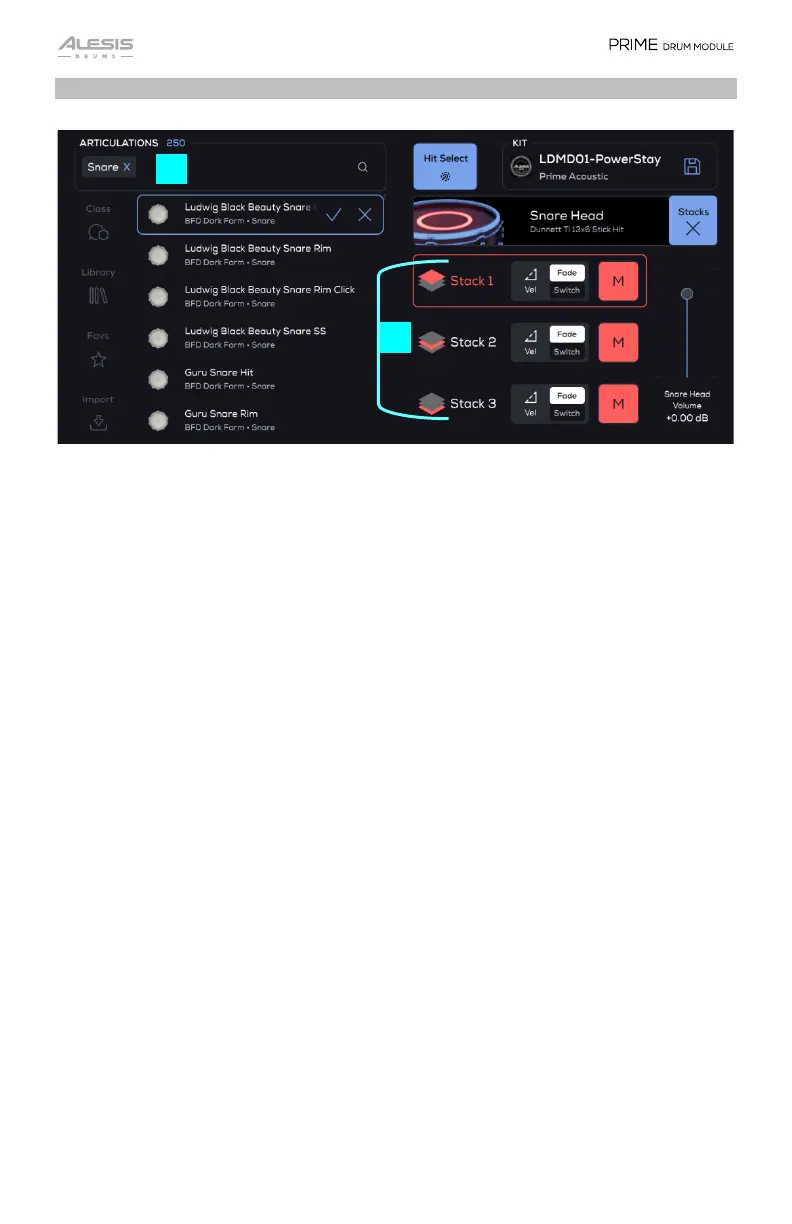
The Stacks allows you to layer up to three extra sounds/articulations on top of the
main Kit Piece sound. You can also browse and load individual sounds or articulations
(for example, Ludwig 14x5 Snare Rimshot) directly to an individual Trigger Zone (such
as Snare Center or Snare Rim).
1. Articulation Browser
While the Kit Edit default mode deals with Kit Pieces (collections of Articulations),
the Stacks mode deals with all the individual Articulations. All searching/filtering
features are the same, but the content in the browser will just show Articulations.
Example:
• Kit Piece: Ludwig Acrolite 14” Acro Snare
o Articulations:
Ludwig Acrolite 14” Snare On Hit
Ludwig Acrolite 14” Snare On Rim
Ludwig Acrolite 14” Snare On Rim Click
Ludwig Acrolite 14” Snare On SS
2. Stack 1-3
Select the Stack to be edited by tapping this object, which includes an image of the
currently loaded Articulation or Kit Piece. The parameter carousel represents the
parameters for the articulation of the stack, NOT the main kit piece.
1
2


 To Next Page