30
(3.4) Mixer Mode Overview
In the Mixer Mode, you have the power of the BFD sound engine at your fingertips.
Here you can use the touchscreen to adjust the volume balance of your kit, apply
effects, and route your sounds to various outputs of the PRIME drum module.
To open Mixer Mode, press the Kit button and then tap Mixer on the left edge of
the screen.
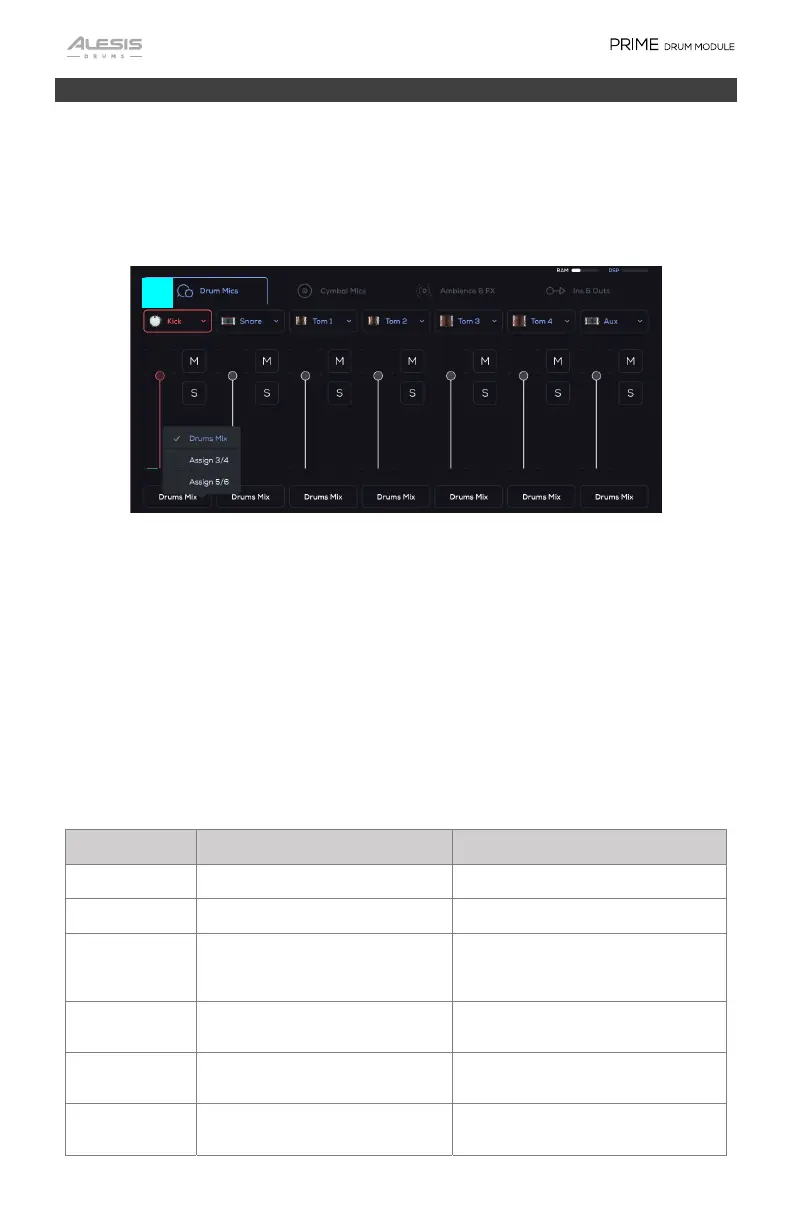
1. Drum Mics
This grouping of the drum trigger slots shows the corresponding mixer channel.
• Kick
• Snare
• Tom 1
• Tom 2
• Tom 3
• Tom 4
• Aux
Kick, Snare, Tom 1, Tom 2, Tom 3, Tom 4, Aux Parameters
Parameter Description Value Range
Volume Channel volume INF dB, – -99.19 – 0 – 6.00 dB
Pan Channel Pan 100 L – C – 100 R
Headphone Trim Adjusts the volume going to the
Headphone Out based on the Main
Out’s volume.
-100 – 0 – 100 %
Reverb Amount Controls the send level of the
channel to the reverb bus
0 – 100 %
Reverb Preset Displays the Reverb plugin preset
name
Click on the Reverb Preset > to select
from a list of effects.
FX Amount Controls the percent of the send
level going to the FX bus
0 – 100 %
1


 To Next Page