24
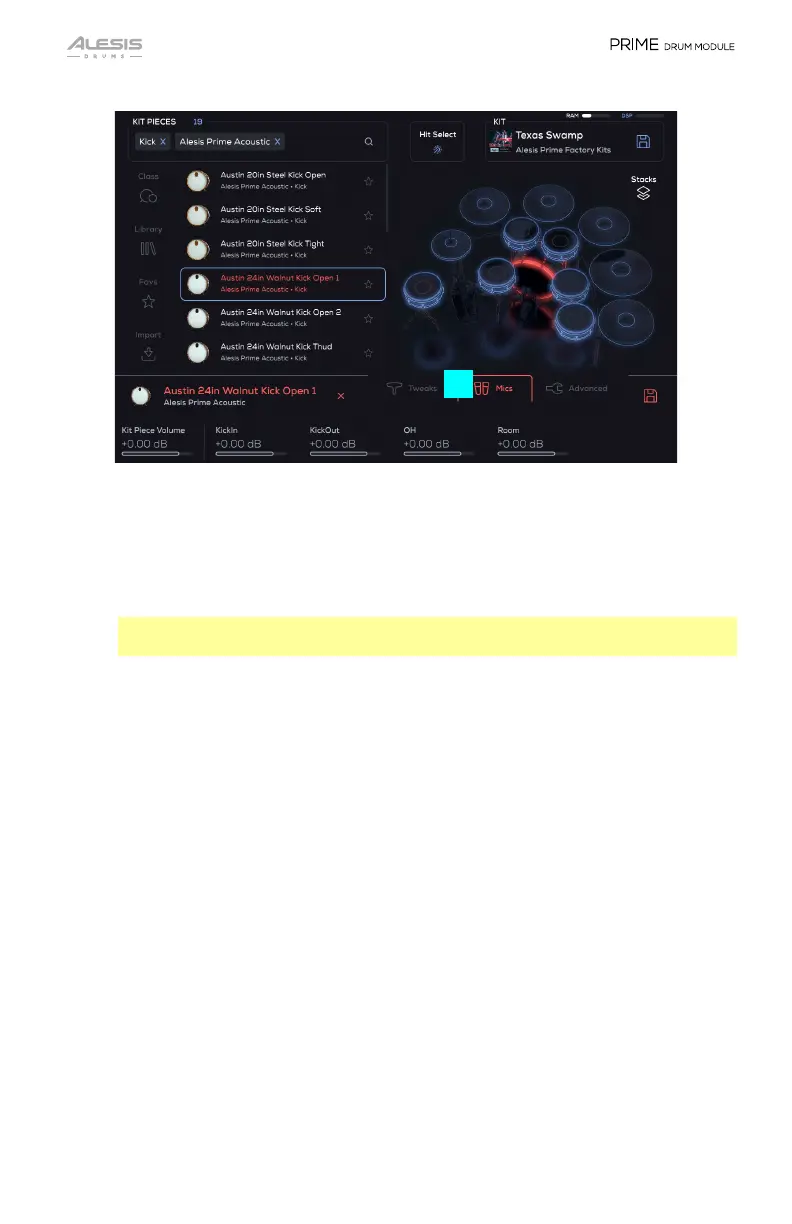
14. Mics
This shows the individual mic channels, which are adjusted using the Small
Encoders, and how much of the channel is sent to the Mixer.
• Kit Piece Volume: The overall volume of the loaded Kit Piece (-INF – 0.00 –
+6.00 dB).
Important: The following is a list of all controllable parameters. The Kit Piece
that is selected determines which parameters will be shown.
The volume parameters for any mic channel are -INF – 0.00 – +6.00 dB. The
names of the mic channels vary depending on the types of mic techniques
used in the Kit Piece library you are playing. Some common mic channel
names you will find are:
• Direct (-INF – 0.00 – +6.00 dB): Controls the mic channel’s volume for
the direct volume of the Kit Piece being sent to the Mixer.
• KickIn (-INF – 0.00 – +6.00 dB): Controls the mic channel’s volume for
the inside microphone volume of the Kick Drum being sent to the Mixer.
• KickOut (-INF – 0.00 – +6.00 dB): Controls the mic channel’s volume for
the outside microphone volume of the Kick Drum being sent to the Mixer.
• Snare Bottom (-INF – 0.00 – +6.00 dB): Controls the mic channel’s
volume for the bottom microphone volume of the Snare Drum being sent
to the Mixer.
• Snare Top (-INF – 0.00 – +6.00 dB): Controls the mic channel’s volume for
the top/head microphone volume of the Snare Drum being sent to the Mixer.
• OH (-INF – 0.00 – +6.00 dB): Controls the mic channel’s volume for the
overhead microphone volume of the Kit Piece being sent to the Mixer.
• Room (-INF – 0.00 – +6.00 dB): Controls the mic channel’s volume for
the room microphone volume of the Kit Piece being sent to the Mixer.
13
14


 To Next Page