32
3. Ambience & FX
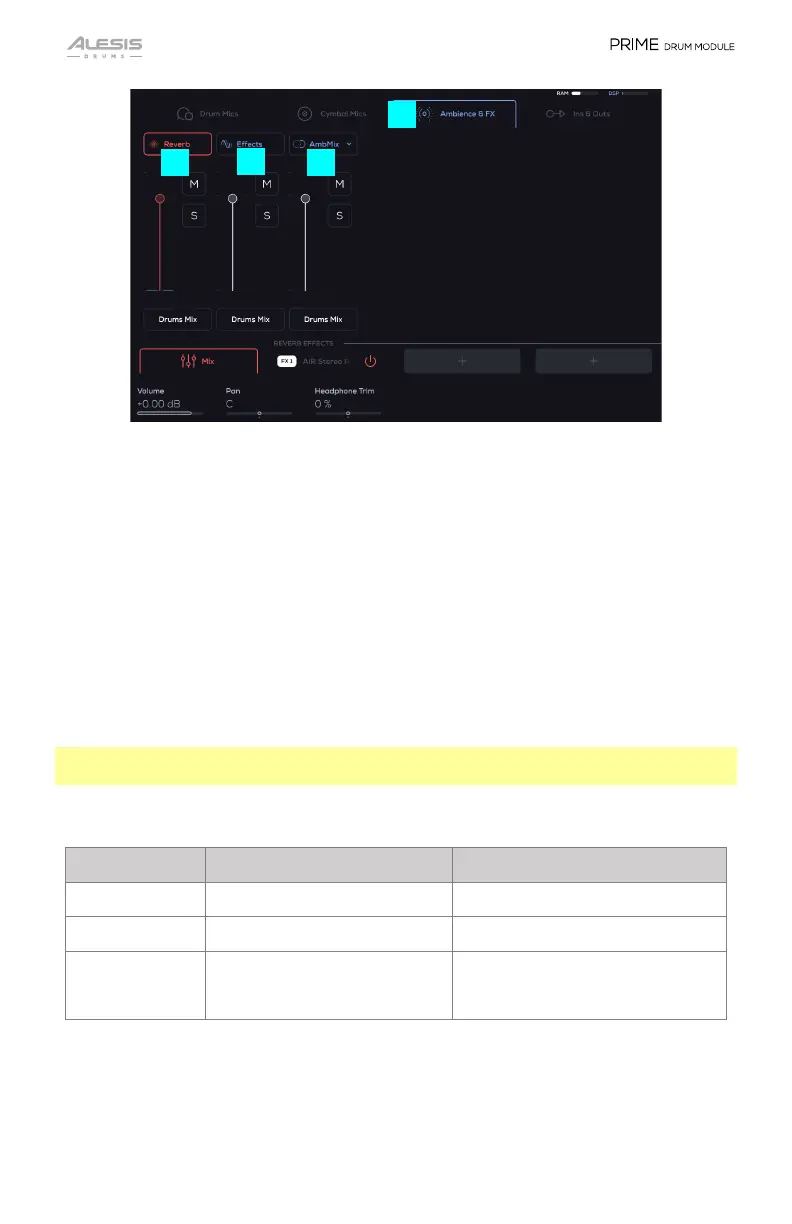
This has the grouping of the Reverb and Effects Sends for the Drums Mix, Assign
3/4, and Assign 5/6.
A. Reverb: This channel includes 3 insertable Effects that can be added to the
Reverb channel. The amount of Kit Piece audio being set to this channel is
controlled via the Small Encoder controlling the Reverb Amount value.
B. Effects: This channel includes 3 insertable Effects that can be added to the
Effect channel. The amount of Kit Piece audio being set to this channel is
controlled via the Small Encoder controlling the FX Amount value.
C. AmbiMix (Ambient Mix): Shows This channel includes 3 insertable Effects that
can be added to the AmbMix channel. The amount of Kit Piece audio being
set to this channel is controlled via the Small Encoders controlling the OG
and Room values in the Kit Edit’s Mics page.
Note: For the Reverb, Effects, AmbMix, additional parameters may be available
depending on what effects are added to the FX slots.
Reverb, Effects, and AmbMix Parameters
Parameter Description Value Range
Volume Channel volume -INF – 0.00 – +6.00 dB
Pan Channel Pan 100 L – C – 100 R
Headphone Trim Adjusts the volume going to the
Headphone Out based on the
Main Out’s volume.
-100 – 0 – 100 %
3
B
C


 To Next Page