34
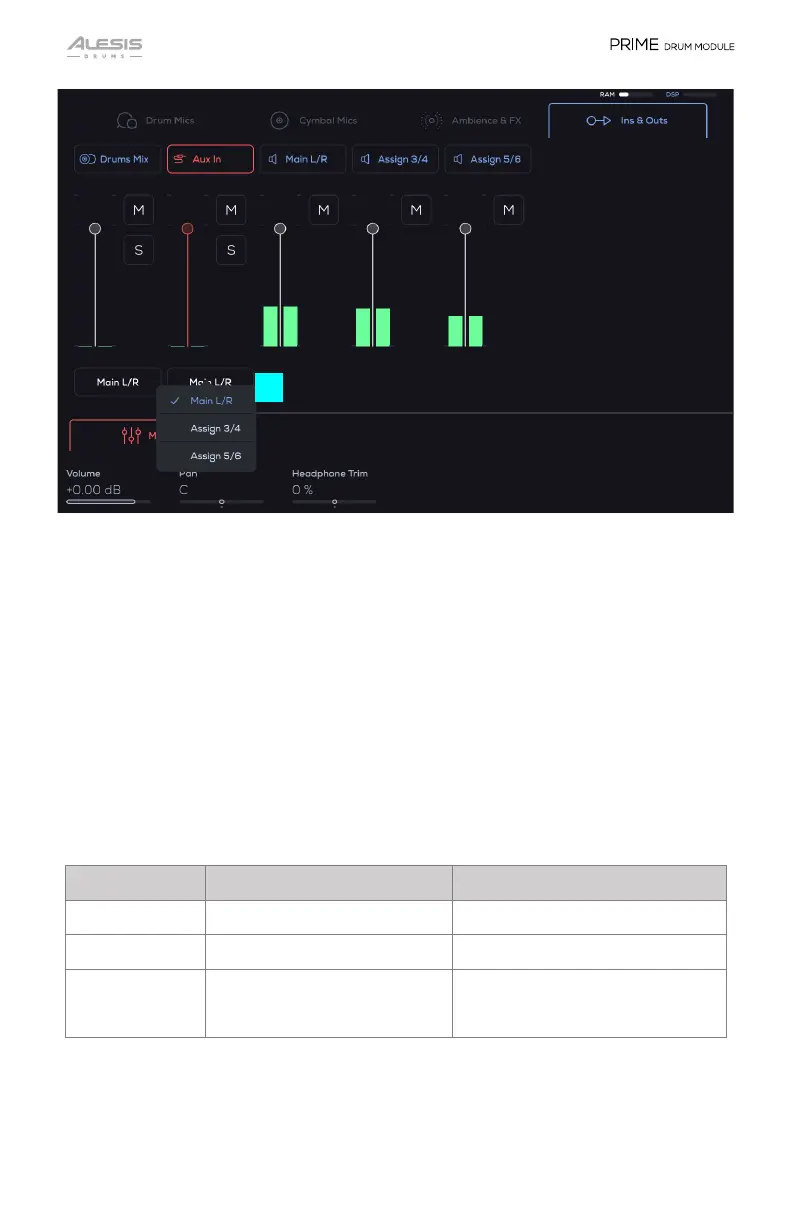
8. Output Routing
You can select from Main L/R (this default setting receives all channels), Assign
3/4, or Assign 5/6.
To route audio from different outputs:
1. In the Mixer page “groups” of mixer channels, tap on the tabs to select a
different mixer channel group. When an instrument track that has a dropdown
arrow is pressed, you will see the Mixer levels for all of the microphones
available for that Kit Piece.
2. Tap the Drums Mix button. Select to route the audio to the different hardware
outputs (Assign 3/4 or Assign 5/6).
Drums Mix, Aux In, Main L/R, Assign 3/4, Assign 5/6 Parameters
Parameter Description Value Range
Volume Channel volume -INF – 0.00 – +6.00 dB
Pan Channel Pan 100 L – C – 100 R
Headphone Trim
(Aux In only)
Adjusts the volume going to the
Headphone Out based on the
Main Out’s volume.
-100 – 0 – 100 %
8


 To Next Page