41
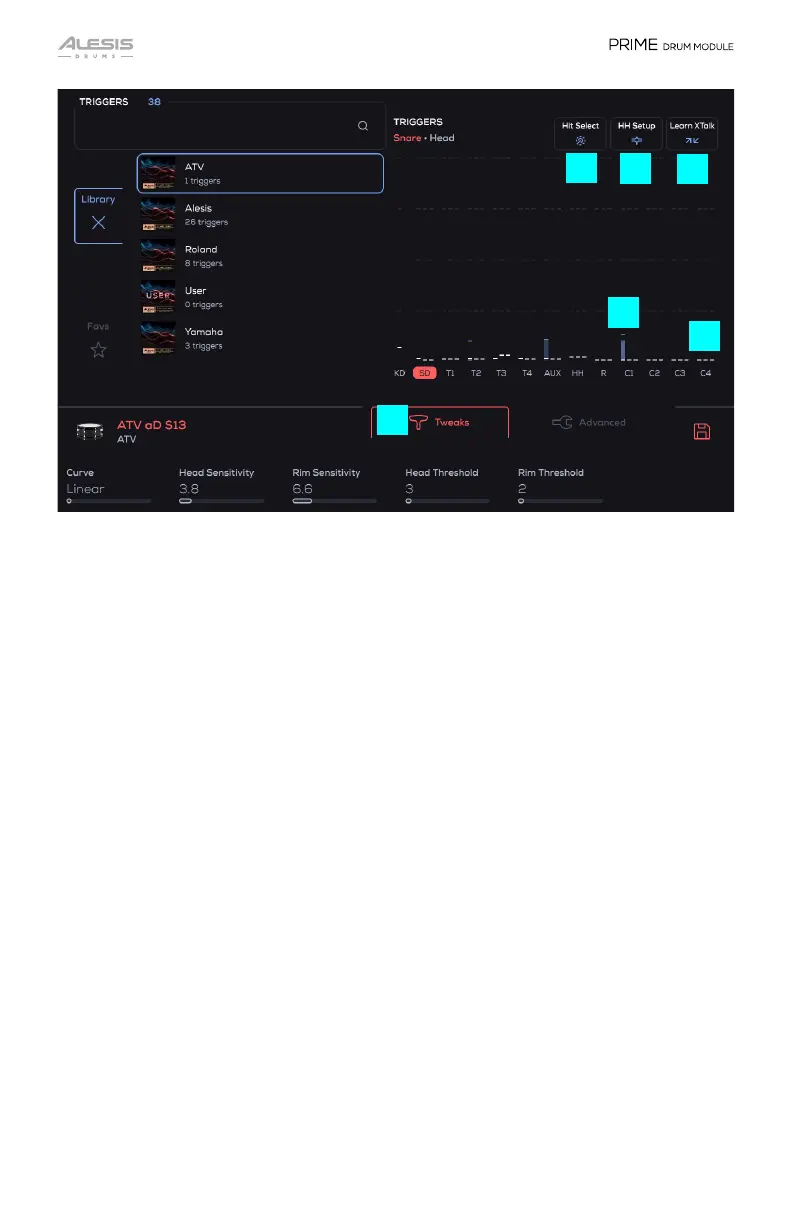
7. Hit Select
Selects a Trigger Slot on-screen by hitting the trigger connected to that trigger
input. When set to Latch Mode, toggle this setting on or off by tapping the button.
When set to Momentary Mode, press and hold this button to enable Hit Select.
8. HH Setup
Press to bring up the hi-hat calibration procedure overlay to adjust the hi-hat’s
open position optimally. See the section Hi-Hat Setup for more details.
9. Learn XTalk
Enter this mode to learn to filter out vibrations which are causing unwanted
triggering. See the section Learn XTalk for more details.
10. Trigger Meters
Shows bars for the incoming trigger signals. A vertical block displays the incoming
trigger event with the height of it corresponding to the MIDI velocity.
11. Threshold Indicator
These white dashes show what the Head Threshold, Rim Threshold, and cymbal
Threshold is set to. An incoming trigger event will only be heard if the signal goes
above the threshold setting.
12. Tweaks
Shows various trigger settings for the trigger inputs. See the section Trigger Input
Tweaks for more details.
9
8
7
10
11
12


 To Next Page