57
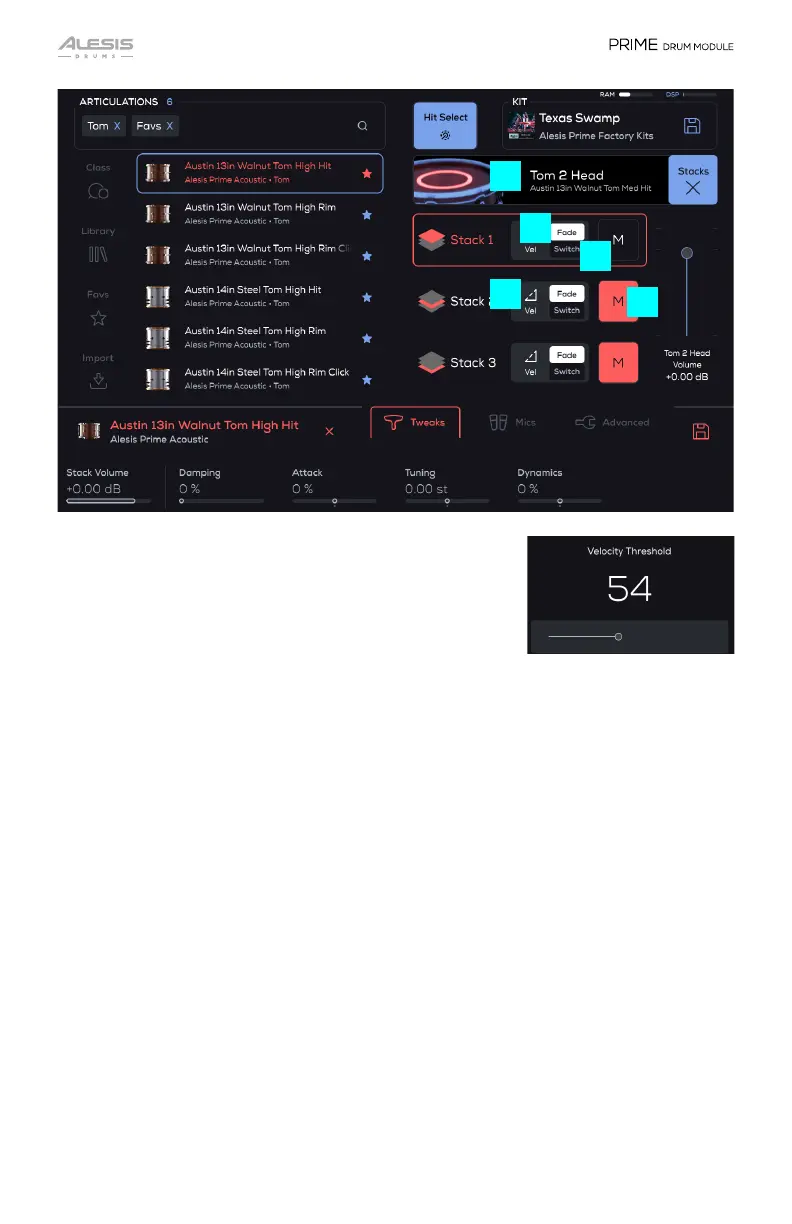
3. Velocity Threshold
Tap to open and set the MIDI Velocity value with the
slider (0-127).
4. Fade
The Stack will begin playback starting at the set MIDI Velocity Threshold and
change the audio playback volume dynamically up to 127. If the slider is set to 0
(leftmost), the audio playback is unchanged from the original state. If the slider is
set to 127 (rightmost), the Stack will play at velocity 127 at normal playback volume.
5. Switch
This is the same as Fade except that the Stack does not sound until the slider value
is reached, then it will begin playback dynamically as normal. If you set the slider to
0, audio playback is unchanged from the original state. If you set the slider to 127,
the Stack will play at velocity 127 at normal playback volume.
6. Mute
Tap to mute the selected Stack.
7. Trigger Zone
This graphically shows which Trigger Zone is currently selected. All drums have
head, rimshot, and rim only. All cymbals have bow, edge, and bell zones. The Hi-hat
has bow, edge, bell, and pedal zones. It also shows the articulation assigned to the
main kit piece for that zone (the darker/smaller grey text below the zone name).
4
5
6
7
3


 To Next Page