The ‘All Weekdays’ or ‘All’ buttons can be used instead of clicking individual dates to implement a specific schedule
throughout the month or to clear existing schedule for the whole month.
The schedule will need to be applied to each month separately.
Recurrent schedules are also supported. Select the desired schedule from the drop-down menu and select "Recurring"
from the button on the top right. Once selected, configure the recurrency settings underneath the calendar. To apply,
click on the starting day on the calendar. The schedule will now be populated onto the calendar. Save the settings.
6.6.2 Schedules
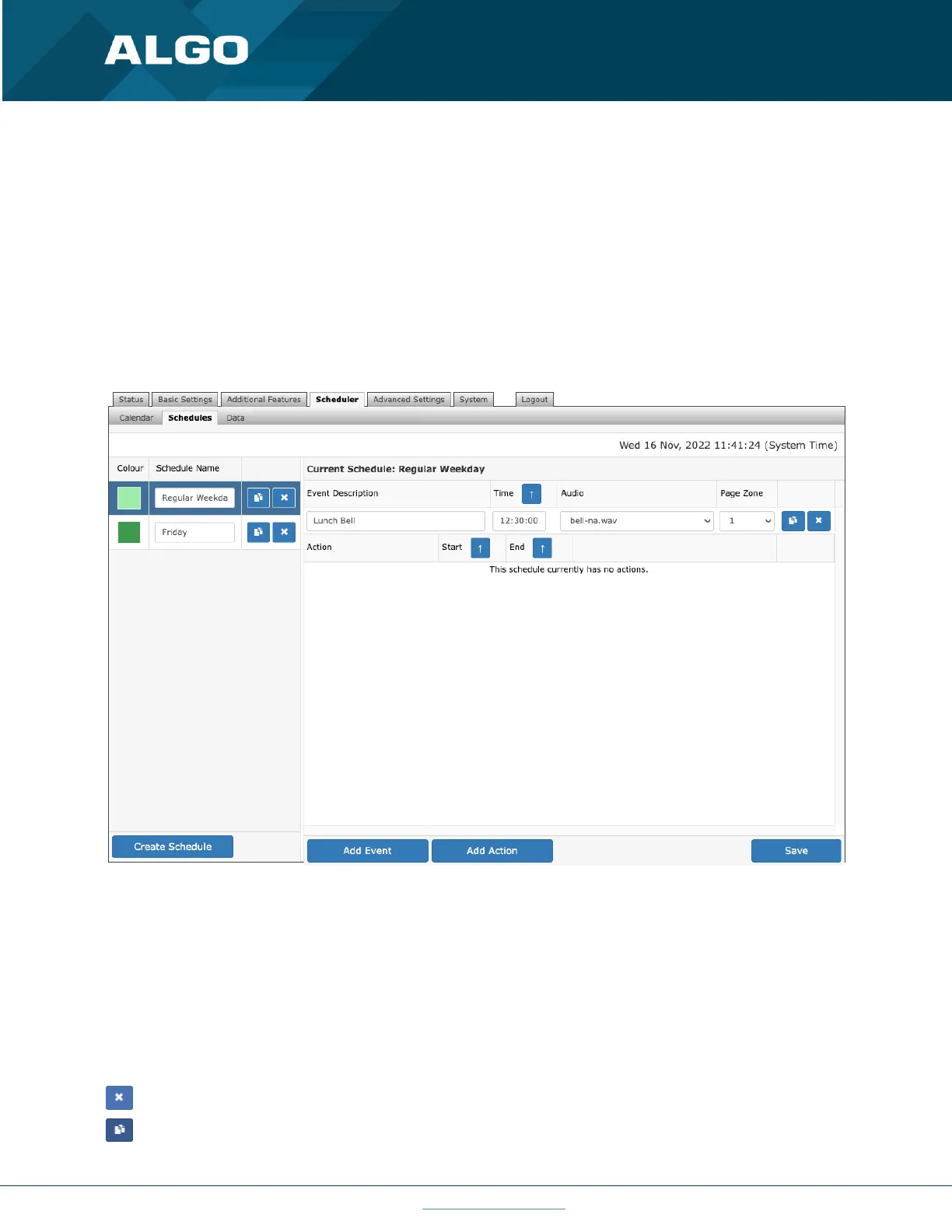
Press Create Schedule to add a bell schedule that will be implemented on specific calendar days. Give a ‘Schedule
Name’ and pick a ‘Color in Calendar’ to represent the schedule on the calendar.
Select the schedule, and in the ‘Current Schedule’ section, add events (bells) to the schedule. Specify the event
Description, Time, Audio files to be played, and the Page Zone (if Multicast Transmitter mode is enabled).
The chosen audio file will be played locally (e.g., amplifier connected to the 8301) and/or over the network via
multicast to all other Algo endpoints (e.g., 8186, 8188, 8180, 8128, etc.) or RTP multicast compatible third-party
equipment that are configured as Receivers on this zone.
Delete schedule or event button
Copy event button



 To Next Page