40 Get more from your alienDVR with our Free CCTV tips at aliendvr.com
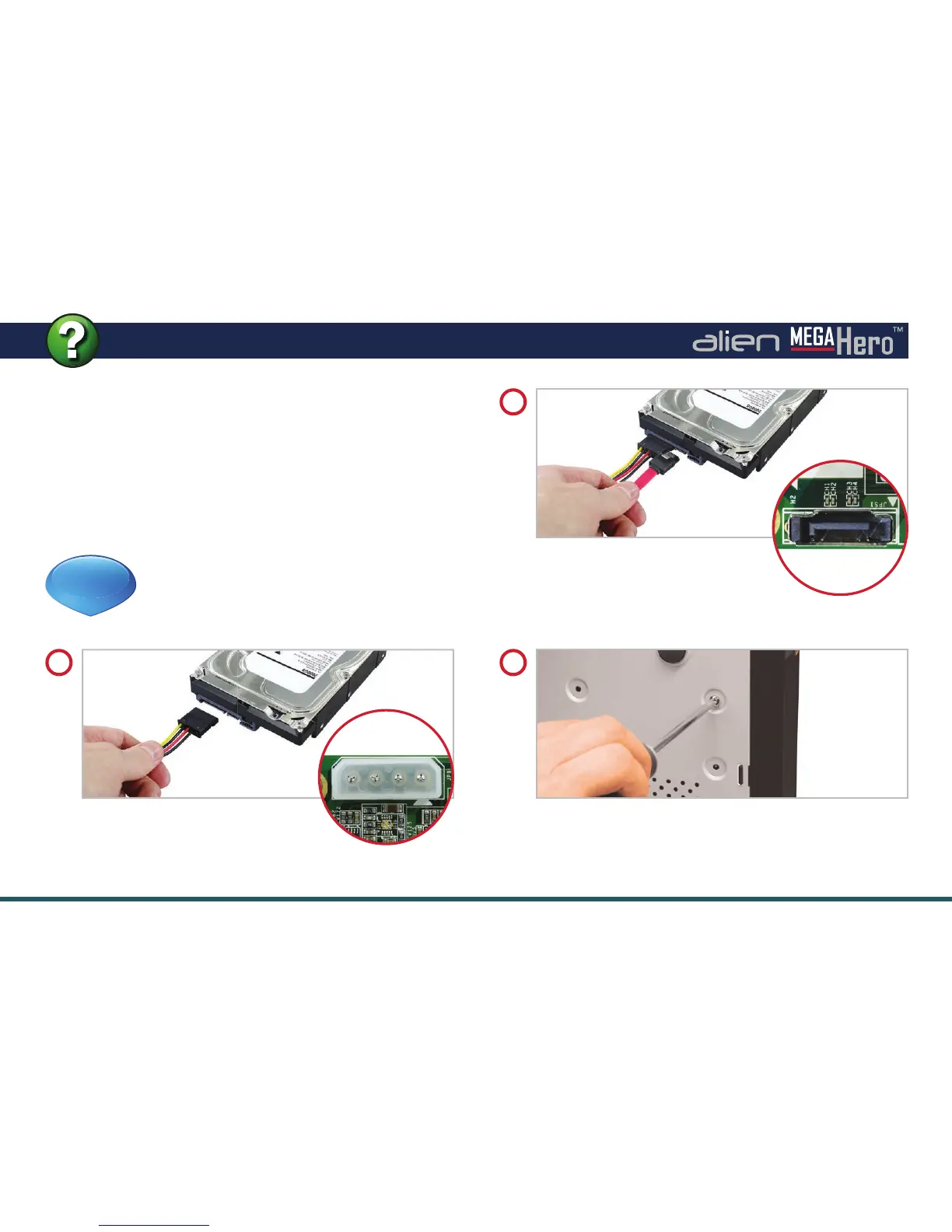
How To - Install A 3.5” SATA Hard Drive
Now connect the SATA cable to
the SATA socket on the hard drive.
Connect the other end to the SATA
socket on the PCB then place the drive in the DVR case.
2
Connect the power cable to the
power socket on the hard drive.
Connect the other end (White plug) to
the power socket on the PCB.
1
Screw through the four holes in the base of the DVR,
and into the four xing holes in the bottom of the hard
drive. (Screws supplied with hard drive.)
3
See online tip 301 for a more in depth
guide to installing a 3.5
inch SATA hard
drive at aliendvr.com
TIP
301
To record higher quality video or to record for longer
periods of time you may wish to add an extra hard drive to
your DVR. This process is a lot easier than you may think.
After removing the top casing of the DVR just follow our
quick step by step guide.
Note: MegaHero DVRs are designed to house 3.5” SATA
hard drives.



 To Next Page