Alienware ALX Desktop Manual
17
Connecting to an NVIDIA® SLI™ Graphics Configuration
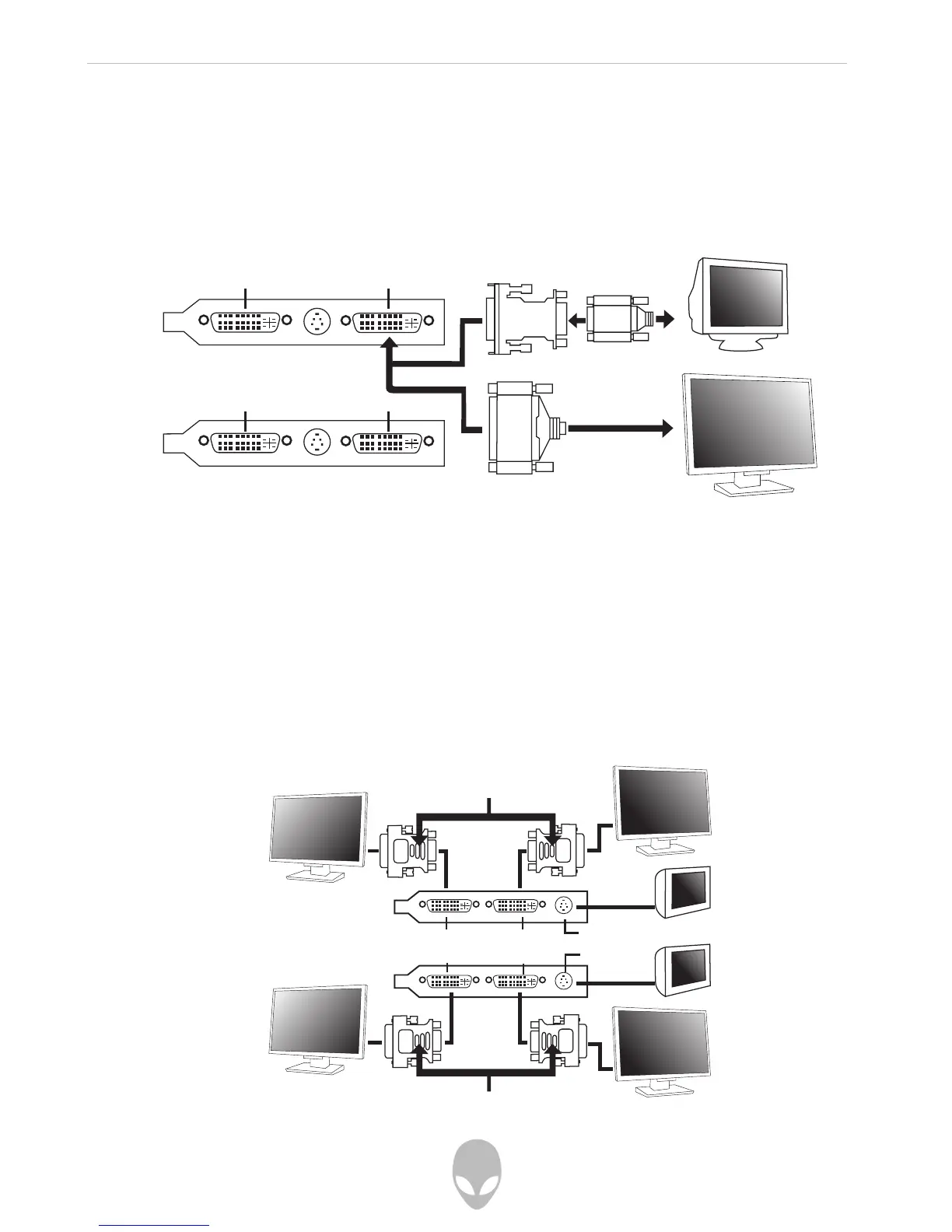
SLI-enabled graphics provides hardware support for one DVI-I monitor or one VGA
monitor using a DVI-to-VGA adapter.
The following shows how to connect your display to an SLI graphics configuration:
Configuring an SLI Graphics Configuration with Multiple Displays
Multiple monitor support is only available in an SLI configuration when SLI is disabled
in the NVIDIA driver control panel. When SLI is enabled, all other display devices
connected to other DVI or S-Video connections become inactive.
An SLI graphics configuration can support up to four displays when SLI is not enabled.
The illustration below shows possible display connections:
DVI Connector DVI Connector
DVI Connector DVI Connector
DVI Display Port 2 DVI Display Port 1
DVI Display Port 4 DVI Display Port 3
S-Video Port 1
S-Video Port 2
DVI to VGA Adapter
DVI to VGA Adapter















 To Next Page