Chapter III Display & Operation
42
3.2.2 Parameter Setting
Notice: Upon each power-on, adjust P00.00 to 356 and save it before changing other
parameters.
Some parameters takes immediate effect upon setting; wrong parameter settings
may lead to mal-operation and result in an accident.
Other parameter settings take effect after restarting.
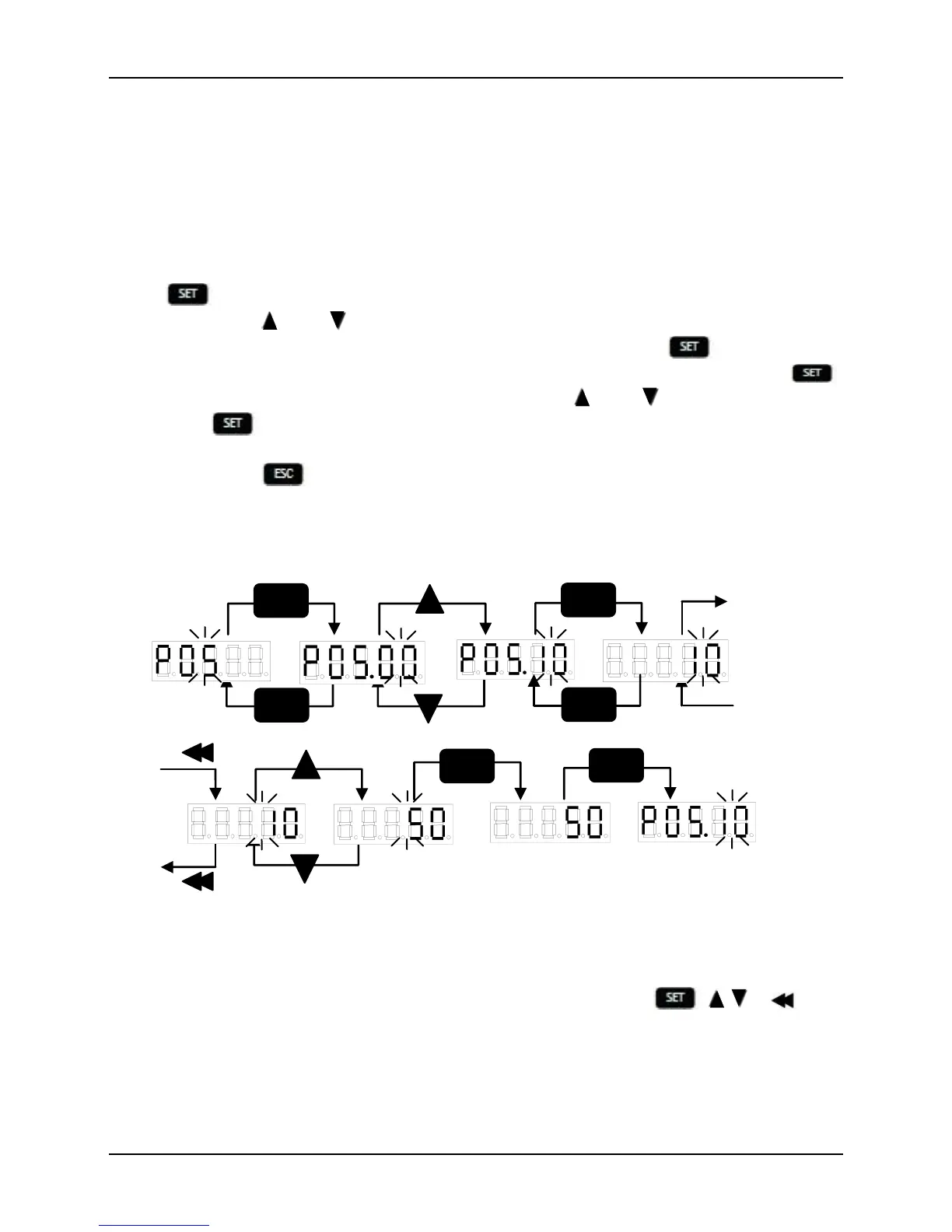
Press in the primary menu to proceed to the secondary menu of “function code
numbers”; press and to select among different function code numbers under
different function code groups to check or set parameters. Press to proceed to
the tertiary menu of corresponding parameters and it flickers at the LSB. Press
to move the flicker bit to change the parameter. Press and to change parameter
values and to save the final value which then stops flicker. Perform two actions
along with the operation of saving: saving the parameter value in RAM and writing in
EEPROM. Press to return to the previous menu. The value setting of P05.10 is
shown in Fig. 3-2 as an example of parameter setting.
Fig. 3-2 Parameter Setting
In the tertiary menu of parameters displayed on the monitor, , , , are
annul.


 To Next Page