Set the control mode (P00.02) at speed test run (the setting is
4). At this time, the drive is at enabled state, the motor is
initiated and at zero speed running state, gentle vibration can
be felt when touching the motor with hand.
3.2
Keyboard
operation
method
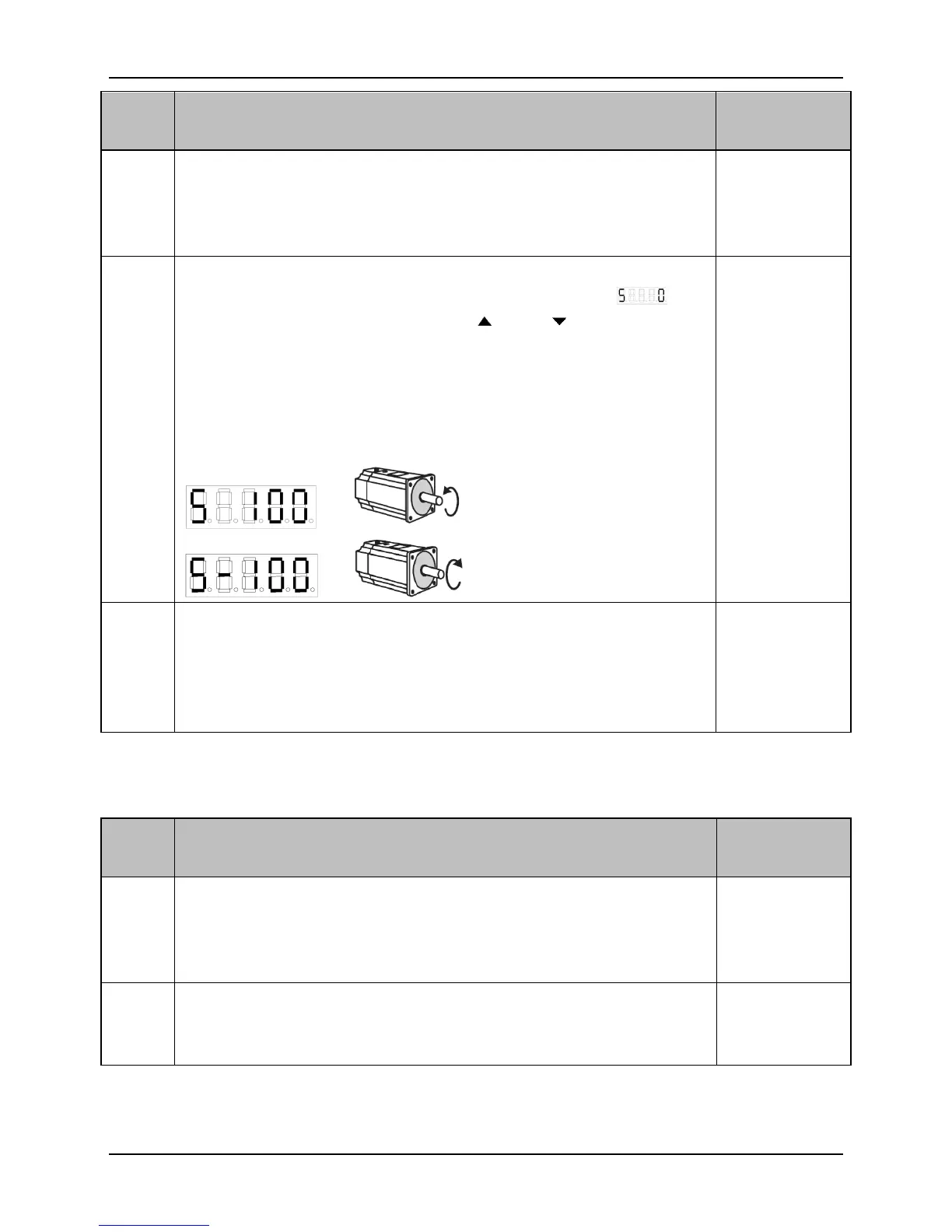
Entering the speed test run setting (P01.00) through keypad
operation, the indication sign of speed test run is , the
numerical unit is r/min. Use the and key to change
the speed and direction, and the motor shall be operated in the
given speed. If the speed display is positive (the first digital
display is S), means the motor is rotating in clockwise, if the
display is negative, means the motor is rotating in
anti-clockwise.
3.2
Keyboard
operation
method
If need to stop the motor rotating, the rotating speed can be set
at 0, or also exit the test run speed setting interface, then
re-entering (P01.00), the original set speed will be cleared and
the motor will stop. Change operation mode (P00.02) can also
stop the motor rotating.
3.2
Keyboard
operation
method
■ JOG Trial Operation (P00.02=5)
Connect the control circuit power supply (the main circuit
power is disconnected temporarily), and the display of drive is
on. If there is an alarm, please check the connection.
2.4 The main
circuit
terminal
wiring
Connect the main circuit power supply.
2.4 The main
terminal
wiring


 To Next Page