579400001-J1 Rev F
9. Installing Standalone Power and Distribution Bays
9.1 Standalone Power Bay
A single standalone power bay can be used in existing power systems to replace multiple power bays with lower capacity.
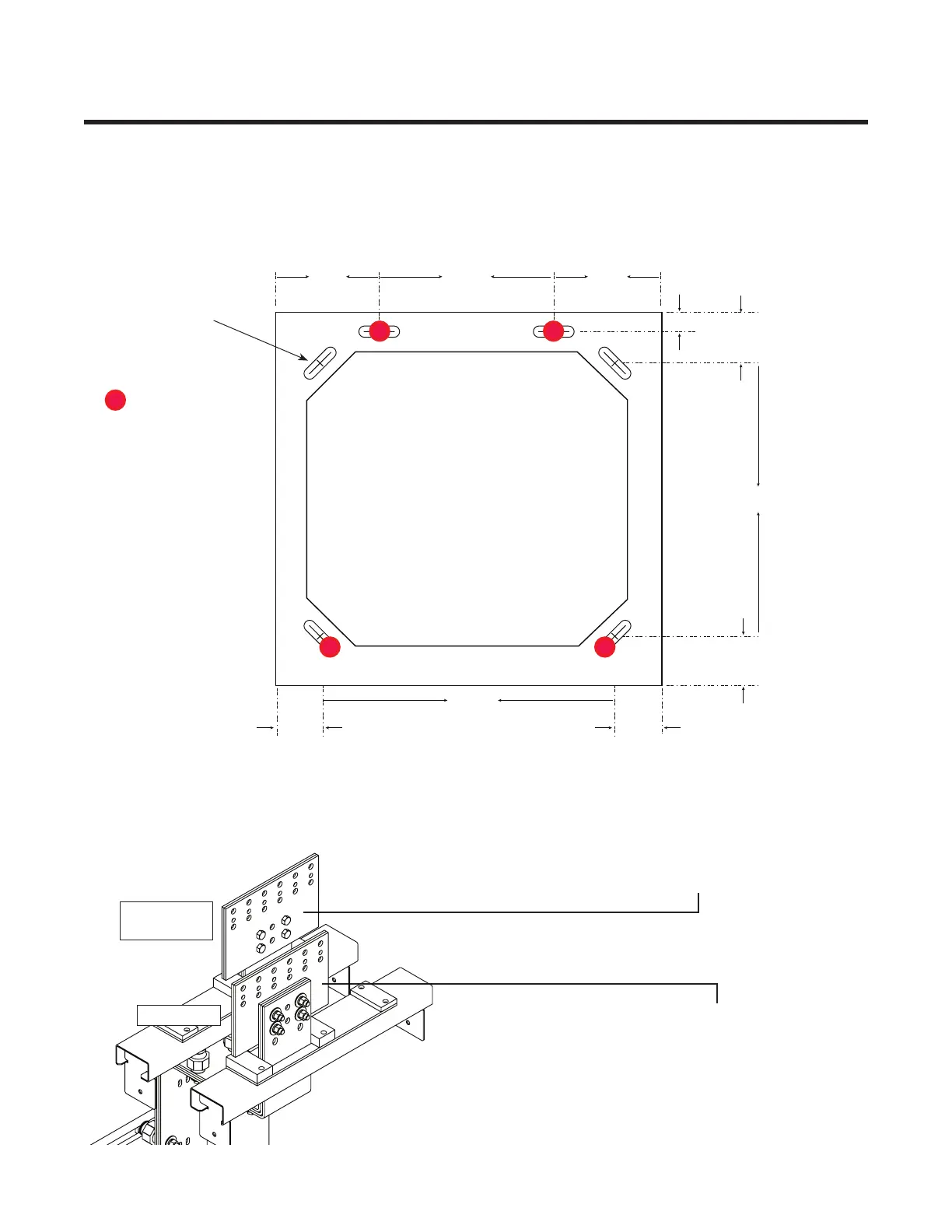
1. Secure the bay to the floor. Locate bolts in slots as shown for greatest stability.
2. Connect a cable (typically a 2/0 cable) between the frame of the bay and MGB or FGB.
.813 X 3.00"
mounting slots,
6 places.
7.6 0 ʺ
12.80ʺ
7.6 0 ʺ
1.50ʺ
3.75ʺ
20.50ʺ
3.75ʺ
3.30ʺ3.30ʺ
21.40ʺ
3. Refer to section 8.3 on page 51 to connect AC input to the AC distribution assembly at the top of the unit.
4. Connect the power bay positive return detail to the existing system overhead battery return bus.
5. Connect the power bay "Hot" detail to the existing system overhead "Hot" power bus.
6x 750MCMj (min) 1/2" on 1 3/4" centers
or 3/8" on 1" centers
Mounting bolts
"Hot" detail
Positive
return detail
"Hot"power system bus
Battery return system bus
FRONT
REAR


 To Next Page