BOOM BARRIER BV5868 3131
INDICATION
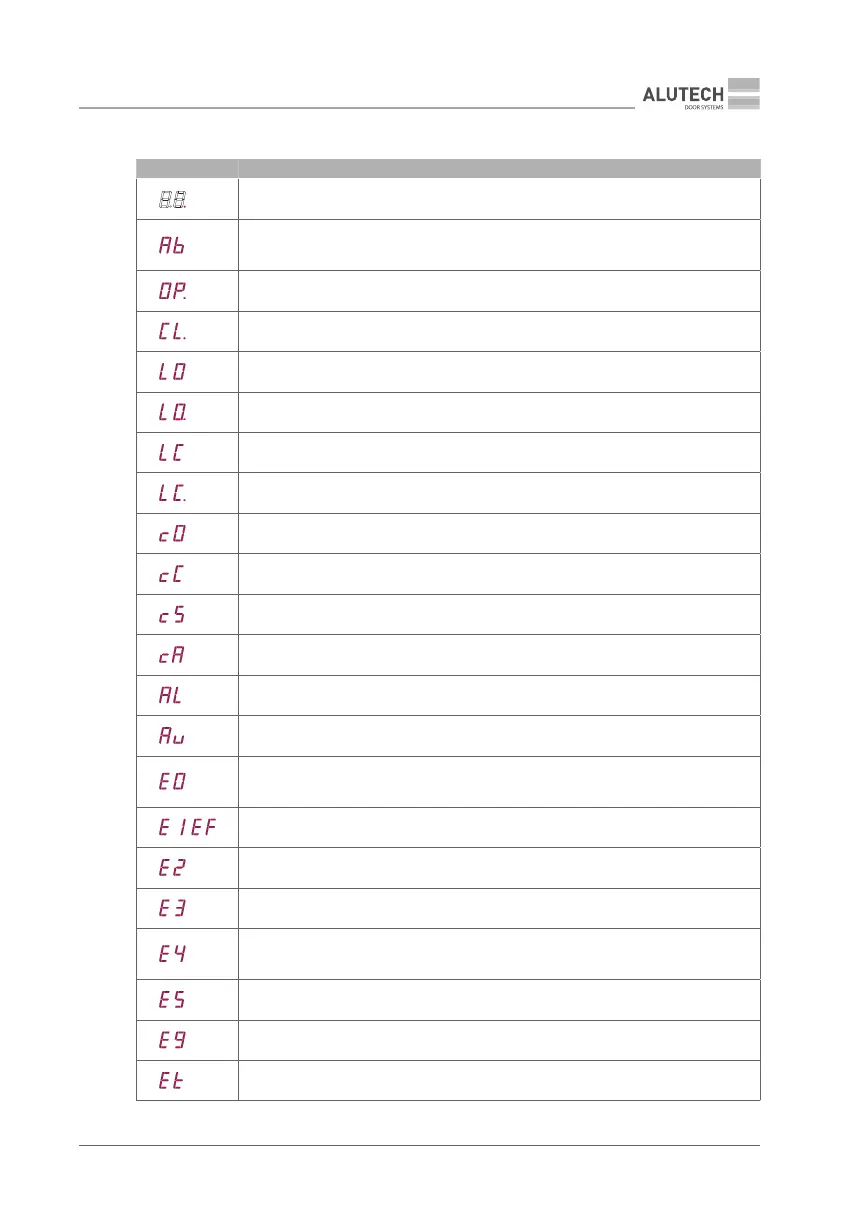
Table 20 — Indications of the control panel display 15 (see Fig.37)
Standby mode (one dot is on the display)
Boom has not been selected in settings (adjust P1–F1, see sub-section ‘7.2. Setting
operation parameters’)
Opening
Closing
OPEN end position switch is activated(OP.L input, terminal block 12)
Stopped in OPEN end position(full open)
CLOSED end position switch is activated (CL.L input, terminal block 12)
Stopped in CLOSED end position (full close)
Open command is sent and movement delay is performed
Close command is sent and movement delay is performed
Movement stopped by control command
Open command is sent from ALR input (terminal block 4)
ALR input activated (terminal block 4)
Countdown to automatic closing
End position switches circuit error
(end position switches open /OP.L and CL.L input, terminal block 12)
,
Obstacle detected by integrated security system
Security device / photocells activated (PH1 and / or PH2 input, terminal block 4)
Safety edge activated (SE input, terminal block 4)
Error occurred during PHOTOTEST
(sub-section ‘7.2. Setting operation parameters’ P7–F3)
STOP security device activated (S input, terminal block 4)
Synchronized operation error (sub-section ‘7.2. Setting operation parameters’ P9–F1)
Movement interruption at work time end



 To Next Page