BAG0017.7 10.17
6.1.1 Spray rate greater than 1000 l/ha
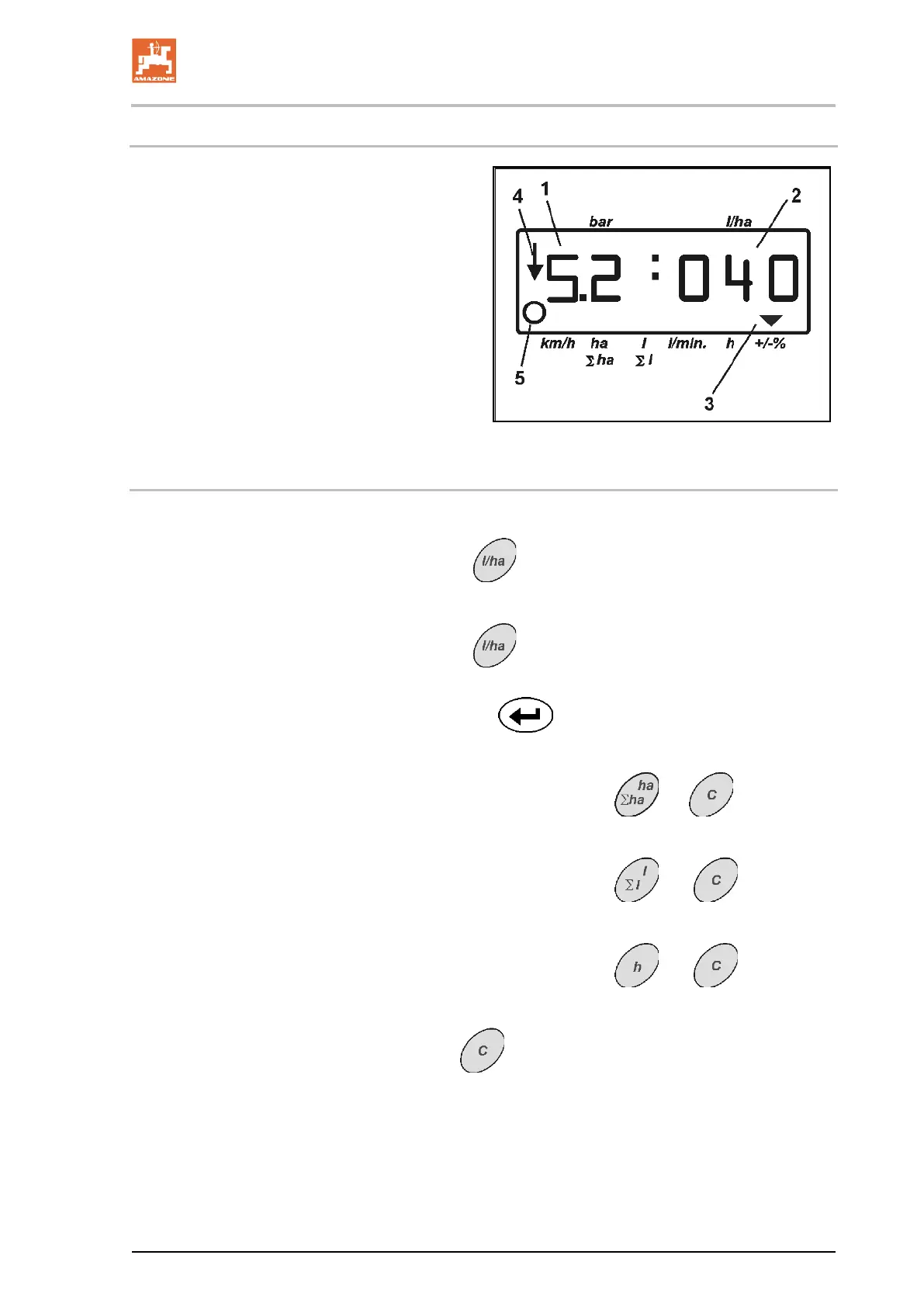
Only 3 places are available for showing the
spread rate in the work display.
However, spread rates greater than 1000 l/ha
can be entered and applied.
The display for spread rates greater than 1000
l/ha then appears as follows:
• The lower point in the display is not shown.
• Only the last 3 places of the spread rate are
shown
Fig. 10 – Example of display for entered spread
rate 1040 l/ha.
10
6.1.2 Deletion of job data
The data stored for one job can be deleted individually.
1. Actuate key .
→ The last job worked will appear on the display.
2. Actuate key
(possibly several times) and select the de-
sired job.
3. Actuate the key
and thus confirm the job.
4. Deletion of data:
• Simultaneously actuate the keys
and .
→ The value for the area worked is deleted.
• Simultaneously actuate the keys
and .
→ The value for the amount sprayed is deleted.
• Simultaneously actuate the keys
and .
→ The value for the hours worked is deleted.
5. Press key
to leave the menu.









 To Next Page