BAG0126.4 09.17
4.3.5 Detailed settings
• Signal tone when opening the shutter with
active limiter on / off
• Fill level alarm calculated with weighing
technology (Profis) / spread rate application
(Control)
• Desired number of tasks
• Distance counter to find tramlines on / off
2
Percent quantity change during operation.
10 %
1
Select the number of part width sections (2,
4, 6
4
1
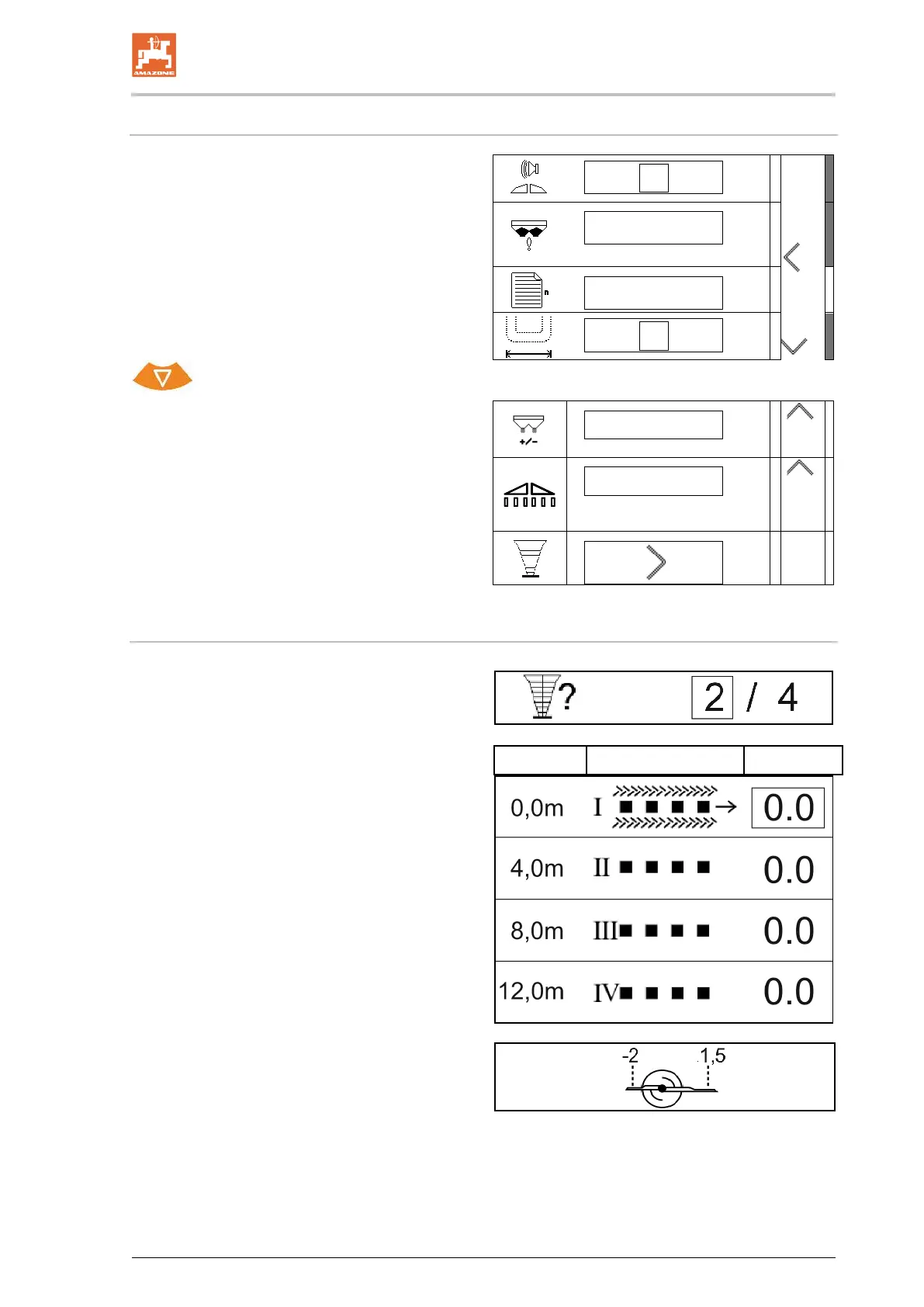
• Checking the lateral distribution with the
mobile test rig
Checking the lateral distribution with the mobile test rig
Select "Mobile test rig".
• 2 measuring points (8 trays)
• 4 measuring points (16 trays)
(1) The position of the measuring points is dis-
played in metres beginning from the tram
Example:
4 measuring points / working width: 24 m /
Measuring points: 0 m (tramline), 4 m, 8 m, 12 m
(2) Measuring points 1, 2 or 1, 2, 3, 4
(3) Entry of the fertiliser fill level of the corre-
sponding measuring cup in graduation marks
on the measuring cup.
After entering the measuring cup fill levels, the
required correction of the spreading vane position
for the long and short spreading vanes is shown.
Positive value: set the vane to a bigger value on
the scale.
Negative value: set the vane to a smaller value on
the scale.


 To Next Page