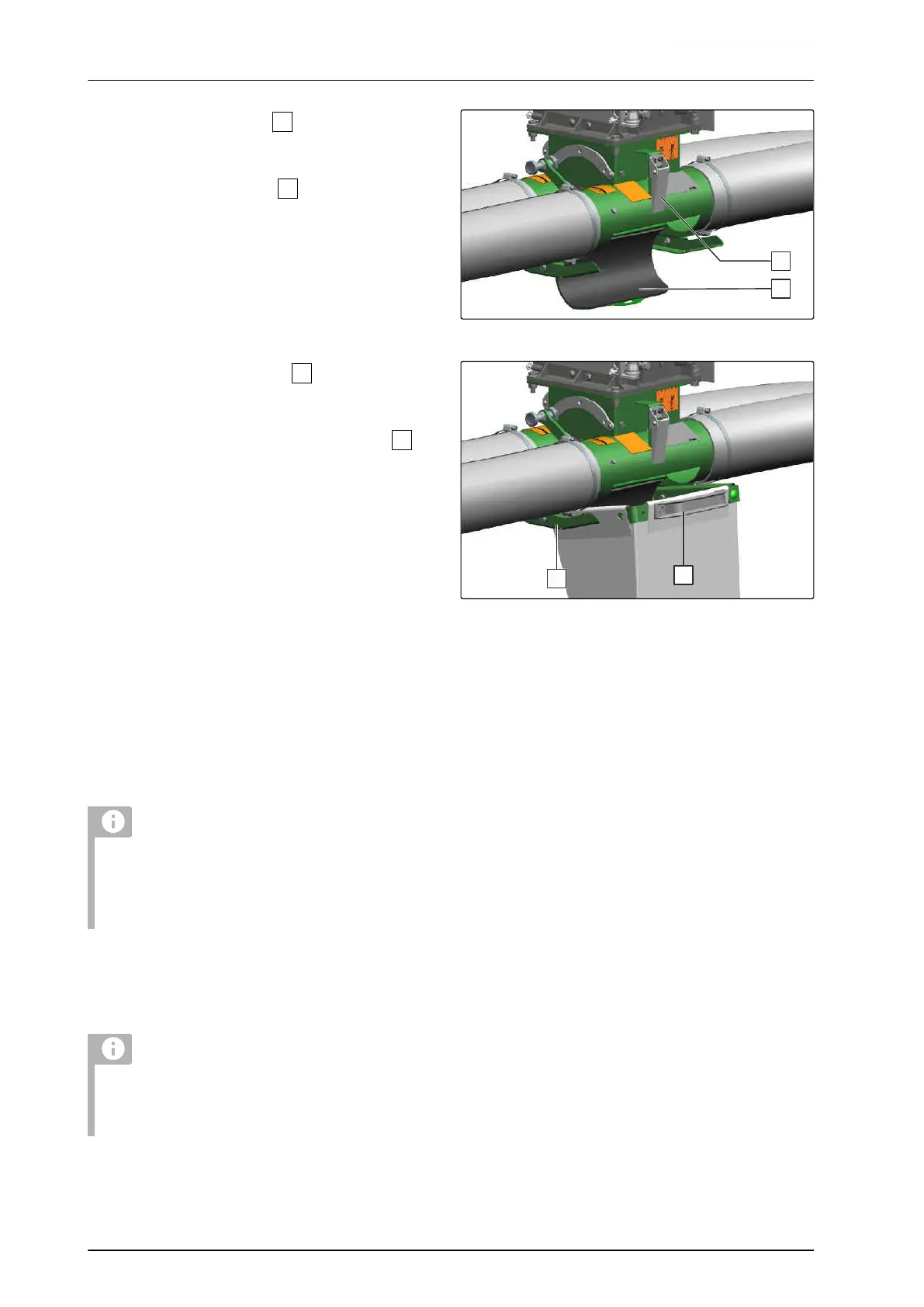
2. Unlock the locking lever
on the metering
housing.
3. Open the calibration flap
.
CMS-I-00003654
4. Take the calibration bucket
from the storage
compartment.
5. Push the calibration bucket into the holder
under the metering housing.
6. To the metering roller,
Actuate the calibration button for 10 seconds.
7. Empty the calibration bucket.
8. Hang the calibration bucket with the calibration
scale on the weighing point.
9. To tare the calibration scale,
switch on the calibration scale with the empty
calibration bucket.
10. Push the calibration bucket into the holder under
the metering housing again.
NOTE
If uniform emptying is desired for a 2-chamber
hopper with only one seed type, the target rates
must be converted to the percentage of the
hopper volume.
11.
To start the calibration via the control terminal,
refer to the ISOBUS software operating manual,
"Calibration menu".
NOTE
To determine the calibration factor as precisely as
possible, fill the seed remaining in the sluice into
the calibration bucket.
CMS-I-00003653
6 | Preparing the machine
Preparing the implement for operation
MG6492-EN-II | P.1 | 21.11.2023 | © AMAZONE
68




 To Next Page