en
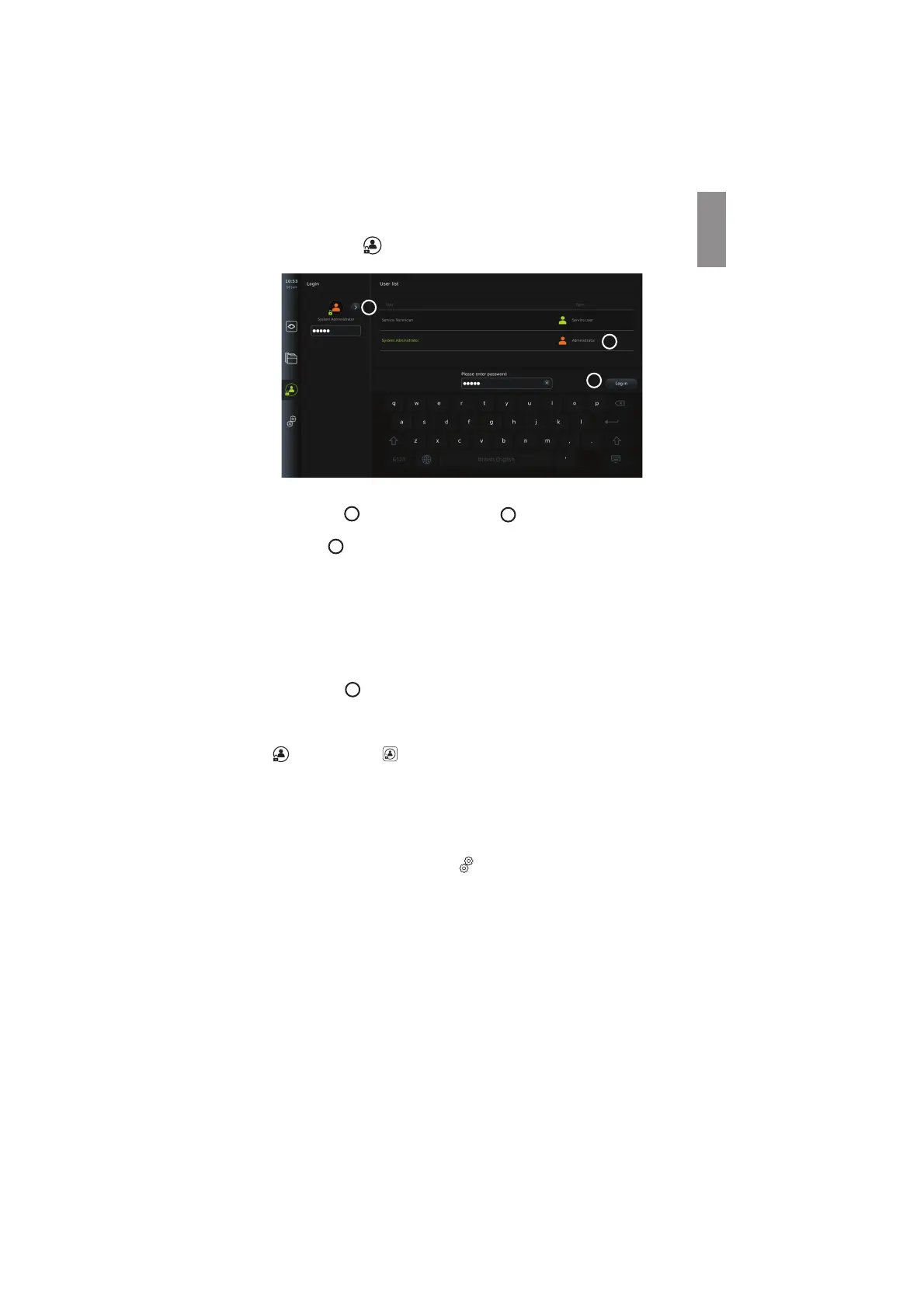
To log in, press the Login tab in the tool bar on the left. The first level menu will appear
and show the last user to log in to the displaying unit.
2
3
4
5.2.1. To log in as Administrator
• Press the arrow
2
and select the Administrator
3
user profile from the User list.
• Enter the factory default password: AmbuAdmin.
• Press Log in
4
.
The password must be changed during first-time setup. Find password requirements in section
5.3.4. If you lose the Administrator password, contact your local Ambu representative for
assistance.
NOTE: Access to Archive without login can be enabled by an Administrator in General settings
explained in section 5.8. By default, users are logged out of the device after 10 minutes of
inactivity.
5.2.2. To log in as another user
• Press the arrow
2
to open the User profiles menu.
• Select the desired user account and type the password in the Enter password field.
• Press the Log in button.
A confirmation dialog box will appear in the lower left corner if login was successful and the
Login
icon will change to indicating that the device functionality is unlocked.
5.2.3. Edit password for Administrator
Editing the Administrator password follows the same procedure as editing the Advanced user
password (see section 5.3.3). Note that it is not possible to edit the Administrator user profile
name or create new Administrator profiles.
5.3. User Profiles
In the User profiles menu under the Settings tab, you can create new or edit existing user
profiles. To access this menu, you must be logged in as Administrator (see section 5.2). The
following sections provide information on user account privileges and instructions on creating
and editing user profiles.
5.3.1. User types
There are four different user profile types. The Default user is active when turning on the
displaying unit and does not require login. Login is required for Advanced (blue), Administrator
(orange) and Service users (green). Each user profile type has a different level of access to the
system. The user profile types, and their system access are shown in the table below.
11



 To Next Page