5.3.4. Password requirement
Passwords are required to be at least 8 characters. Any character is allowed. It is recommended
to use a combination of upper- and lower-case letter, numbers and symbols to enhance
password protection. Ensure to follow local guidelines.
5.4. Language
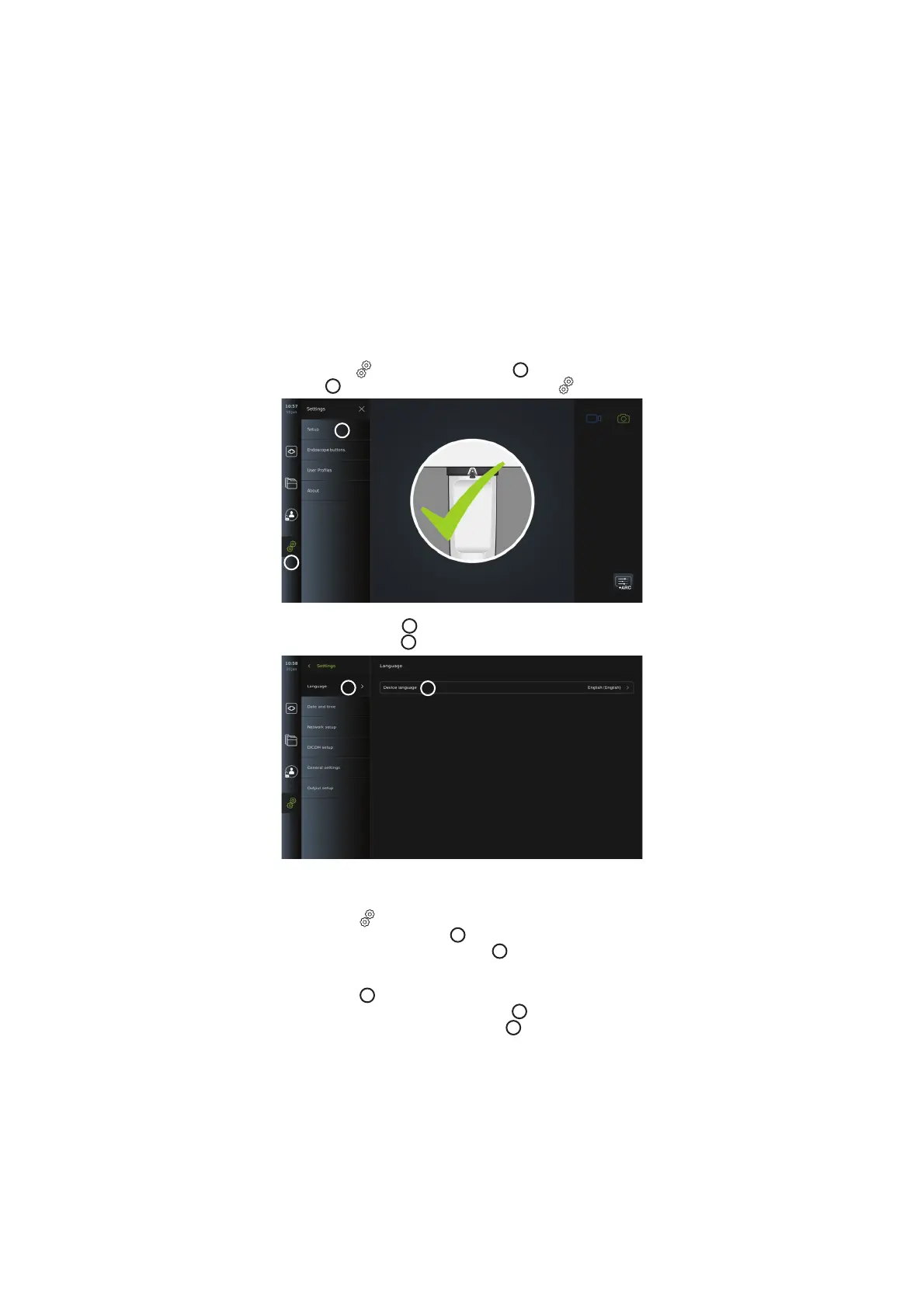
In the Language settings under the Setup menu, the language for the user interface can be
changed. The default language is English. When setting up the displaying unit, select your
language preference.
• Press the Settings
tab in the tool bar on the left
12
.
• Press Setup
13
(the top menu of the menu bar in the Settings
tab).
12
13
• The Language menu opens
14
.
• Open the Device language
15
drop-down menu and select language from the list.
14
15
NOTE: The language will change immediately when a new language is chosen.
5.5. Date and Time
• Press the Settings tab in the tool bar on the left.
• Press Setup and select Date and time
16
.
• Open the Time zone setting drop-down menu
17
and select your time zone from the
list. It is important to choose the correct time zone as the correct daylight savings is
updated automatically.
• Select Time format
18
.
• Swipe the hours and minutes wheel under Set time
19
to set the current time.
• Select the current date in the calendar under Date
20
.
14



 To Next Page