5.8. General Settings
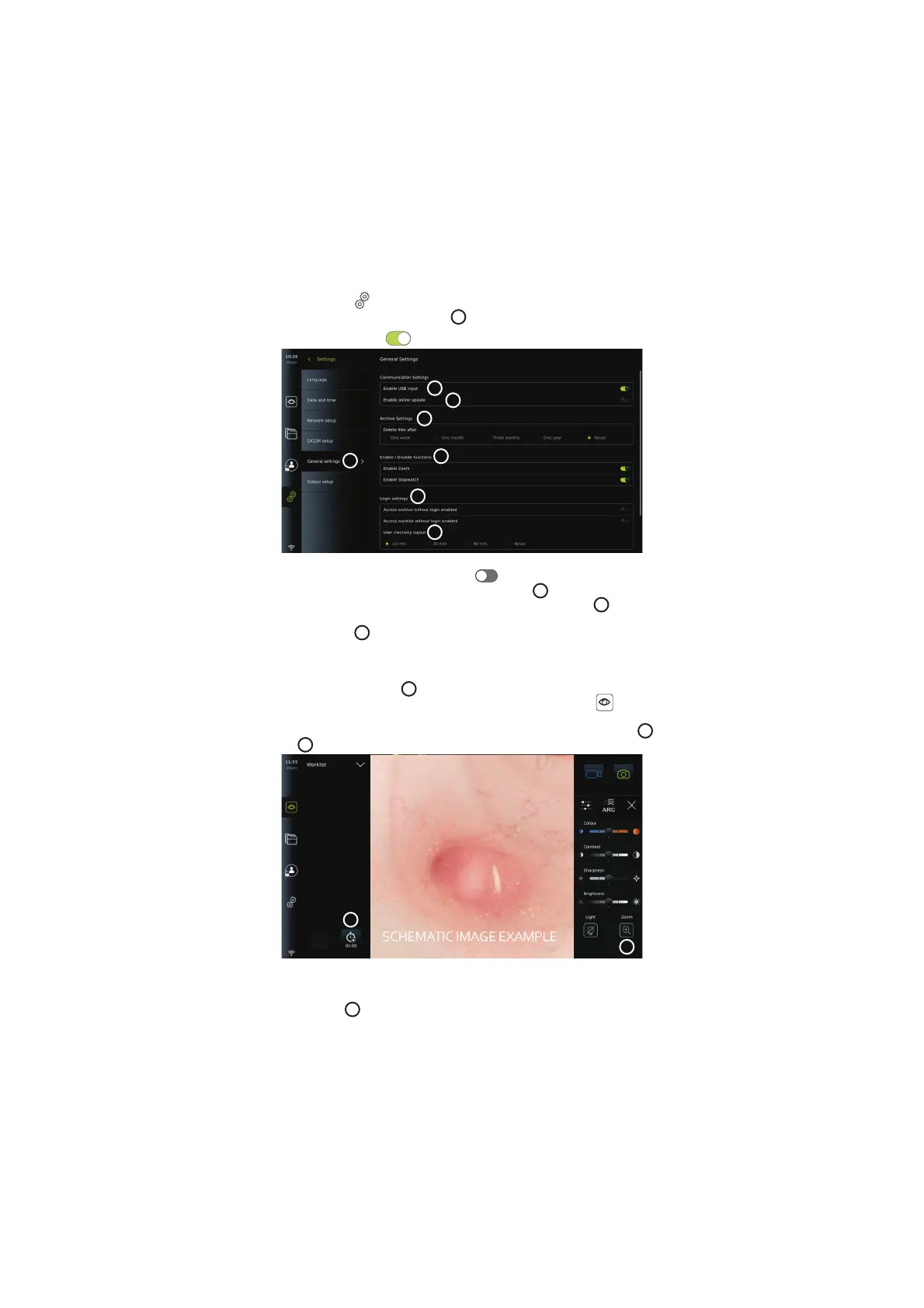
In General Settings under the Setup menu, the Administrator can enable or disable
Communication Settings, Archive Settings, the functions Zoom and Stopwatch, and allow
Access to archive without login as well as set User inactivity logout time.
• Press the Settings
tab in the toolbar on the left.
• Press Setup and press General settings
49
.
• Press the ON/OFF sliders
to enable or disable the user's ability to use the functions.
49
50
51
52
53
52
54
If USB input is disabled (slider pushed to the left ), the USB ports are inactive and cannot
be used to export files or perform software updates/upgrades
50
. Also, if the Enable online
update is disabled, the user will not be able to download software updates
51
.
In the Archive settings
52
, the Administrator can choose if and when files should be
automatically deleted. If a specific period is chosen, files such as photos and videos will
automatically be deleted after the selected period.
Under Enable/Disable functions
53
, the Administrator can enable/disable the Zoom and
Stopwatch functions. These functions will be available under the Live view
tab (see
section 7.3. for operating instructions) or directly through the buttons on the visualization
device (refer to section 5.10). Shown below is a user interface image where the Zoom
54
, and
Stopwatch
55
functions are made available in General settings.
54
55
Be aware that if a function is disabled, the symbol is not visible in the menu where it is
normally located.
In the Login settings
53
, the Administrator can enable/disable Access archive without login
or Access worklist without login. When activated, please be aware that the Archive or
Worklist is no longer password protected. The Default User is provided Advanced User
privileges to access previous procedures and view, delete and export files. Please see section
5.3.1. for further information on user types. The feature is disabled by default.
20



 To Next Page