en
34
35
33
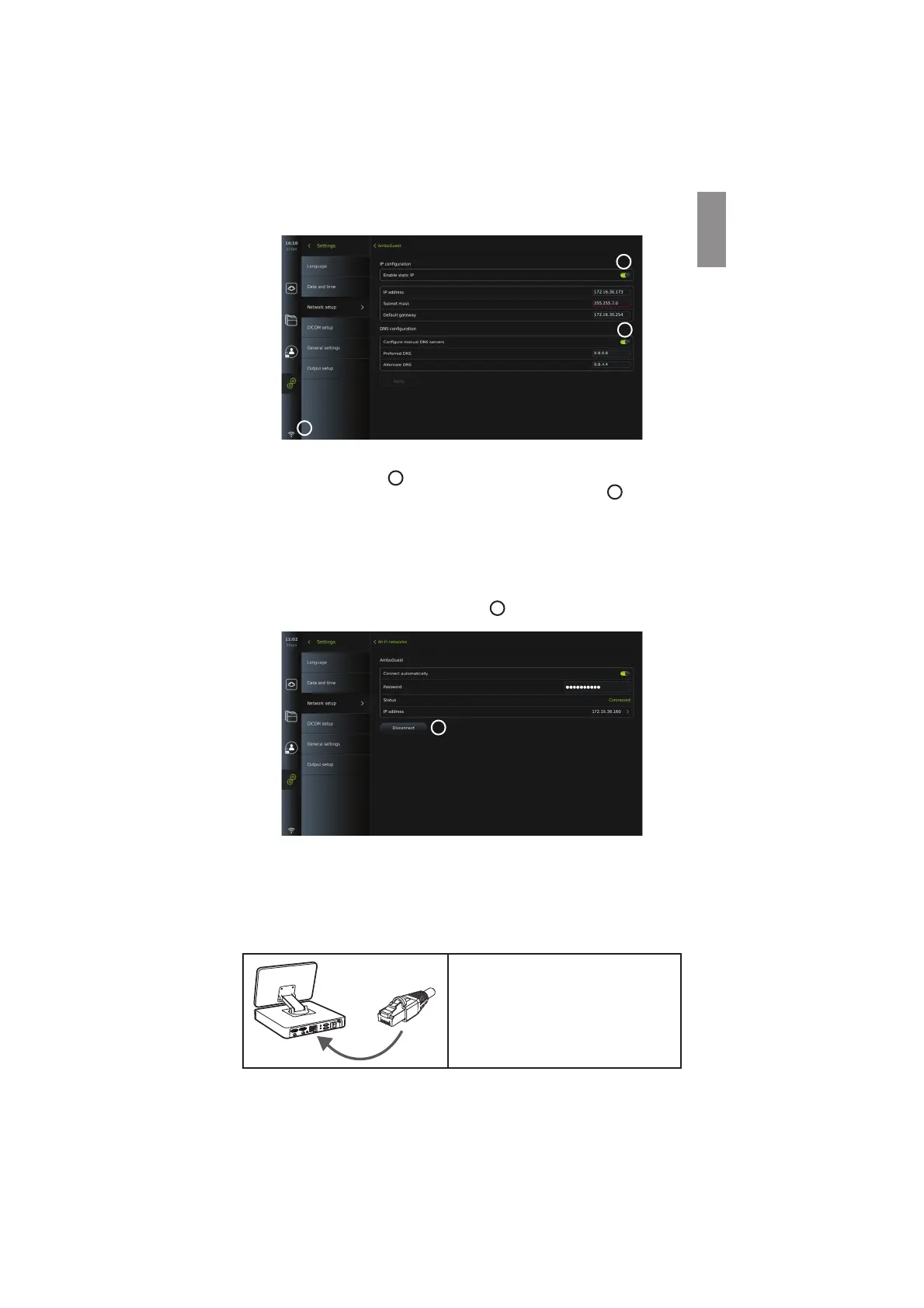
Connecting to a hidden network:
Press the Add network button
29
. Enter the hidden network name and password. The
network will hereafter automatically appear on the list of Available networks
28
.
NOTES:
• Wi-Fi networks which require redirection to a login webpage for entering user name and
password are not supported on the displaying unit.
• Only WPA and WPA2 are supported.
Disconnecting from network:
Select the connected network and press Disconnect
36
.
36
5.6.1. Connecting to Wi-Fi and local area network (LAN)
The displaying unit contains a Wi-Fi module and an ethernet port to connect the device to a
local network. This can be used for exporting recorded imaging data to a PACS server (Picture
Archiving and Communication System) on the local network (see section 7.3.4.).
A Wi-Fi antenna can be connected to the displaying unit to achieve a better Wi-Fi connection.
The displaying unit can be connected to LAN via a LAN cable.
Connecting to LAN (Ethernet):
Connect one end of a LAN cable to the
ethernet connection port on the back of the
displaying unit.
Ensure that the other end of the LAN cable is
connected to a router or LAN wall connector.
17



 To Next Page