en
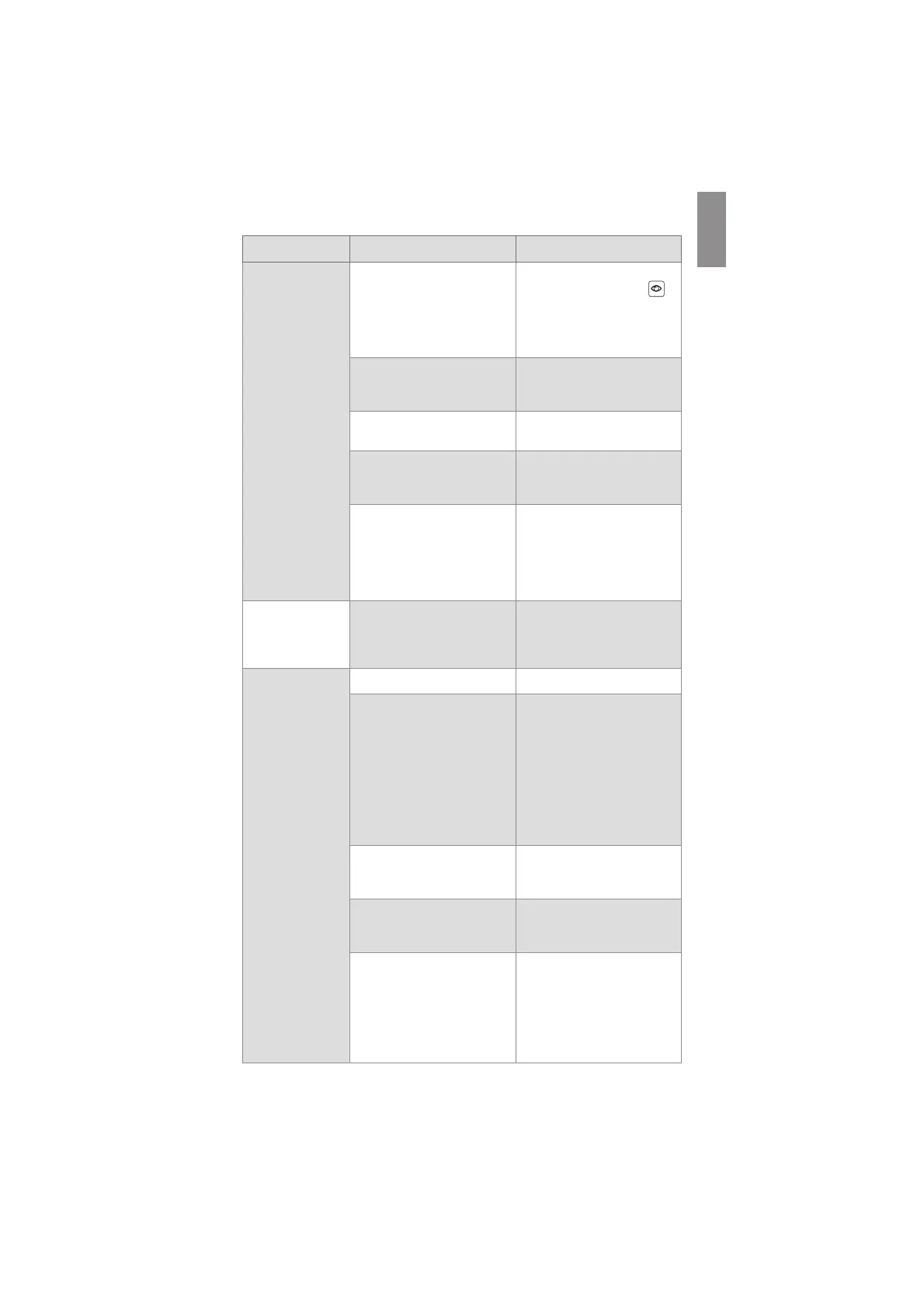
Problem Possible cause Recommended action
No live image from
the visualization
device on the
displaying unit
screen
OR
No LED light in the
distal end of the
visualization
device.
A recorded image in the current
procedure folder is blocking
the live image
OR
A menu box is blocking the live
image.
Return to live image by
pressing the Live View tab
.
If this does not work perform a
Power OFF Cycle (follow the
procedure above this table).
LED light switched off by
activation of the Light off
function.
Deactivate the Light off
function (see section 7.3.8.).
Failure on visualization device
connection.
Connect/reconnect
visualization device.
The displaying unit and the
Ambu visualization device have
communication problems.
Perform a Power OFF Cycle
(follow the procedure above
this table).
Failure on visualization device
or VDI-port on the displaying
unit.
Connect a new visualization
device.
If this does not work, the VDI-
port on the displaying unit may
be damaged.
Live image on the
displaying unit is
ONLY working
while booting.
Processing failure. Perform a Power OFF Cycle
(follow the procedure above
this table).
No image or User
Interface on the
external monitor.
External monitor is turned OFF. Turn ON external monitor.
Issue with SDI or VDI cable or
cable connection.
Check if the cable is connected
properly.
If possible, try a new cable.
Note: Cable may be damaged,
or cabling quality or length
may be insufficient. An RG6
grade cable with shielding is
recommended.
SDI – External monitor does not
support 3G-SDI.
Make sure that your external
monitor supports 3G-SDI (1920
x 1080p 60 fps.).
Wrong input channel is
selected on the external
monitor.
Make sure the correct input
channel is selected on the
external monitor.
Wrong video output is chosen
on the displaying unit.
Make sure to connect the video
cable to one of the connector
ports in the video output
group, that is configured for
external monitors. Default on a
new device is Video Output
group 1.
45



 To Next Page