EasyManua.ls Logo

Ametek Reichert Phoroptor VRx - User Manual

Ametek Reichert Phoroptor VRx
116 pages
Print Icon
To Next Page IconTo Next Page
Loading...
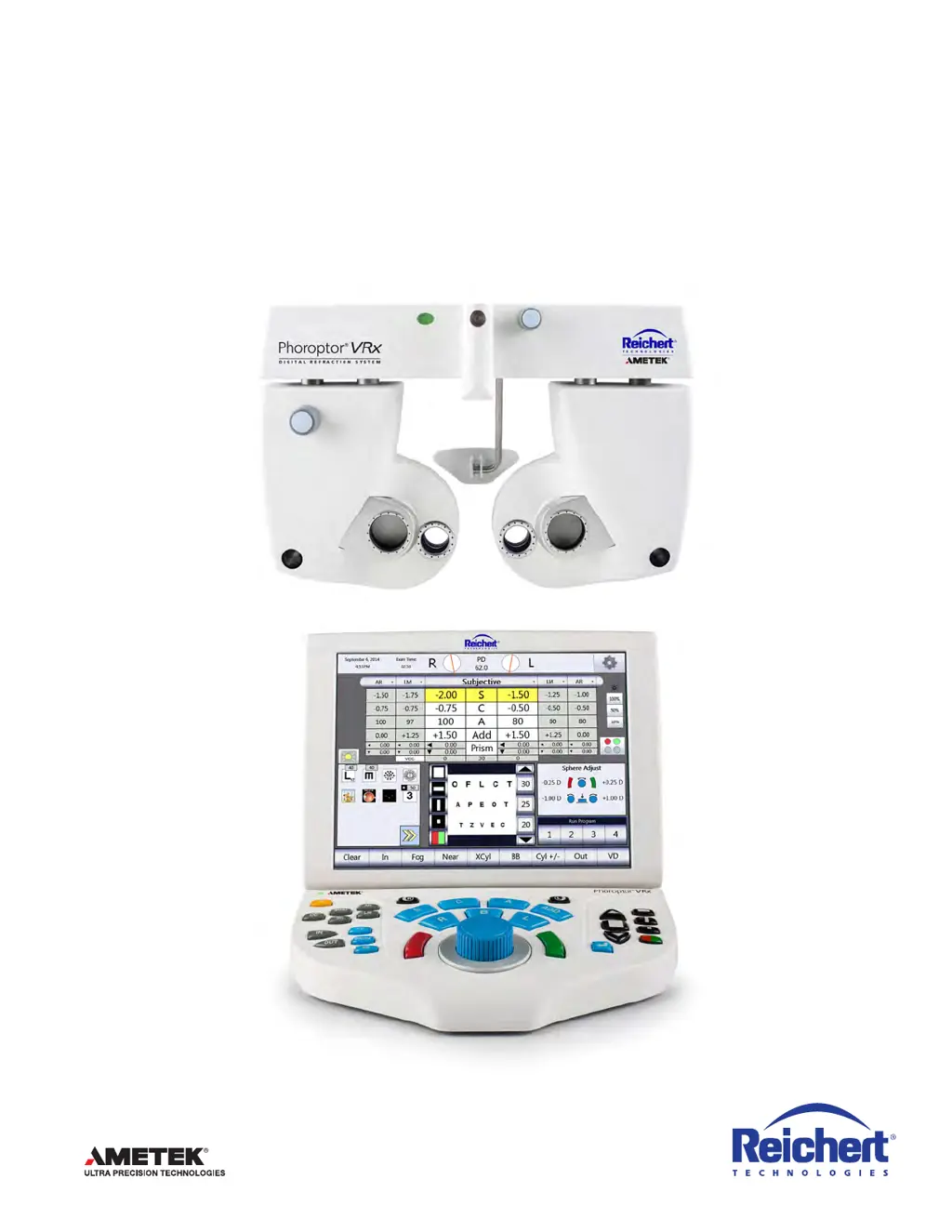
Phoroptor
®
VRx
Digital Refraction System
Users Guide

Table of Contents

Questions and Answers

  • M
    Michael BeckSep 10, 2025
    Why is my Ametek Reichert Phoroptor VRx Medical Equipment projector not working?
    • L
      Laura YoungSep 10, 2025
      If your Ametek Medical Equipment projector isn't working, it might be due to several reasons: * The projector is not connected or turned off. * The wrong projector driver is selected. * The projector cable is damaged or loose. Here's what you can do: * Connect the projector and turn it on. * Select a suitable projector driver. * Set up the correct interface parameters in the Ports Settings screen. * Check the connection cable.
  • A
    Anna Kelly DVMAug 23, 2025
    What to do if the Ametek Reichert Phoroptor VRx Medical Equipment application fails?
    • S
      ssantiagoAug 23, 2025
      If the application fails, try performing a software update. Also, check the cable to the central unit and the power supply, as these could be the cause.
  • C
    Christine TaylorAug 25, 2025
    What to do if the Ametek Reichert Phoroptor VRx projector doesn't work?
    • L
      limichaelAug 25, 2025
      If the projector is not working, first connect the projector to the central unit and turn it on. Then, select a suitable projector driver and set up the correct interface parameters in the Ports Settings screen. Finally, check the connection cable.
  • C
    Connie DavisAug 26, 2025
    What to do if the Ametek Reichert Phoroptor VRx Medical Equipment instrument port 1 or 2 doesn't work?
    • A
      annamarksAug 27, 2025
      If Instrument 1 or 2 Port is not working, tap the Settings menu on the screen, and open the Ports Settings screen. Check the connection cable.
  • J
    james28Aug 27, 2025
    How to fix Ametek Reichert Phoroptor VRx base unit failure?
    • V
      Veronica SmithAug 28, 2025
      If you are experiencing a base unit failure, check the power supply to ensure it is correct.
  • R
    Raven AllenAug 29, 2025
    What to do if there is no image on the Ametek Reichert Phoroptor VRx display?
    • J
      Johnny NelsonAug 29, 2025
      If there is no image in the display despite the unit being switched on, exchange the fuses on the cable plug of the central unit.
  • P
    Phillip LyonsSep 18, 2025
    What causes split cylinder color mismatch on Ametek Reichert Phoroptor VRx Medical Equipment?
    • A
      Andrew SchneiderSep 19, 2025
      If the split cylinder red/green color rings on your Ametek Medical Equipment do not match the controller display orientation, causing the operator to walk the cylinder, it could be due to the unit being powered down during lens motion or a lens dial stall. To correct this, try pressing and holding a 3-button sequence: * Right side correction: “R”, “A”, Red/ Green * Left side correction: “L”, “A”, Red/ Green
  • J
    james92Sep 12, 2025
    How to fix Instrument 1 or 2 Port issues on Ametek Reichert Phoroptor VRx Medical Equipment?
    • C
      Charles SilvaSep 12, 2025
      If the Instrument 1 or 2 Port on your Ametek Medical Equipment isn't functioning correctly, the cause might be: * A wrong unit driver. * Wrong interface parameters. * A damaged or loose connection cable. To fix this: * Go to the Options Menu on the screen and open the Ports Settings screen. Set the correct unit driver and interface parameters for Instrument 1 or 2. * Check the connection cable.
  • J
    Jill KirkSep 8, 2025
    What to do if there is no image on the display of Ametek Reichert Phoroptor VRx Medical Equipment?
    • S
      Sarah MillerSep 8, 2025
      If there's no image on the display of your switched-on Ametek Medical Equipment, the fuses on the cable plug of the central unit might have failed. Replace the fuses on the cable plug of the central unit to resolve this.
  • C
    Christopher MartinezSep 5, 2025
    What to do if the green LED on Ametek Reichert Phoroptor VRx Medical Equipment is not lit?
    • V
      Victoria BentonSep 5, 2025
      If the green LED on your Ametek Medical Equipment's central unit isn't lit, it could be due to the cable not being connected or the switch being set to OFF. To resolve this, ensure the cable is properly connected and set the switch to the ON position.

Summary

Warnings and Cautions

General Safety Warnings

Critical safety information, warnings about user qualifications, injury, and death risks.

Electrical and Handling Precautions

Cautions regarding power, grounding, EMC, and safe handling to prevent damage or injury.

Introduction to Phoroptor VRx

Indications for Use

Details the intended applications and purposes of the Phoroptor VRx system.

Contra-Indications

Lists any conditions or situations where the device should not be used.

Instrument Setup and Configuration

Unpacking and Parts Identification

Steps for unpacking components and identifying system parts and accessories.

Connecting System Components

Guides on connecting the Phoroptor Head, Controller, and external devices to the Central Unit.

Controller Operation and Interface

Explains the use of the control knob, keypad, and display screen elements.

Options and Setup Menu

How to navigate and customize system settings, language, and output options.

Refraction Procedures

Programs and Charts Management

Recording, managing, and selecting charts for refraction test sequences.

Data Input and Adjustment

Importing, entering, and adjusting patient refraction values (Sphere, Cylinder, Axis, Add).

Specific Refraction Tests

Detailed procedures for Cross Cylinder, Near Vision, Prism, and Binocular Balance tests.

Data Output and Maintenance

Data Output Options (EMR;Printer)

Configuring and exporting refraction data to EMR systems or printers.

Cleaning and Maintenance Procedures

Guidelines for cleaning external surfaces, screen, and replacing fuses or battery.

Troubleshooting and Specifications

Troubleshooting Common Issues

Solutions for common error messages and operational problems encountered with the device.

System Specifications and Compliance

Technical details on physical dimensions, electrical requirements, and regulatory compliance.

Appendices

Instrument Cables and Compatibility

Lists compatible cables and devices for connecting to the Phoroptor VRx.

Data Output Samples

Examples of data output formats for EMR and printer.

Ametek Reichert Phoroptor VRx Specifications

General IconGeneral
BrandAmetek
ModelReichert Phoroptor VRx
CategoryMedical Equipment
LanguageEnglish