EV3000
INSTALLATION & COMMISSIONING
13.2 Time Out Setting For Automatic Evacuation Sequence
The selection of the time can be achieved either before or after the power up sequence.
The time base is ten (10) seconds, i.e. the minimum time out possible is 10 seconds to a maximum
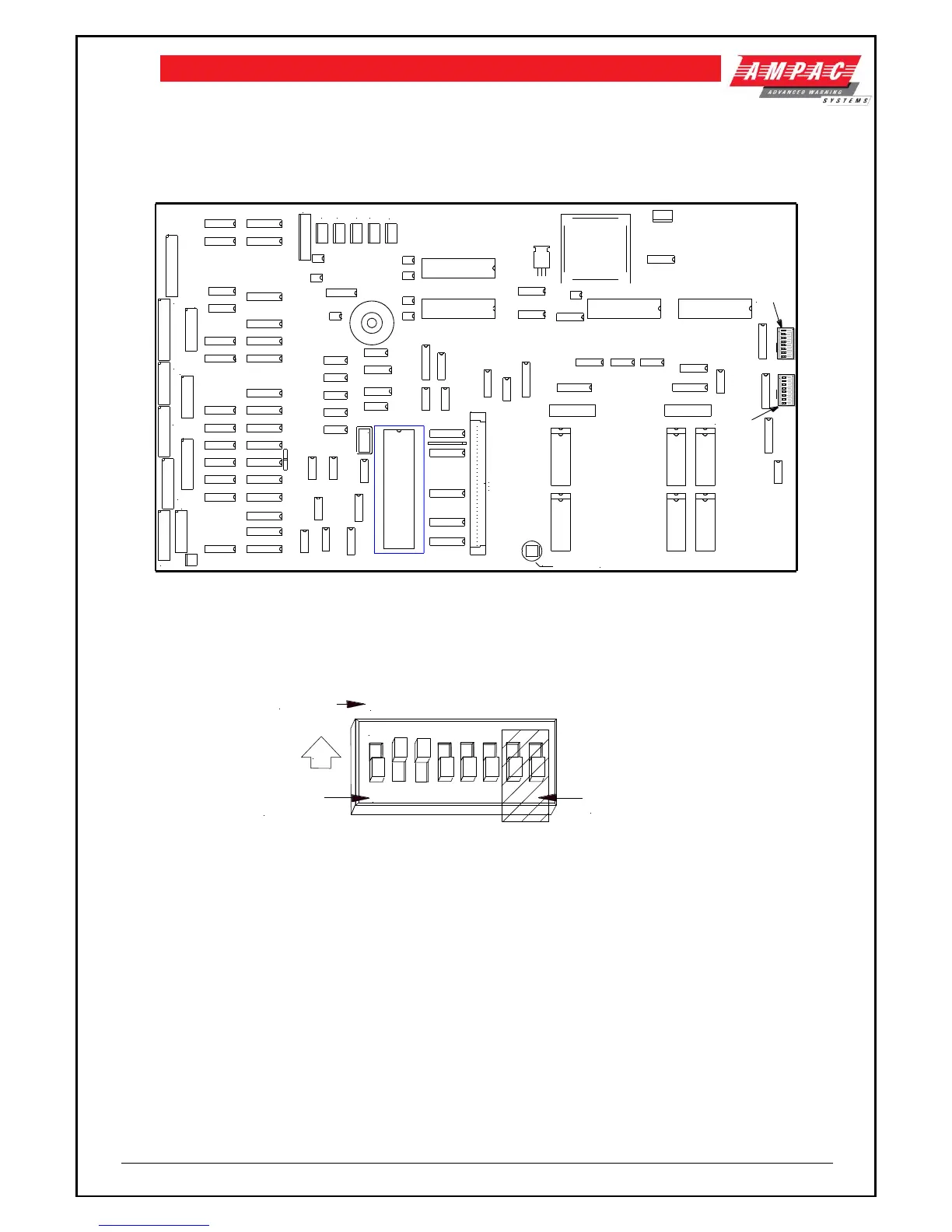
of 10 minutes in 10 second increments. An eight position DIL switch located on the rear of the 302-
4220 main CPU Board (refer Figure 27) is provided to select the required time out.
API-422-C
MEMORY
MODULE
EXPANSION
32
31
30
29
28
27
26
25
24
23
22
21
20
19
18
17
16
15
14
13
12
11
10
9
8
7
6
5
4
3
2
1
SW5 DO
NOT
TOUCH
CN24
CN17
CN16CN15CN14
CN13
CN12
CN4
CN1
CN3
CN5
CN6
+
CN10
CN11
CN7
CN8
CN9
CN26
CN23
RESET
TIME OUT
SELECTION
SWITCH
ON
1 2 3 4 5 6 7 8
ON
1 2 3 4 5 6 7 8
Figure 33: Switch settings
SETTING THE TIME OUT
The total time out is calculated by adding the count of the switches that are “ ON “ as shown below,
PLUS one (1) and then multiplying this total by the base time. The base time is usually ten seconds
unless stated otherwise.
ON
1 2 3 4 5 6 7 8
1 2 4 8 16 32
SWITCHES 7 & 8
ARE NOT USED
ON
SWITCH
NUMBERS
COUNT
Figure 34: Switch Settings
Example: Switches numbered 2 + 3 are ON, all others are OFF
The count for the Timeout is therefore = (2 + 4 + 1) x 10 = 70 seconds


 To Next Page