21 Assembly Ampler – Stellar / Stout
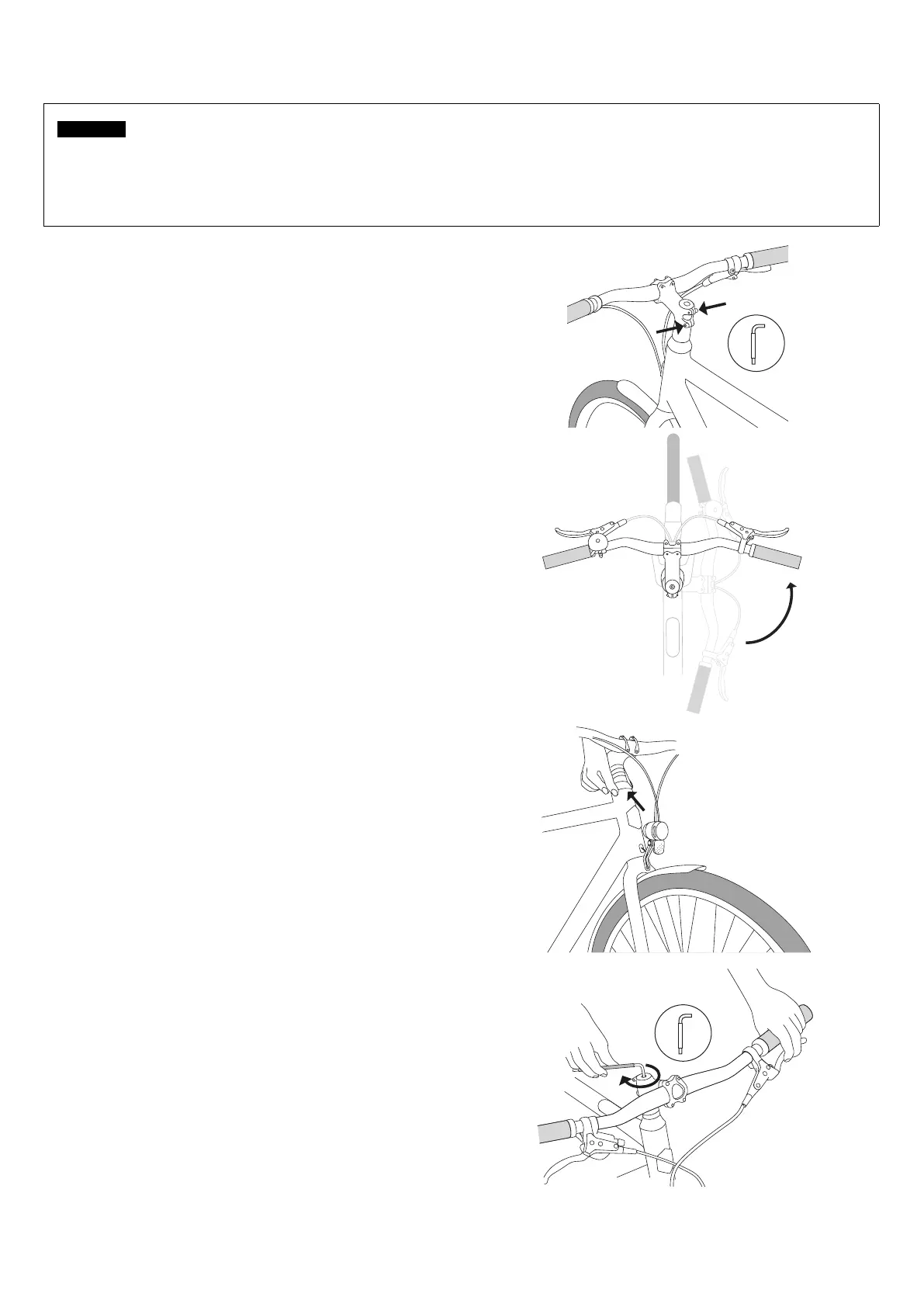
5.1 Handlebar alignment
1. Slightly loosen both stem clamping screws on the steerer
shaft with a 4 mm hex key.
To straighten the handlebar, it is best to stand upright over
the top tube, facing the front wheel.
2. Align the stem with the front wheel.
y Do not tighten the stem clamping screws yet.
3. Place your ngers on the dust cap between the frame
and the stem.
4. Move the wheel
J If there is noticeable "play" on the headset during movement:
y Loosen the stem clamping screws.
y Tighten the headset cap screw a little tighter.
y Tighten the stem clamping screws again.
ATTENTION
Fasteners can be damaged by over-tightening!
Overtightening fasteners can overload them, damage the thread, leading to a loss of locking force and breakage of fasteners.
Do not exceed the tightening torque of the fasteners.
If necessary, use a suitable torque wrench.



 To Next Page