Copyright © 2019 ANK Audio Kits
www.AudioNoteKits.com
audionotekits@rogers.com
Page 47
4.5 Installing the Capacitors
Next, let's install the electrolytic capacitors. Remember that the stripe denotes the NEGATIVE lead.
On the board you'll see a + sign which denotes the POSITIVE side. Be sure to align the capacitors
correctly into position.
Install the 2 10uf 16V Nichicon Electrolytic Capacitors at C5 and C6.
Install the 4 4700uf 16V Rubycon Electrolytic Capacitors at C1, C2, C3, and C4. Again, use
something to support the board so that the capacitors lie flat.
4.6 Installing the Regulators
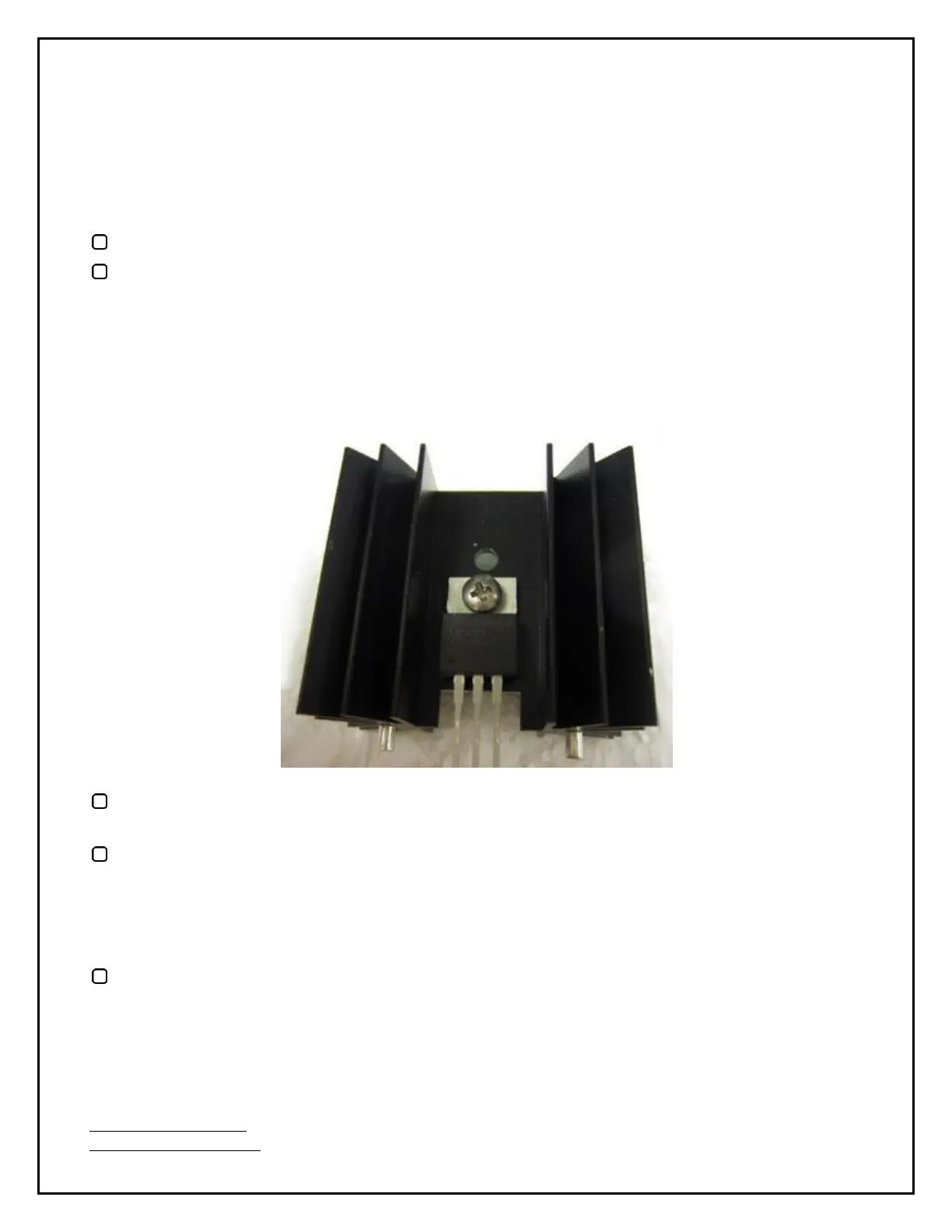
First, let's have a look at how a regulator is attached to a heatsink.
Take an M3 PAN head screw and mount a regulator on a heatsink as shown above. The heatsink
is the same front and back.
Insert a regulator and heatsink into the board at IC2
. (If you start with IC1 you won't be able to
use a screwdriver to tighten the regulator to the heatsink.) Make sure that the regulator is
inserted straight by doing the final tightening of the screw while holding the regular and
heatsink in position on the board where it will go. Solder the 3-pin regulator and the heatsink
from underneath the board. Again, use whatever props you need to get it straight.
Follow the same process and install the other regulator at IC1. Note that they are oriented in the
same direction.
Congratulations! You've now completed the Filament Supply PCB.


 To Next Page