Copyright © 2019 ANK Audio Kits
www.AudioNoteKits.com
audionotekits@rogers.com
Page 33
2.11 Connecting and Mounting the IEC Board
Again, referencing the diagrams on the previous page,
Push the crimped ends of the Red and Black wires coming from the IEC board onto the left (wider
spaced) lugs of the Rocker Switch, Red on top, Black below. Apply the pressure necessary to
position the wires correctly onto the lugs.
Using the prepared Blue–Brown
9
twisted and crimped pair of wires, connect the IEC socket: Blue
(Neutral) from the middle lug, Brown (Live/Hot) from the top lug — to the right (narrower
spaced) lugs of the Rocker Switch, Blue on top, Brown below. Again, apply the pressure necessary
to position the crimps correctly onto the lugs.
Take the Green wire that is prepared at one end with a ground lug and at the other end with a
crimp. Attach it to the bottom lug of the IEC socket.
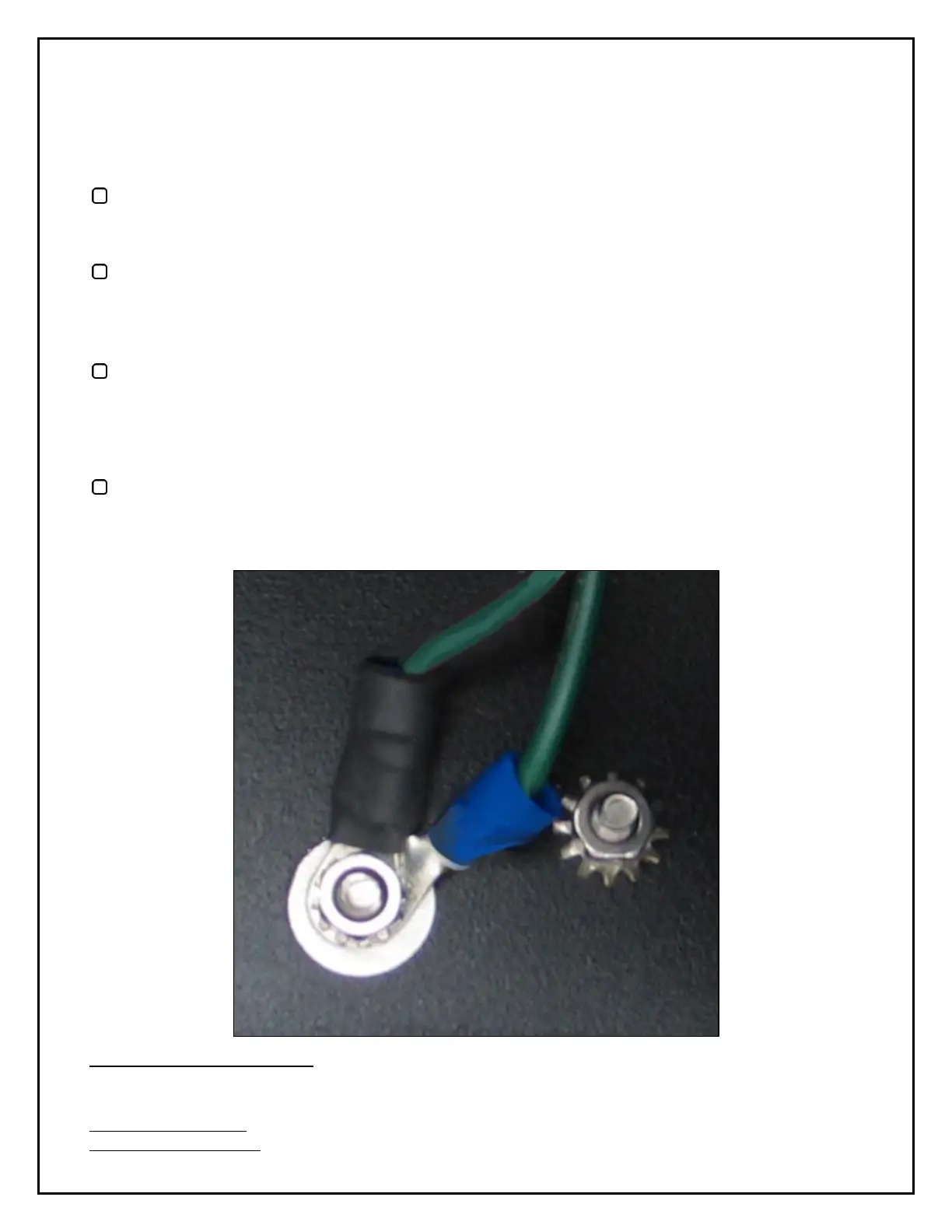
Finally, let's make two Chassis Ground connections.
Retrieve the Green ground wire from the Mains transformer and the Green IEC ground wire and,
using a nut, loosely secure the two grounds to the Chassis Ground lug, as shown below. We'll add
a third Ground wire later.
9
Or whatever color we've supplied. Again, it's the connections that matter, not the color.


 To Next Page