Copyright © 2019 ANK Audio Kits
www.AudioNoteKits.com
audionotekits@rogers.com
Page 56
6.2 Installing the Output Transformers
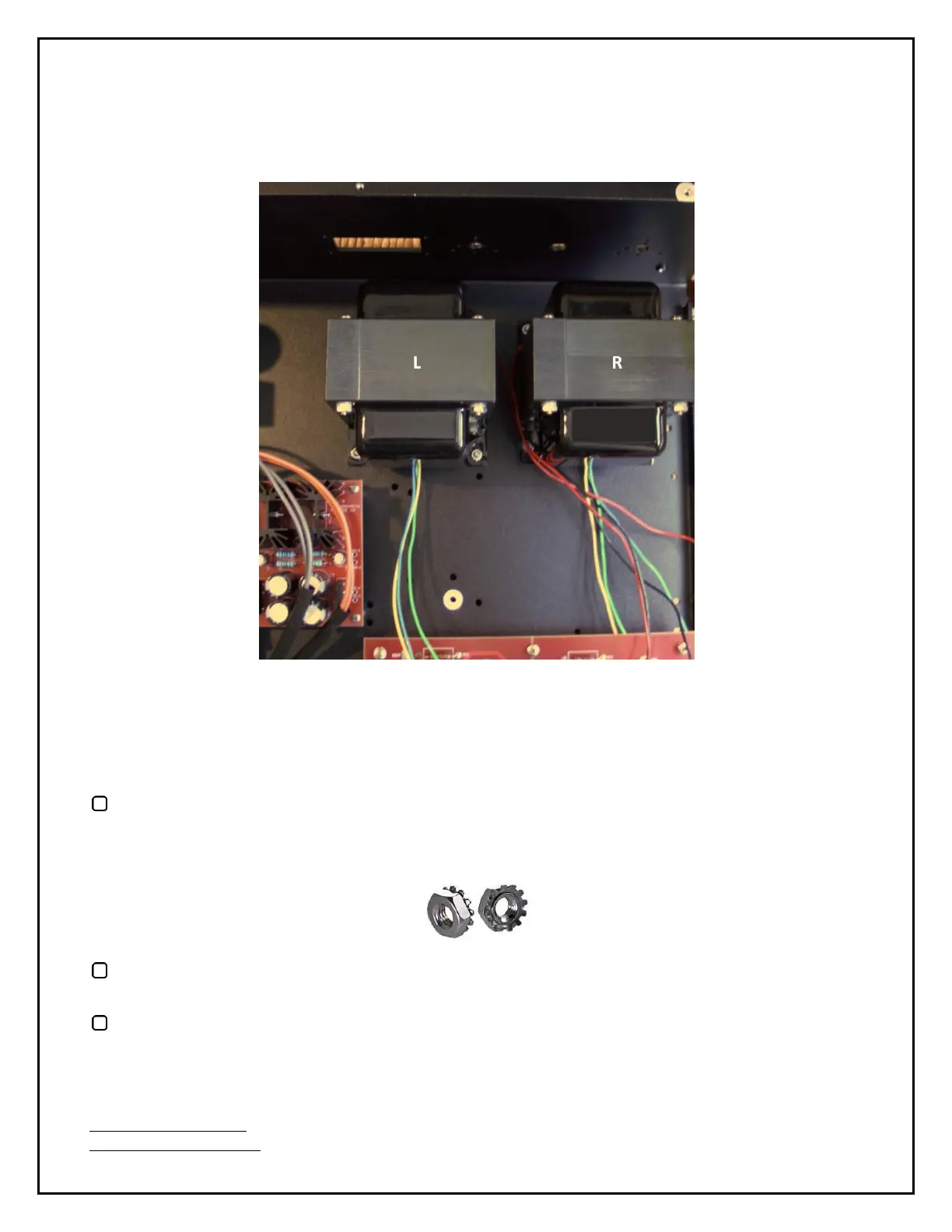
Have a good look at the picture below:
First we'll install the output transformer closest to the side of the chassis.
It may be that one of the 4 holes in the chassis that will be used to install this transformer is the hole
for the foot at the rear corner of the chassis. If that's so, temporarily remove the foot.
Install this transformer as shown in the picture above with the Green, Yellow, and Blue
Secondary wires facing the Driver board. Use 4 M4 screws and Keps K-Lock nuts (these are M4
nuts with attached locking washers).
Similarly, install the second transformer as shown above — also with the Green, Yellow, and Blue
Secondary wires facing the Driver board. Again, use 4 M4 screws and Keps K-Lock Nuts.
Route the Black Primary wires for both transformers along the front of the chassis heading
towards the Power Supply board and the Red Primary wires from the back around and through
the gap between the transformers and lay them towards the Driver board.


 To Next Page