36
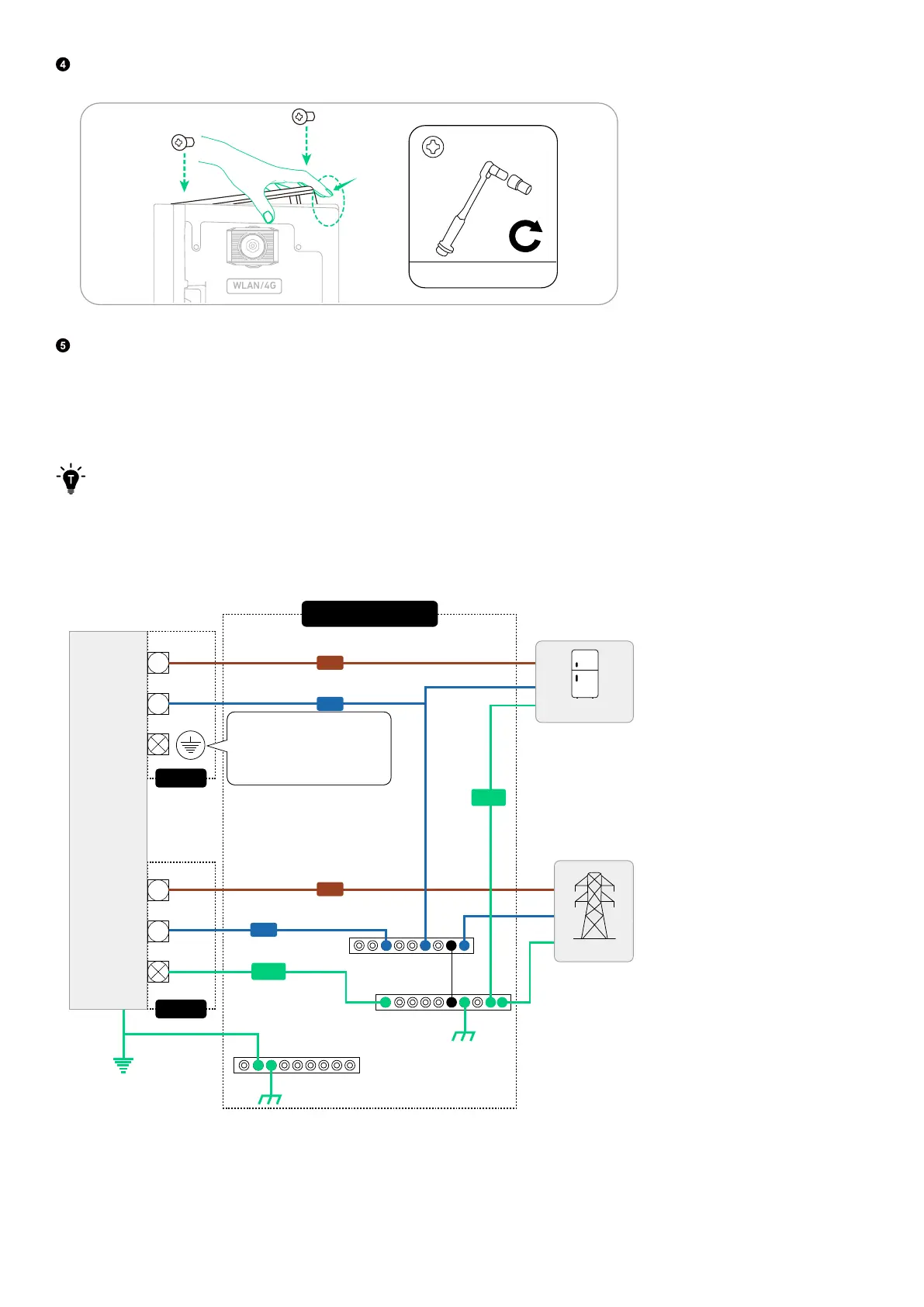
Press the back of the panel to reinstall it, and then tighten the screws (M3×8 mm).
WLAN/4G
AC GRID
AC BACKUP
COM
After installing the dongle, configure the Internet settings in the Anker SOLIX Professional app. For detailed instructions,
refer to “Step 2: Configure System Network”.
Connect to the Grid and Backup Loads
Connect the power module to the grid and the backup loads.
·
The power module uses the AC backup port as the o-grid port, which is separate from the grid-interactive port (AC
grid port).
·
In Australia and New Zealand, a Neutral-Ground link must be created between the neutral bar and the ground bar
in the distribution box. Do not connect the GND (PE) conductor of the AC backup port to the ground bar.
Figure: Electrical connections between the power module and the grid / backup loads (Australia / New Zealand).
O-Grid
Grid
Distribution Box
Backup Loads
Grid
Power
Module
L
L
N
N
GND
GND
Neutral Bar
Neutral-Ground Link
Ground Bar
Ground Bar
Do not connect to this
terminal for the grid
systems in Australia and
New Zealand.



 To Next Page