40
WLAN/4G
AC GRID
AC BACKUP
COM
WLAN/4G
AC GRID
AC BACKUP
COM
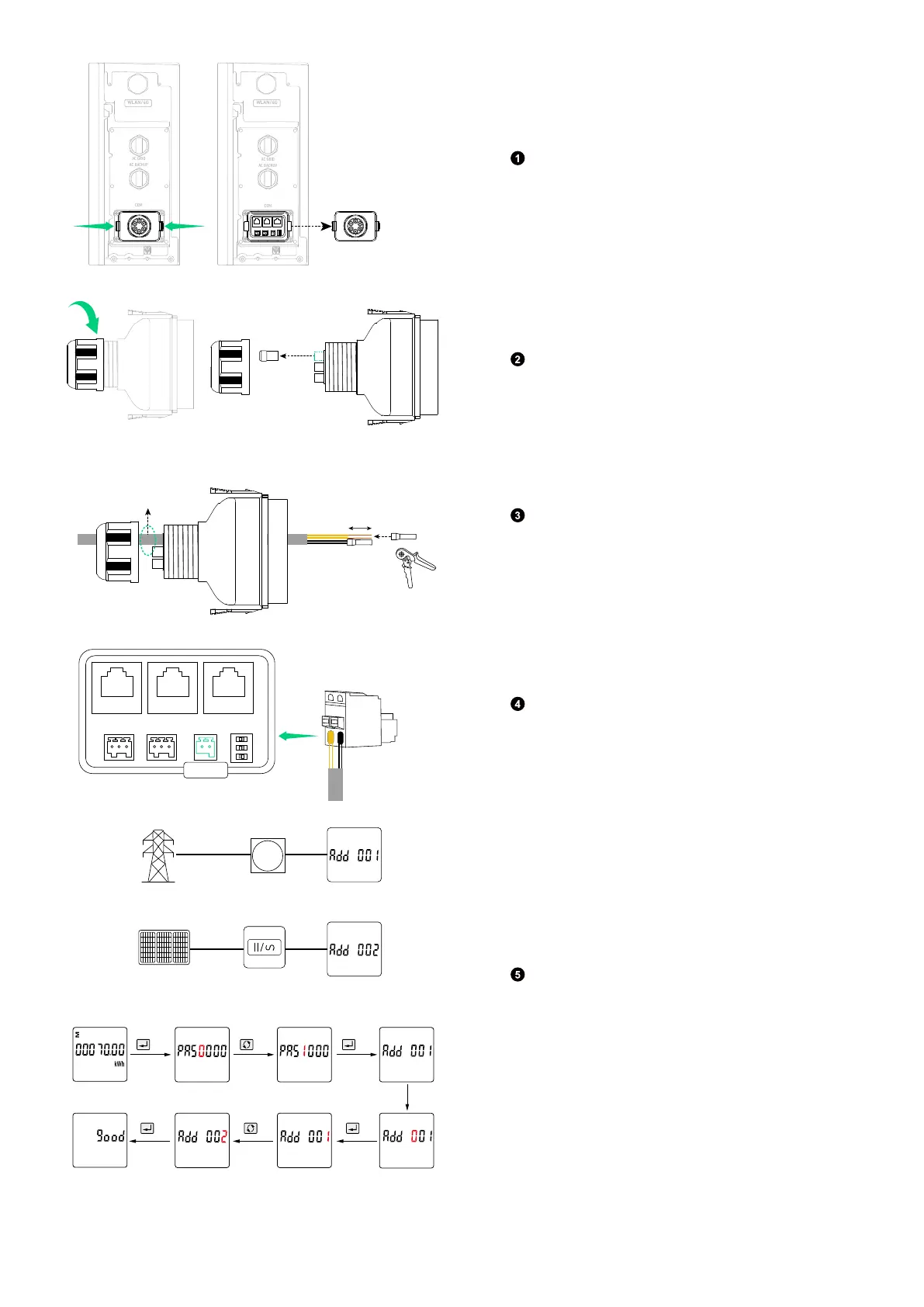
Remove the wiring compartment cover by pressing
the clips on both sides.
Remove the wiring compartment cover by pressing
the clips on both sides.
(Φ 5.5±0.5 mm)
Ethernet Cable
10 mm
Crimp one tube terminal (for 0.2-0.35 mm²
conductor, included) onto the 485+ (485A)
conductors, and the other tube terminal onto the
485- (485B) conductors.
Meter
485+ (485A) 485- (485B)
Insert the tube terminals into the 2-pin terminal
block connector (included), and plug it into the
terminal block socket labelled Meter.
Grid
Main Meter
Solar Panels Solar Inverter
3s
3s
3sx1
x1 x2
Password: 5100
Set the communication address of the power
sensors (SDM230-Modbus V1).
Power sensor on the grid side: Add 001
Power sensor on the solar panel side: Add 002



 To Next Page