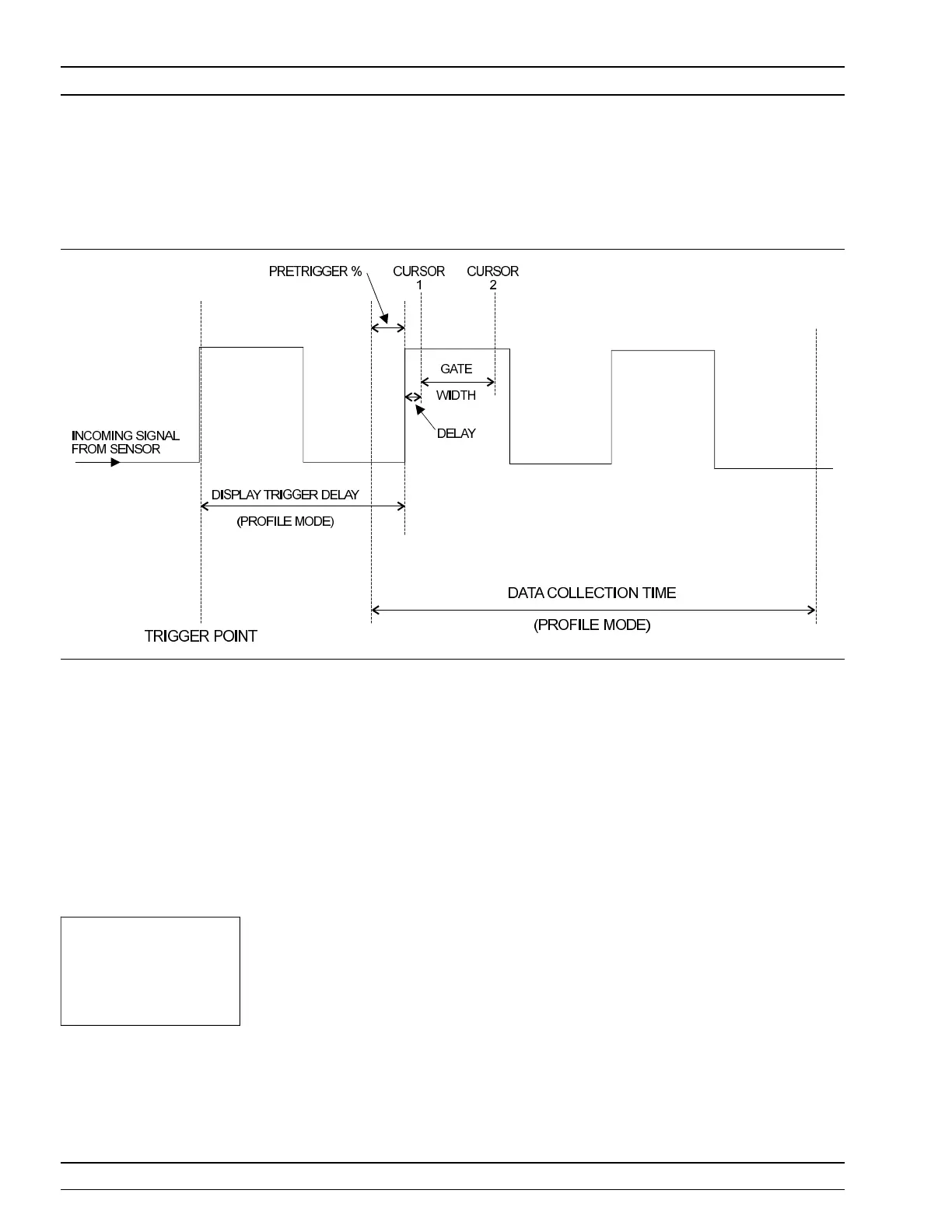
Fig ure 4-4 shows a typi cal trig ger tim ing dia gram. Note that the dis play
trig ger de lay is only pres ent when in Pro file op era tion mode, and helps
in set ting the ‘wi ndow’ po si tion along the sig nal.
The Data Col lec tion Time (col lec tion pe riod) is only present when in
Pro file op era tion mode (
Sys tem|Pro file|PE RIOD ), and is the pe riod of
time dis played on the pro file graph.
The Gate Width is the sec tion of the sig nal in which the meas ure ments
are per formed. In Pro file mode, this is the time be tween Cur sor 1 and
Cur sor 2 and is used to pro vide the Be tween Cur sor Av er age
measurement.
Dis play Trig ger De lay (
Sys tem|Pro file|DE LAY ) is the de lay af ter the
trig ger point.
The Pretrig ger % (
Sys tem|Graph ics|PRE TRG %) is only used in the
Pro file mode, and shows a percentage of the data col lec tion time as
Pretrig ger in for ma tion. If the dis play trig ger de lay is less than the
pretrig ger de lay pe riod, there will be no Pretrig ger in for ma tion as it
will be be fore the trig ger point it self.
Set ting the dis play trig ger de lay to the length of the data pulse causes a
trig ger on the first pulse, but dis plays the sec ond pulse with valid
“pretrig ger in for ma tion.” This is the best method for re peti tive sig nals
and can be used to ver ify sig nal repe ti tion in ter vals.
4-20 ML2400A OM
TRIGGER MENU OPERATION
NOTE
Ex ter nal trig ger is only
ef fec tive at 800 KHz or
lower.
Figure 4-4. Sam ple Trig ger in Graphic Mode












 To Next Page