CHAN NEL
[GRMD]
Se lect Chan nel 1 or Chan nel 2. The chan nel se lected will be dis -
played on the left of the screen, above the mid dle value of the y
axis.
DATA HOLD
[GRPIX]
Se lects how the graph is dis played on the screen. Se lect from
NORMAL, AVG, Min&Max, Min, or Max.
TIME
[GRDDT]
Sets the data hold time, from 1 minute to 24 hours.
Source sweep This soft key be comes avail able when the
Sys tem|Setup|MODE is set to Source
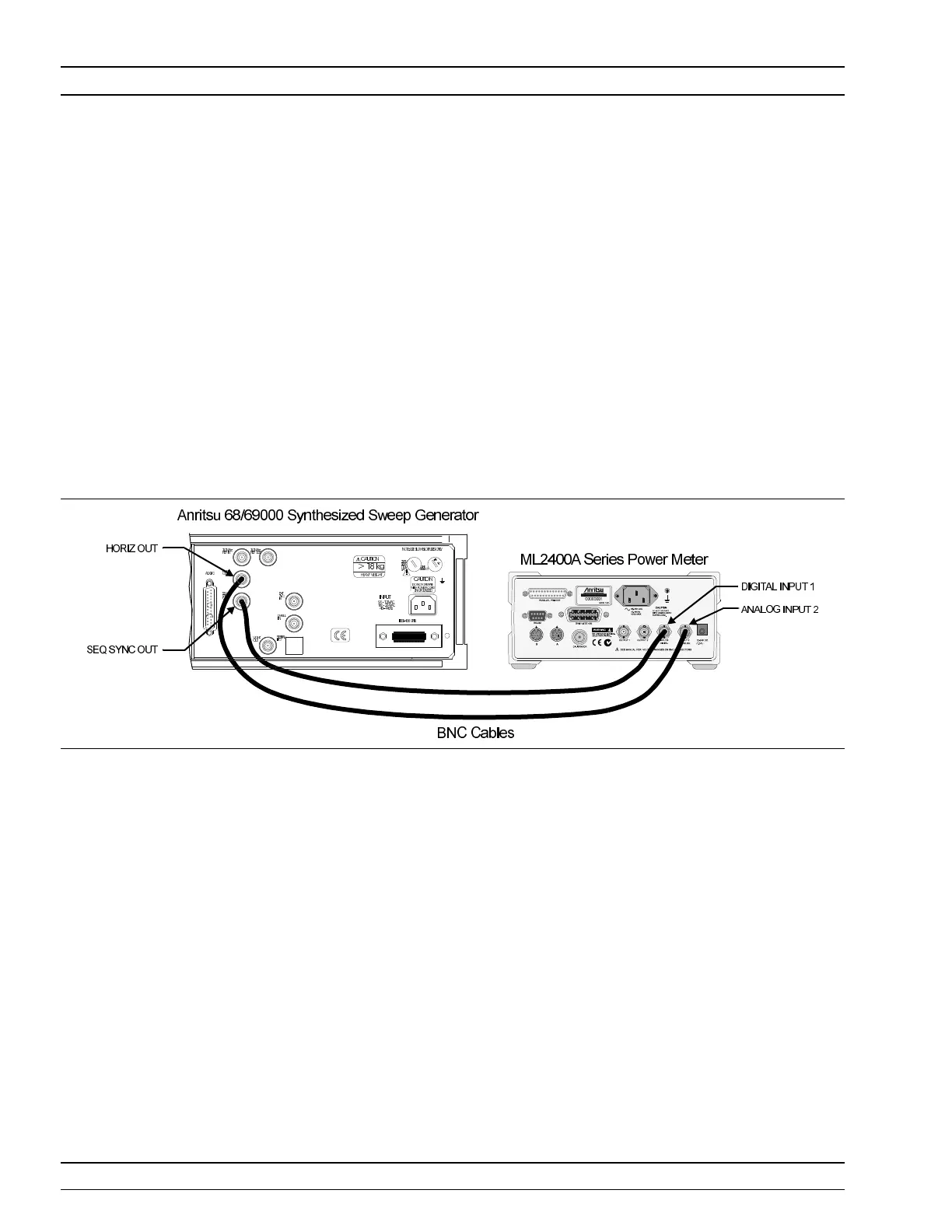
Sweep . The Source Sweep mode pro vides in ter con nec tion be tween a sig nal
source/gen er a tor and the power me ter. Using sim ple tech niques, this can pro -
vide swept power-accurate mea sure ments over any fre quency range at very
high speed. The sweep data is avail able over GPIB and can pro vide a sim ple
low cost sca lar an a lyzer func tion.
If the source used does not pro vide a blank ing out put, the blank ing sig nal may
be dis abled as fol lows: se lect
Sys tem|Rear Panel|BNC . Se lect PORT un til
INPUT 1 (dig i tal) is se lected, then se lect TTL Level to al ter the ac tive state of
the blank ing sig nal ex pected. Set ting the TTL Level to
LOW will al low the
Source sweep to prog ress with out a Blanking sig nal. This is use ful for third
party sources or sim ple VTO sys tems. If a Source Sweep is later se lected which
does pro vide a blank ing sig nal, re mem ber to re store the po lar ity of this sig nal
to
HIGH or an in cor rect dis play will re sult. Op er ating a source sweep which
has BANDSWITCH blank ing de lays in it with out an ap pro pri ate blank ing sig -
nal may lead to glitches in the re sult ing mea sure ment at the bandswitch
points (sim ple VTO sys tems do not usu ally have bandswitch points).
Source sweep op er a tion mode in cludes the fol low ing dis play con trols:
CHAN NEL
[GRMD]
Se lect Chan nel 1 or Chan nel 2. The chan nel se lected will be dis -
played on the left of the screen, above the mid dle value of the y
axis.
4-24 ML2400A OM
SYSTEM MENU OPERATION
Fig ure 4-5. Source Sweep Mode In ter con nec tion Example












 To Next Page