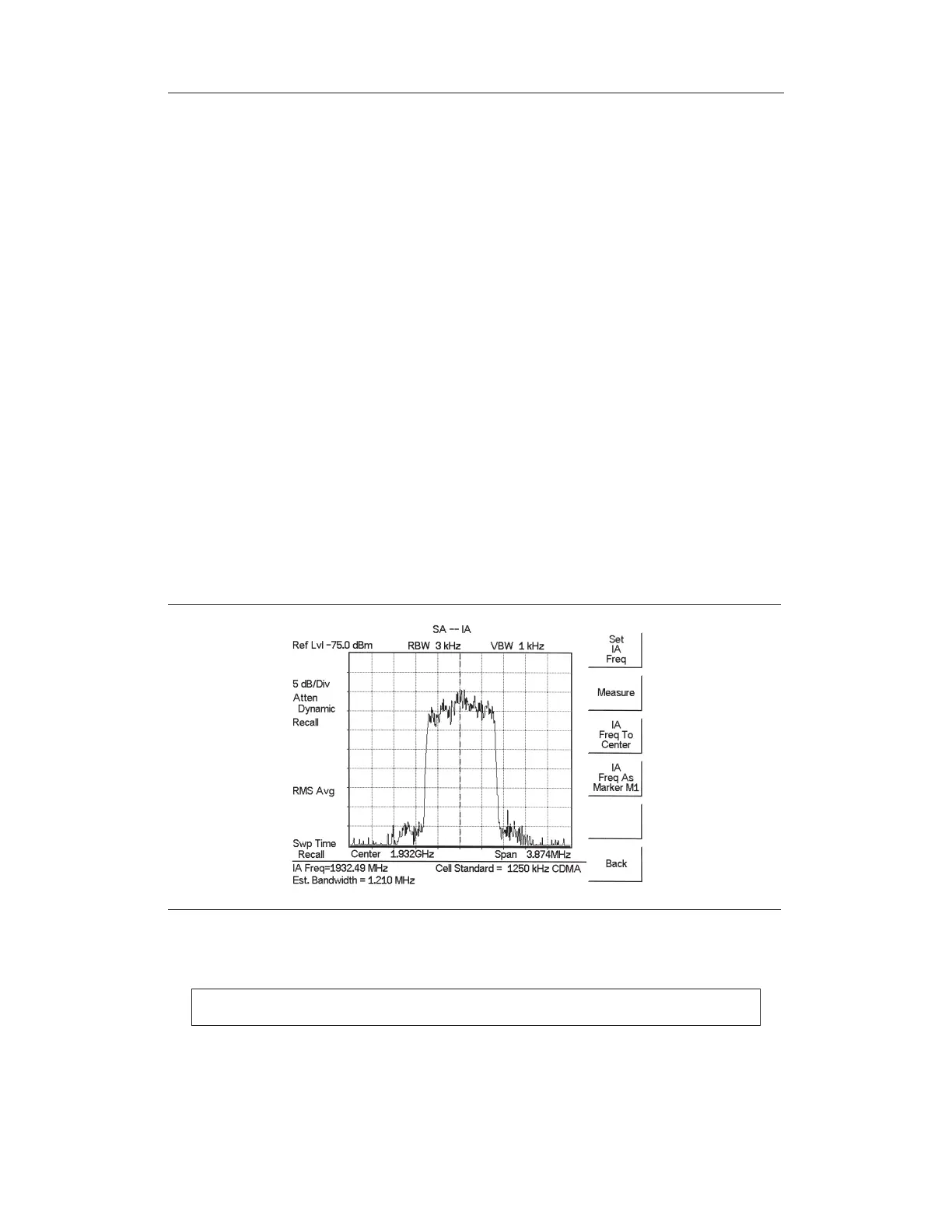
Interference Analysis
Multiple wireless networks often operate in complicated signal environments. Three or four
base station antennas may be located on the same tower, and can create interference prob
-
lems. Interference is one of the most common problems affecting wireless network systems
capacity and coverage. The Site Master captures and analyzes a received signal and dis
-
plays the air interface standard and estimated bandwidth of the received signal, which is
critical in recognizing and analyzing the interfering signals.
Procedure
Step 1.
On the Site Master, press the MODE key, use the Up/Down arrow key to select
the
Spectrum Analyzer mode and press ENTER.
Step 2.
Press the MEAS/DISP key and select the
Measure soft key.
Step 3. Press the
More soft key and the Int. Analysis soft key.
Step 4. Press the Set
IA Freq soft key, enter the appropriate frequency to analyze the in
-
terfering signal, and press ENTER. Alternatively, press the
IA Frequency as
Marker M1
soft key when marker M1 is on to set the IA frequency to the current
M1 frequency.
Step 5. Press the Measure soft key to start the measurement. A message box on the
screen states that the analysis is in process, then, when the measurement is com-
plete, displays the Cell Standard and estimated bandwidth of the interfering sig-
nal.
NOTE: Use IA Freq To Center to center the frequency on the display.
5-16
Chapter 5 Spectrum Analyzer Measurements
Figure 5-7. Interference Analysis



 To Next Page