Need help?
Do you have a question about the Apeks Quantum and is the answer not in the manual?
Details the three buttons (MODE, A, B) used to access modes, change settings, and switch displays on the Quantum dive computer.
Guide to setting dive parameters like operational mode (DIVE/GAGE), Nitrox mixes, depth alarms, and dive time alarms.
Essential steps before diving: verifying time/date, altitude sector, and dive settings for safe operation.
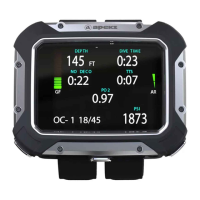
Details the primary and alternate dive displays showing current depth, NDL, dive time, PO2, ascent rate, and nitrogen/oxygen graphs.
Guides users on performing the three-minute safety stop when required, including indicators and alerts for proper execution.
Instructions on how to switch between Nitrox Mix 1 and Mix 2, including PO2 limits and default settings.
Explains the mode entered when exceeding no-decompression limits, displaying stop depth, stop time, and total ascent time.
Details various warnings like FO2, Fast Ascent, PO2, Decompression Stop Violation, Oxygen Limit, and Out-of-Range alerts.
 General
| Type | Dive Computer |
|---|---|
| Nitrox Compatibility | Yes |
| Gas Switching | Yes |
| User Replaceable Battery | Yes |
| Integrated Compass | Yes |
| Color | Black |
| Maximum Operating Depth | 100 meters |
| First Stage | Not applicable |
| Second Stage | Not applicable |
| Maximum Depth | 100 meters |

 To Next Page