6 Local Control Panel
(continued)
6-30
C232-302-401/402/403/404-603 / C232/EN M/A23
6.5.8 Password-Protected Control Actions
Certain actions from the local control panel (such as a manual trip command for testing
purposes) can only be carried out by entering a password. This setup is designed to
prevent accidental output and applies even when the global change-enabling function
has been activated.
The password consists of a pre-defined sequential key combination entered within a
specific time interval. The following example illustrates the password-protected output of
a manual trip command using the factory-set password. If the password has been
changed by the user (see the section entitled ‘Changing the Password’), the following
description will apply analogously.
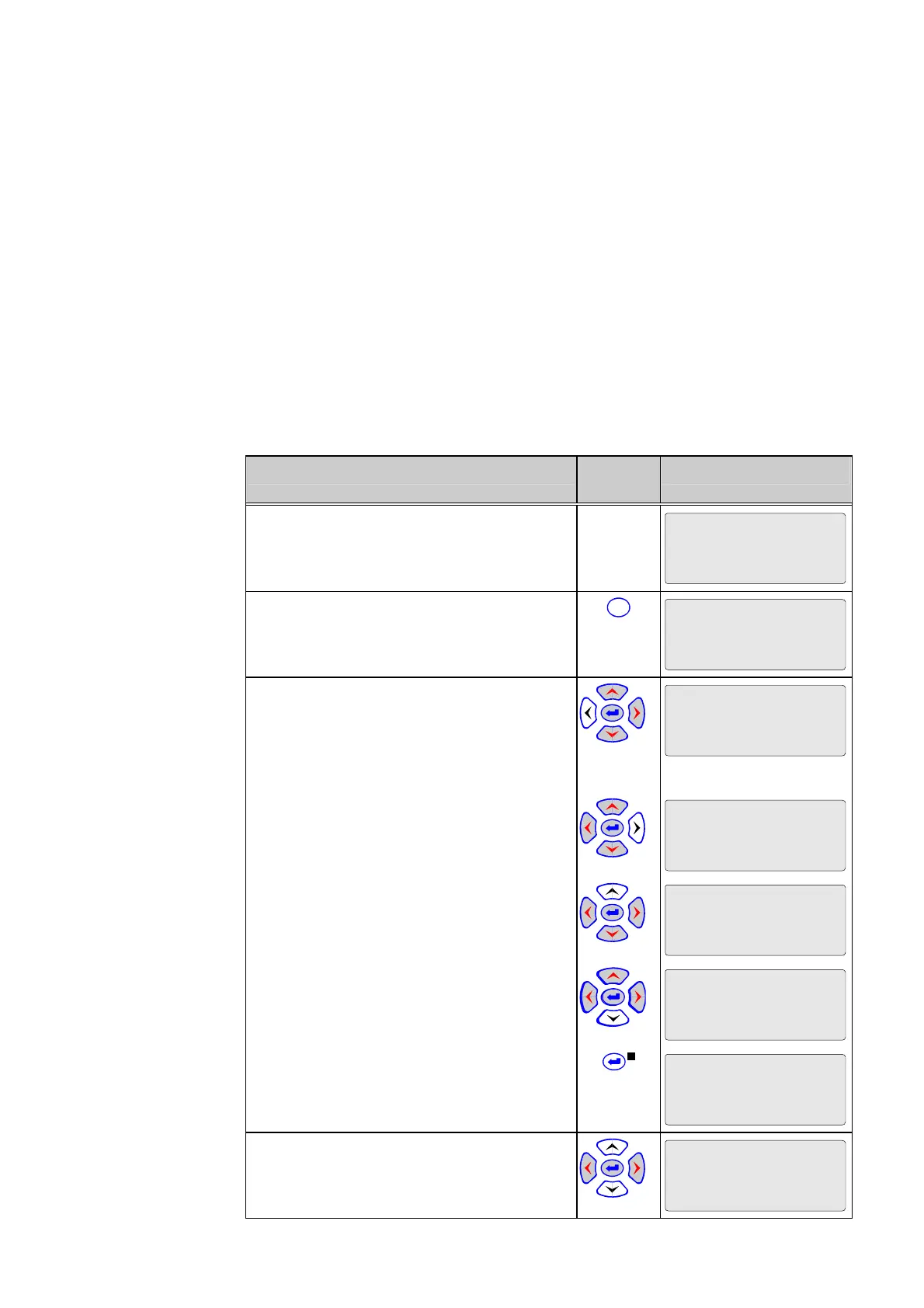
Control Step / Description Control
Action
Display
0 In the menu tree ‘Oper/CtrlTest/MAIN’,
select the parameter ‘Man. trip cmd. USER’.
Oper/CtrlTest/MAIN
Man. trip cmd. USER
Don't execute
1 Press the ENTER key. Eight asterisks (*)
appear in the fourth line of the display.
C
Oper/CtrlTest/MAIN
Man. trip cmd. USER
Don't execute
********
2 Press the following keys in sequence:
‘left’
Oper/CtrlTest/MAIN
Man. trip cmd. USER
Don't execute
*
‘right’
Oper/CtrlTest/MAIN
Man. trip cmd. USER
Don't execute
*
‘up’
Oper/CtrlTest/MAIN
Man. trip cmd. USER
Don't execute
*
‘down’
The display will change as shown in the
column on the right.
Oper/CtrlTest/MAIN
Man. trip cmd USER
Don't execute
*
Now press the ENTER key. The LED indicator
labeled EDIT MODE will light up. This
indicates that the setting can now be changed
by pressing the ‘up’ or ’down’ keys.
Oper/CtrlTest/MAIN
Man. trip cmd. USER
Don't execute
3 Change the setting to ‘Execute’.
Oper/CtrlTest/MAIN
Man. trip cmd. USER
Execute



 To Next Page