Chapter 4: Cabling the Modular Switch Connecting Supervisor Cables
Quick Start Guide: 7500N Series Modular Switches 37
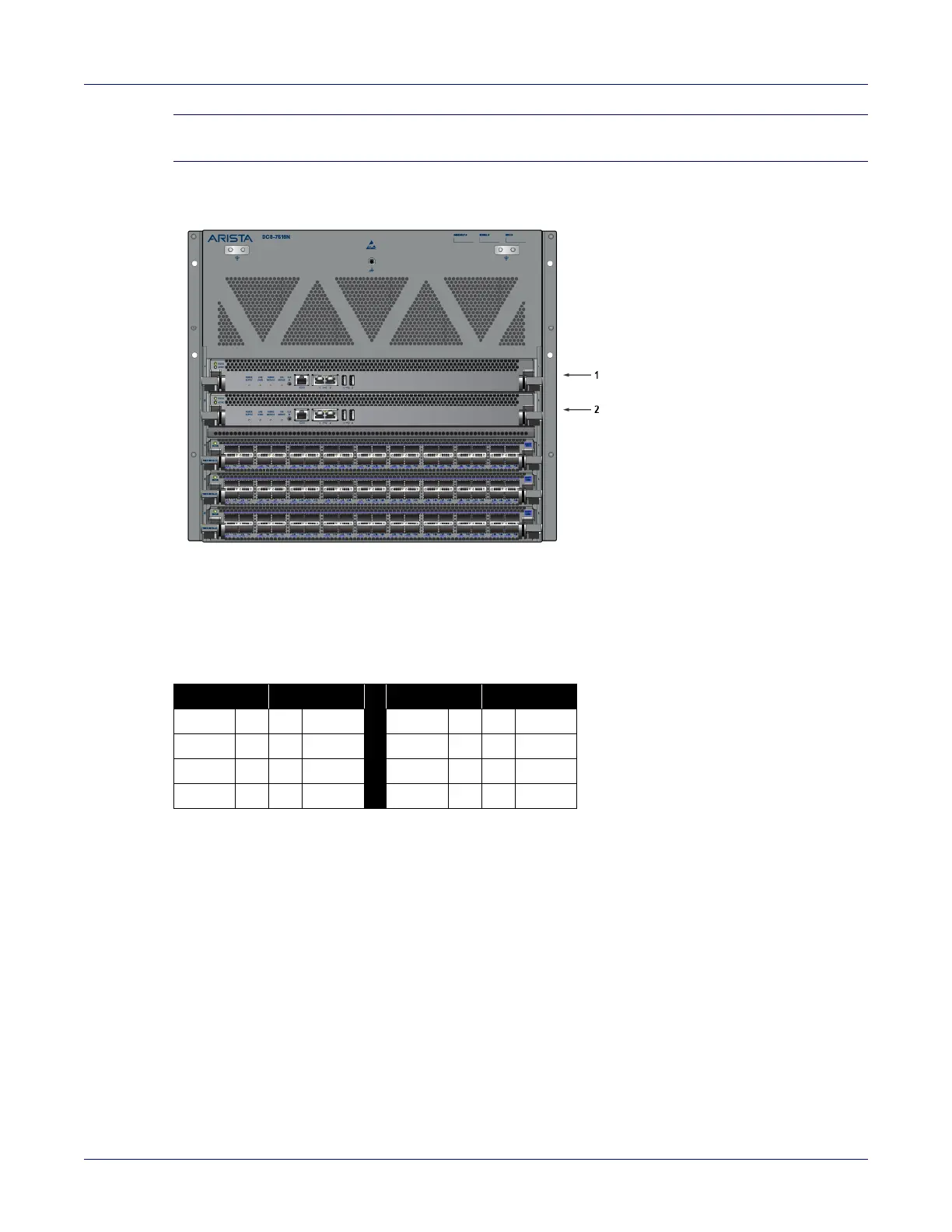
Note Do not insert a line card into either of the slots 1 and 2, designated for a supervisor card. This could
damage the modular switch. Slots for the line cards are numbered 3 through 18.
Figure 4-9: DCS 7516N Supervisor Slots
Table 4-3 RJ-45 to DB-9 Connections
• Ethernet management port: Connect to 10/100/1000 management network with RJ-45 cable.
• USB Port: May be used for software or configuration updates.
• Clock Input Port: Port type is MCX connector, 2-5.5V, 50 ohm termination.
1 Supervisor slot 1
2 Supervisor slot 2
RJ-45 DB-9 RJ-45 DB-9
RTS 1 8 CTS GND 5 5 GND
DTR 2 6 DSR
RXD 6 3 TXD
TXD 3 2 RXD DSR 7 4 DTR
GND 4 5 GND CTS 8 7 RTS



 To Next Page