installation &
operating instructions
Design Envelope 4200h & 4280
End Suction Horizontal Pumping Units
37
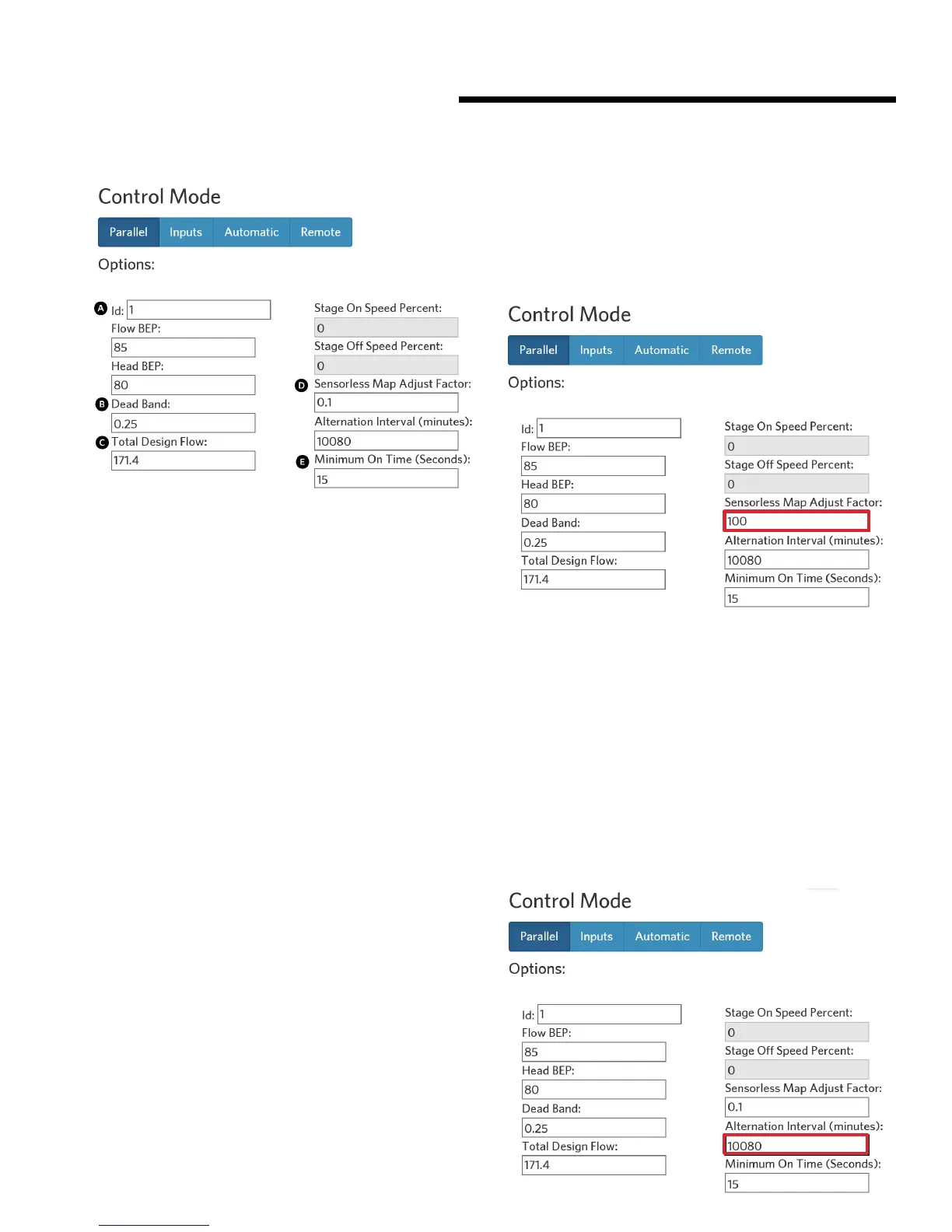
A id: 1 to 8, the lower number is the lead pump
e.g. enter 1 for lead pump, 2 for lag pump
B Dead Band: set to 0.25
C Total Design Flow: enter the parallel flow rate
D Sensorless Map Adjust Factor: set to 0.1
e Minimum On Time (seconds): set to 15
Click update to save all changes. Connect the Webserver to
the second pump and then repeat above steps A to e.
5.9 2*100% capacity split units
When duty / standby is specified, enter the total system flow
into ACE Online or ADEPT, then select 2*100% unit split for
a superior customer value. The 100% flow redundancy is still
in place plus the onboard pspc will engage the second unit in
parallel operation should it predict lower operating costs.
If second side power is locked out, the operating pump will
operate alone on the control curve to 100% design flow.
5.10 duty-standby mode
Duty-Standby mode allows only 1 pump head to operate at a
time while the second pump head is idle. To activate this mode,
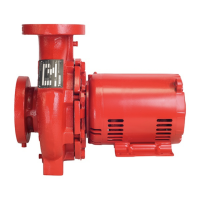
use the Webserver and go to Settings -> Pump, and then go
the Control Mode section, under the Parallel tab, and input the
Sensorless Map Adjust Factor to 100. Click update to com-
plete the change. Connect the Webserver to the second pump
and repeat.
Note that activating Duty-Standby mode eectively disables
the energy ecient staging of Parallel Sensorless operation. To
re-enable Parallel Sensorless control, set the Sensorless Map
Adjust Factor to 0.1.
5.11 alternation
Design Envelope Tango, dualARM, and Twin units are pre-set
to alternate lead-pump operation of each pump head to achieve
equal run hours. The default alternation interval is 10,080
minutes (1 week). This can also be set or adjusted for multiple
single pumps operating in sequence.
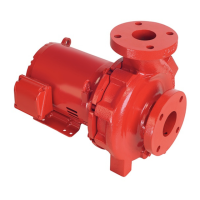
To change this setting, use the Webserver and go to Settings ->
Pump, and then go the Control Mode section, under the Parallel
tab, and input the Alternation Interval (in minutes) to the new
value. Press update to complete the change. Connect the
Webserver to the second pump and repeat.






 To Next Page