installation &
operating instructions
Design Envelope 4322 & 4372
Tango Pumping Unit
43
4.3.11 data logging
Data logs can be used for energy performance analyses or to
troubleshoot system issues. The data logs can be used with a
building automation system (bas) or for each standalone pump.
Each pump controller logs the following data parameters over
pre-defined time intervals (default is 5 minutes).
• Speed (rpm)
• Power (kW)
• Current (A)
• Flow (gpm)
• Head (ft)
• Analog Input 1
• Analog Input 2
• Analog Output
• Digital Input
• Digital Output
• Alarms
• Warnings
• kW-hours
The depc stores up to 3 months of data, at 5 min. intervals.
More data storage is available on the cloud server if the pump
is connected to the internet and has an active Pump Manager
subscription.
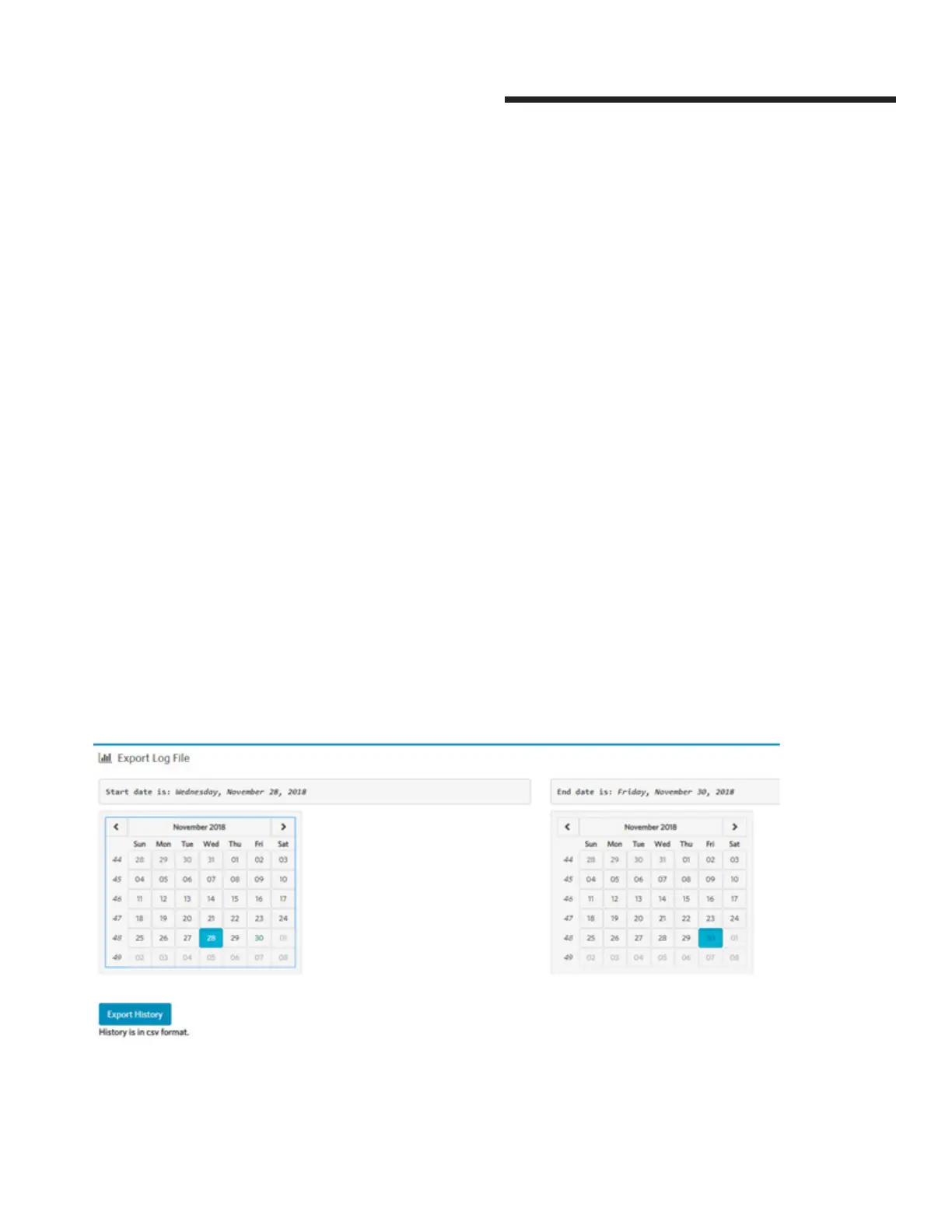
Connect the depc to the Webserver, in the Data -> Trends ->
Export Log File section.
Select the start date, the end date, and then click Export History
to download the data log file in CSV format.


 To Next Page