installation &
operating instructions
Design Envelope 4322 & 4372
Tango Pumping Unit
44
4.4 web interface
4.4.1 connecting via ethernet
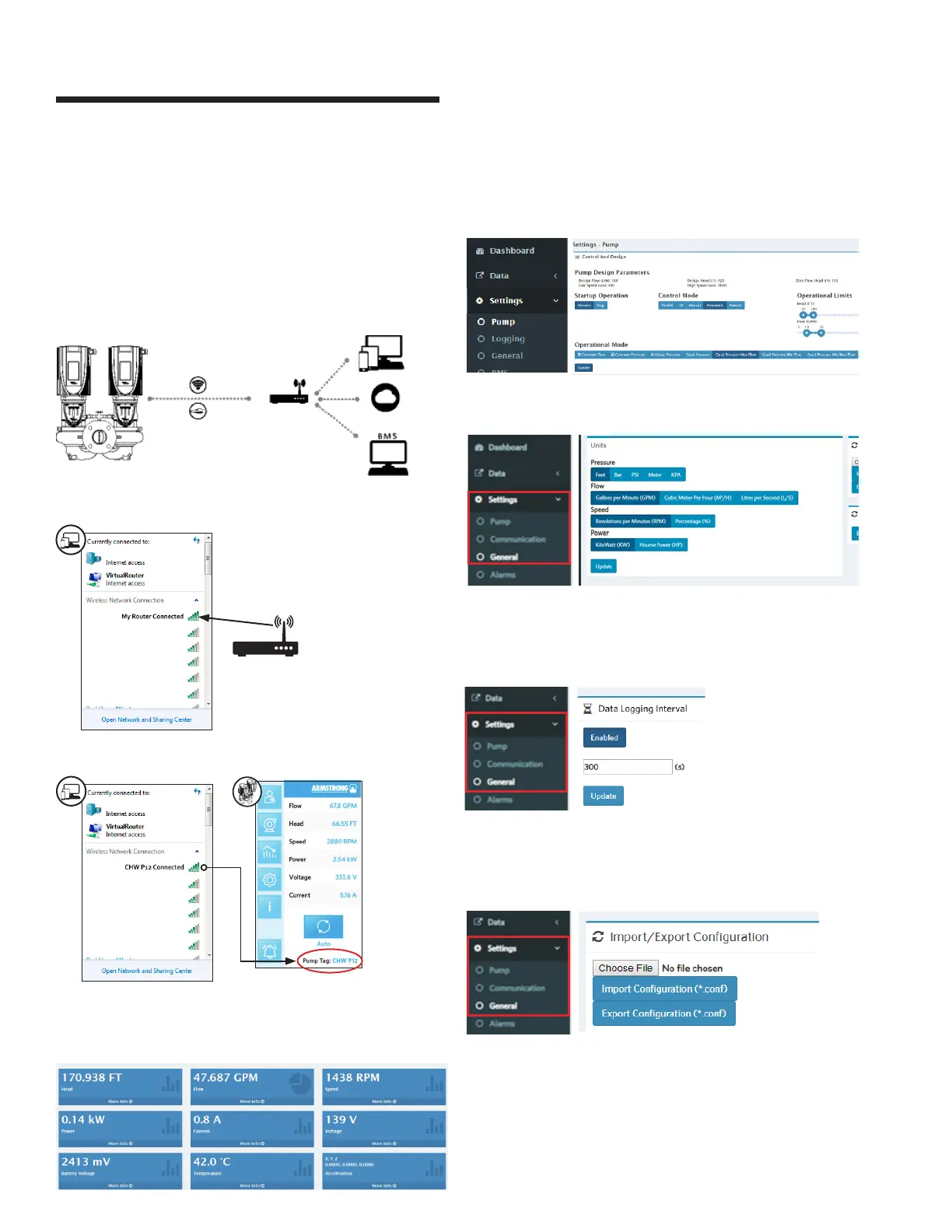
Connect your device to the router via wifi or by Ethernet cable.
4.4.2 connecting via wifi
At the web browser address bar, type the Pump’s ip (from
Pump’s About screen, Ethernet ip address).
Default user level 1 Password: Armstrong1
To access the control modes:
Press settings Pump
Press settings General, select desired units and click Update
To set the interval for timer based recording: Press settings
General, click on enable and input the desired time (default is
300 seconds)
To Import/Export configuration files: Press Settings General,
select a file and click on Import Configuration to input. Click on
Export Configuration to export
Armstrong Strongly recommends to use Google Chrome
browser to access depc web interface. Other browsers might be
used but Google Chrome will guarantee the best operation.






 To Next Page