installation &
operating instructions
Design Envelope 4322 & 4372
Tango Pumping Unit
45
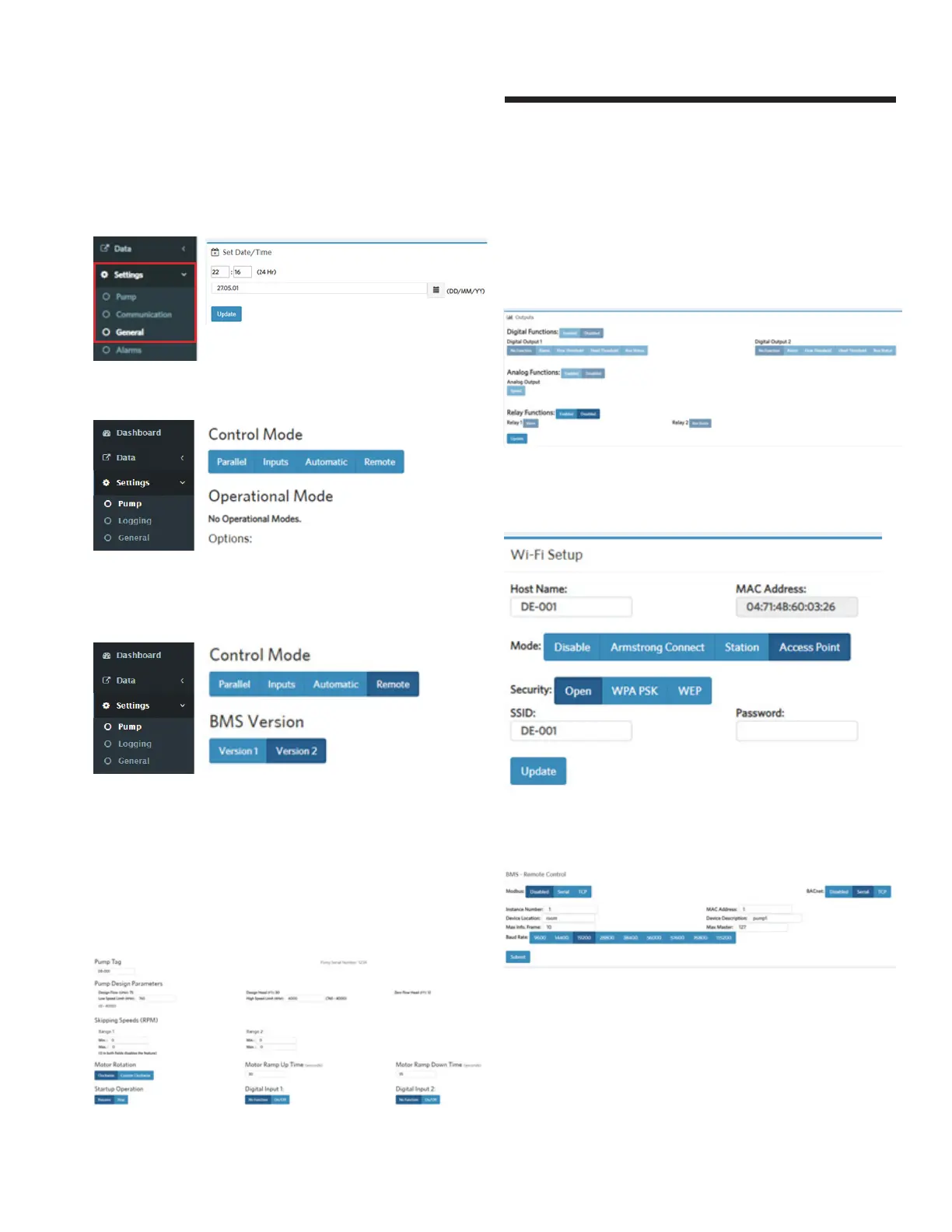
To modify Date/Time: click Settings General and modify date
and time
To access the control modes: Press settings Pump
To select Version 1 or 2 of bms settings, Click on Remote mode
and select Version 1 or 2.
Settings Pump,
To change motor ramp up and down settings, input in Motor
Ramp up Time and Motor Ramp Down Time
To change Pump high and Low Speed, input rpm in High Speed
Limit and Low Speed Limit
To change pump tag, input new tag in Pump Tag
To modify out settings: Settings Pump,
To modify digital outputs: enable in Outputs and select desire,
To modify analog outputs: click enable and speed.
To modify relay settings: enable Relay functions and select
desired settings
To enable Armstrong Connect: Settings Communication, and
click on Armstrong Connect to enable
To set the BACnet max info from, Settings Communication,
enable BACnet Serial and input in Max Info. Frame






 To Next Page