13
X5001 USER GUIDE - 501-3327100
INSTALLING THE GATEWAY (cont.)
Finding a suitable locaon
You can install the gateway in any locaon with access to the cable network. All of the cables connect to the rear panel
of the gateway for beer organizaon and ulity. The LED indicators on the front panel are easily visible to provide you
with informaon about network acvity and status.
For opmum performance, the locaon you choose should:
• Be close to a working AC power outlet.
• Allow the gateway to be mounted vercally for opmized wireless performance.
• Allow sucient air ow around the gateway to keep the device as cool as possible.
• Not expose the gateway to a dusty or wet environment.
Wireless placement consideraons
If you will be operang the gateway on a wireless network, note that the range of your wireless connecon can vary
signicantly based on the physical placement of the gateway. The latency, data throughput performance, and power
consumpon of wireless adapters also vary, depending on your conguraon choices. For best results, place the
gateway:
• In an elevated locaon such as a high shelf, keeping the number of walls and ceilings between the gateway and your
other devices to a minimum.
• Away from electrical devices that are potenal sources of interference, such as ceiling fans, home security systems,
microwaves, or the base for a cordless phone.
• Away from any large metal surfaces, such as a solid metal door or aluminum studs. Large expanses of other
materials such as glass, insulated walls, sh tanks, mirrors, brick, and concrete can also aect your wireless signal.
Desktop mounng instrucons
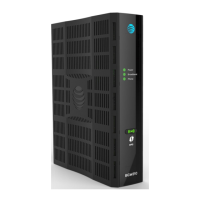
Posion the gateway so that:
• it stands vercally on its base (Do not lay it at on its side.)
• air ows freely around it
• the back faces the nearest wall
• it will not fall to the oor if bumped or moved
• the venlaon holes on the sides of the unit are not blocked














 To Next Page